What should you check before choosing?
Start with where the files need to go: a physical transfer depends on compatible ports, while sharing access with another person depends on an approved service and its permissions. Then match capacity and transfer performance to the size and frequency of your files.
| Priority | What to check | Your needs |
|---|
| Device ports |
Check the data ports on both devices. Choose USB-A or USB-C for matching ports, or a dual-connector stick for mixed ports; check any adapter you plan to use. |
My home and work devices use different ports, so I want to connect the same drive to both without carrying an adapter. |
| Transfer time |
Compare the exact drive’s stated write and read speeds, as well as the host connection. USB Implementers Forum says a USB 3.2 connection operates at its lowest common speed capability; a USB-C connector alone does not establish speed. |
I regularly copy large folders onto a drive and back again, so waiting in either direction matters. That makes a portable SSD worth comparing with a flash drive. |
| Capacity |
Check that the largest folder or batch will fit alongside files already on the drive. Apple Support notes that a Mac cannot save a file when external storage lacks enough free space. |
Before leaving home, I want room for the whole batch rather than discovering that the drive is full partway through copying. |
| Shared access |
Check whether the recipient needs a copy or access to the same files, and whether your work or study setting permits the service. Microsoft says OneDrive sharing can grant access through a link or to specific people. |
Someone else needs to open current files without meeting me to collect a drive, so I would check an approved cloud-sharing option and its permissions. |
| Carrying the drive |
Compare the exact model’s physical design and any stated durability conditions. Treat resistance claims as model-specific, not a promise that a drive cannot be damaged. |
I carry the device regularly, so I want a design I can transport carefully and identify easily among my other belongings. |
| Disconnecting |
Check that copied files are present and close programs using the drive. Microsoft advises using Windows’ safe-removal function before disconnecting USB storage to avoid data loss. |
I need the files to open at the other end of the journey, so I will check the copy and eject the drive before unplugging it. |
Joybuy product options
These options include USB-A and dual-connector flash drives for carrying files between devices, alongside portable SSDs to consider for larger or more frequent transfers. Check the ports and the exact variant before choosing.
 No image available
Samsung T7 Shield 1 TB Portable SSD, Blue
A 1 TB portable SSD to consider for frequent large-file transfers. Samsung states maximum sequential read and write speeds of 1,050 and 1,000 MB/s for the T7 Shield; reaching them requires a USB 3.2 Gen 2 host and cable with UASP enabled. Check the connection available on each computer.
View on Joybuy
 No image available
DigiEra LUS320 128GB USB-A/USB-C Flash Drive
The two connector types suit a trip between USB-A and USB-C devices, provided both ports support data transfer. The product name specifies USB 3.2, a 360° swivel design and a stated read speed of up to 500 MB/s; check write performance for frequent large copies.
View on Joybuy
 No image available
Lexar ES4 1TB Portable SSD with Magnetic Set
A portable SSD option for larger file batches. Its product name specifies USB 3.2 Gen 2 and claimed speeds of up to 1,050 MB/s read and 1,000 MB/s write; check your device and connection before relying on those maximums. If the magnetic set matters to you, confirm compatibility with your phone and case.
View on Joybuy
 No image available
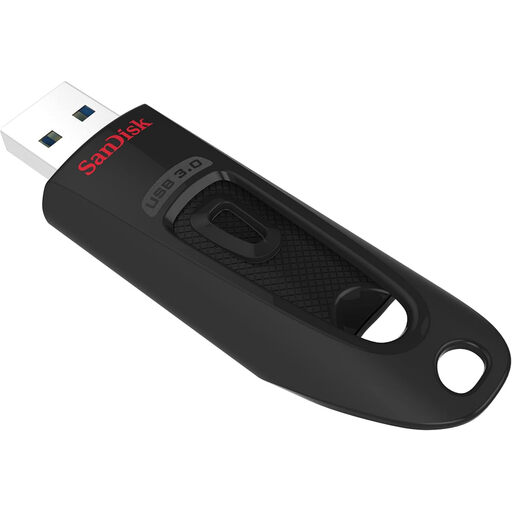
SanDisk Ultra 128GB USB 3.0 Flash Drive
A USB-A stick to consider when both computers have compatible USB-A data ports. Check that its 128GB capacity fits your largest file batch, and compare the exact variant’s write specification if you copy large folders regularly.
View on Joybuy
 No image available
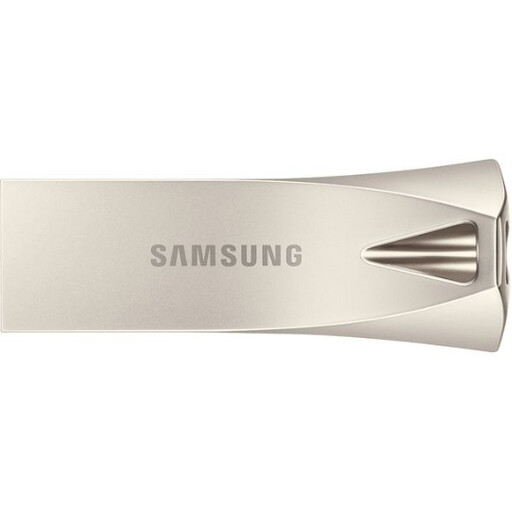
Samsung MUF-512BE3 512 GB USB-A Flash Drive, Silver
The 512 GB capacity may suit a larger batch of files when both computers have compatible USB-A data ports. The product name specifies USB 3.2 Gen 1; if you regularly write large folders to the drive, check the exact variant’s write-speed specification before choosing it.
View on Joybuy
Frequently asked questions
Should I choose a USB-A, USB-C or dual-connector stick?
Choose by the data ports on every device involved: USB-A for matching USB-A ports, USB-C for compatible USB-C ports, or a dual-connector stick when the types differ. The connector shape does not guarantee a transfer speed, so check the exact drive and host specifications too.
When should I consider a portable SSD instead of a USB stick?
Consider a portable SSD when you frequently move large folders or media and transfer time matters. Compare stated read and write speeds under their connection requirements: Samsung says the T7 Shield’s maximum figures require a USB 3.2 Gen 2 host and cable with UASP enabled.
Can I connect a USB drive to an iPad or Mac?
Yes, with a compatible connection and supported apps. Apple says the Files app and other supported iPad apps can access connected external storage; Macs can also connect to external storage by USB or USB-C. Check the device’s port and any adapter requirements before buying.
How do I disconnect a drive from a Windows computer?
Confirm your copied files are present, close programs using the drive, then use Eject or Safely Remove Hardware before unplugging it. Microsoft recommends safe removal to avoid losing data from USB flash drives and external hard drives.


