Students using campus and personal computers
Useful for carrying coursework to a campus computer or uploading a locally stored file. The University of Salford notes that work can be uploaded from a USB stick, alongside other local storage locations.


Choose a USB-A flash drive only when every required device has a USB-A port, a USB-C drive only when every device has a compatible USB-C data port, and a dual USB-A/USB-C drive when ports are mixed or uncertain. For repeated large transfers or larger file collections, a portable SSD may be more suitable, but its claimed speed depends on the host port, hub and cable.
Useful for carrying coursework to a campus computer or uploading a locally stored file. The University of Salford notes that work can be uploaded from a USB stick, alongside other local storage locations.
For physical file transfers between compatible laptops, desktops and peripherals where removable media is permitted. The National Cyber Security Centre advises that USB peripherals create another route to a device and its data, so workplace security rules matter.
For moving files between newer USB-C laptops, tablets or phones and older USB-A computers. SanDisk and Kingston specify dual-connector drive ranges for transfers across both connector types.
Start with the ports on every device in the transfer route, then match capacity and transfer performance to the size and frequency of your files.
| Priority | What to check | Your needs |
|---|---|---|
| Connector compatibility | Check each required device for USB-A or USB-C data ports. A dual USB-A/USB-C drive avoids relying on a separate adapter when both port types are involved. | I need the drive to connect directly to my own computer and any campus, office or shared device I expect to use. |
| Transfer performance | Compare the drive interface and claimed read/write speeds with the host port. USB 3.2 can refer to 5Gbps, 10Gbps or 20Gbps signalling, and hubs or cables can limit performance. | I move large project folders, media or repeated work files and want to avoid paying for performance my computer cannot use. |
| Portability and data protection | Check carrying design, required capacity and any access-control features. Confirm whether encryption and recovery work across the operating systems you use. | I want a compact transfer drive without creating an unmanaged copy of sensitive coursework or work data. |
USB-C describes the connector, not a single data rate. USB Implementers Forum guidance distinguishes USB 3.2 rates of 5Gbps, 10Gbps and 20Gbps, while a slower port, hub or cable can hold back a faster drive.
Check the exact data specification of the computer port and anything in the cable path before choosing a higher-speed model.
A USB-A-only drive cannot connect directly to a USB-C-only computer, and a USB-C-only drive cannot connect directly to a USB-A shared PC.
List every device you need to use. If both connector types appear, or shared-device ports are unknown, choose a dual USB-A/USB-C drive with confirmed connectors.
Removable media can be lost and can provide a route for malware or unauthorised access. The University of Edinburgh and the National Cyber Security Centre both identify removable storage as a security consideration.
Carry only the files needed for transfer, scan received media before use, follow employer or university policy, and keep an authorised separate copy of important work.
Encryption can change access on another operating system. The University of Chichester states that its Windows BitLocker USB process cannot be used on a Mac.
Test encryption, recovery and access on every required operating system before putting the only copy of time-critical files on the drive.
SanDisk offers UK-listed dual-connector flash-drive options for moving files between USB-C and USB-A devices, from the Ultra Dual Drive Go to the Extreme PRO Dual Drive.
Kingston’s UK-listed DataTraveler range includes USB-A, USB-C and dual-connector drives, alongside a cable-free dual-connector portable SSD for larger transfers.
Samsung’s UK BAR Plus is a compact USB-A flash-drive option for users who do not need a direct USB-C connector.
Joybuy options for mixed USB-A and USB-C file transfers, plus portable SSDs for larger study and work file collections.
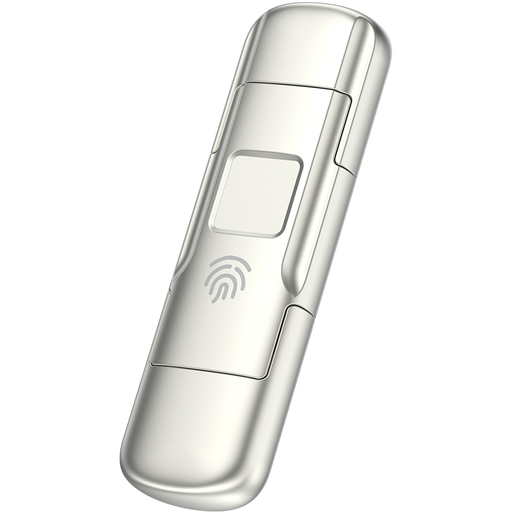 No image available
A compact option for moving files between compatible USB-A and USB-C study or work devices.
The listing specifies 256GB capacity, USB 3.2 Gen 1, USB-A and USB-C connectors, fingerprint access, AES-256 encryption, and claimed speeds up to 550MB/s read and 500MB/s write.
Confirm that its fingerprint and encryption workflow suits your required operating systems and organisation policy; claimed speeds can be limited by the host port or hub.
 No image available
Consider this portable SSD for repeated transfers of larger coursework, project folders or work files.
The listing specifies 1TB capacity, USB 3.2 Gen 2x2, AES-256 hardware encryption, password protection, USB-C-to-C and USB-C-to-A cables, and claimed speeds up to 2,000MB/s read and 1,950MB/s write.
Its stated maximum speed requires a compatible USB 3.2 Gen 2x2 host, and USB-A use depends on carrying the supplied cable.
 No image available
A 1TB option for larger file transfers across compatible USB-C and USB-A computers.
The listing specifies USB 3.2 Gen 2, USB-C-to-C and USB-A-to-C cables, claimed speeds up to 1,050MB/s read and 1,000MB/s write, plus Lexar DataShield 256-bit AES encryption software.
The host connection affects transfer speed. For cross-platform use, choose a suitable file system before copying files, as formatting removes existing data.
 No image available
This 2TB portable SSD suits larger project folders or media-heavy work transferred between compatible computers.
The listing specifies USB 3.2 Gen 2, USB-C-to-C and USB-A-to-C cables, and claimed speeds up to 1,050MB/s read and 1,000MB/s write.
Maximum performance is not guaranteed on every USB-C or USB-A host. The listing also notes that formatting may be needed for cross-platform use and removes existing files.
 No image available
A compact dual-connector option for everyday documents and moderate project files on compatible USB-A and USB-C devices.
The listing specifies 128GB capacity, USB 3.2 Gen 1, USB-A and USB-C connectors, a swivel cover, and claimed speeds up to 500MB/s read and approximately 400MB/s write.
Check that 128GB fits your largest folders. No encryption or password-protection feature is specified, so follow your employer or university removable-media policy for sensitive files.
Check every device that must receive the drive, not only your own laptop. Choose USB-A when all required hosts have USB-A, USB-C when all have USB-C data ports, and a dual-connector drive when both types are involved or shared-device ports are uncertain. USB-C alone does not identify the data speed.
No. USB Implementers Forum guidance identifies USB 3.2 rates of 5Gbps, 10Gbps and 20Gbps, and Kingston states that host-port capability, hubs and cables can limit drive performance. Treat advertised sequential speeds as maximum figures under stated conditions, not guaranteed copy speeds.
A portable SSD is worth considering when you regularly move large files or need higher-capacity portable storage. Kingston specifies its Dual Portable SSD at 512GB to 2TB with USB-A and USB-C connectors and claimed speeds up to 1,050MB/s read and 950MB/s write; check host support if those speeds matter.
There is no universal UK GDPR rule requiring encryption of every USB drive or all personal information. The Information Commissioner’s Office identifies encryption as an appropriate technical measure for protecting personal information on removable media where it is appropriate to the risk, while employers, universities or clients may set stricter policies.
Do not assume that you can. The University of Chichester states that its Windows BitLocker USB-encryption process cannot be used on a Mac, so confirm cross-platform access before encrypting a drive that must be shared with macOS users.