Buying priorities
Start by mapping every device and port involved, then check the largest individual file and the transfer workload before comparing advertised speeds.
| Priority |
What to check |
Your needs |
| Connector compatibility |
List the physical data port on every sending and receiving device. Check USB-C mobile devices support external USB storage; choose dual Type-A and Type-C connectors for mixed-port transfers. |
I want one drive that connects to every device I use without relying on an extra adapter. |
| Transfer workload |
Compare the exact model’s stated read and write figures, host interface and cable capability. USB-IF states that USB products operate at the lowest common speed capability. |
I move large folders or media often enough that a portable SSD’s higher claimed performance could be useful. |
| File size and format |
Check the largest single file, not only the total folder size. Kingston states FAT32 cannot store one file of 4GB or larger; assess exFAT where compatible cross-platform large-file transfer is needed. |
I need to move video or other files above 4GB between Windows, Mac or compatible mobile devices. |
| Protection for carried data |
Consider encryption, password handling and secure deletion where files are confidential. The Information Commissioner’s Office identifies encryption as protection against unauthorised access to personal information on removable media. |
I carry personal or work files that would cause a problem if a small drive were lost. |
Joybuy USB storage options
Joybuy product options for portable file transfers, including dual-connector flash drives for mixed USB-A and USB-C access and portable SSDs for larger, more frequent transfers.
 No image available
Lexar ES4 1TB Portable SSD with Magnetic Set
Consider this portable SSD for frequent large-folder transfers between USB-C and USB-A computers.
The listing states 1TB capacity, USB 3.2 Gen 2 connectivity, up to 1050MB/s read and 1000MB/s write, with USB-C-to-C and USB-A-to-C cables included.
Check host, cable and file-system compatibility for the expected transfer rate. Magnetic attachment for iPhone 15/16 requires the supplied case or magnetic ring, and the listing does not support wireless MagSafe charging.
Joybuy
 No image available
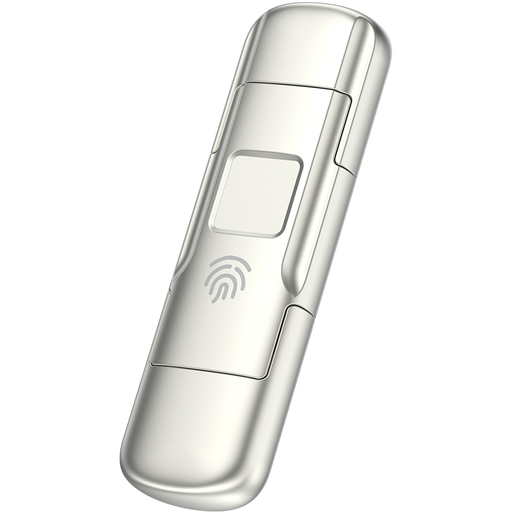
MOVESPEED YSUYC-256GSN 256GB Dual USB Flash Drive
This compact option suits hand-offs between USB-A computers and compatible USB-C devices without a separate adapter.
The listing states 256GB capacity, USB-A and Type-C connectors, USB 3.2 Gen 1, and claimed read and write speeds of 550MB/s and 500MB/s.
Confirm external-storage or OTG support on each USB-C phone or tablet. The listing’s fingerprint and AES-256 encryption features should be assessed against the level of protection you need.
Joybuy
 No image available
DigiEra LUS320 128GB Dual USB Flash Drive
This drive is aimed at routine file hand-offs between USB-A computers and USB-C laptops or supported mobile devices.
The product name states 128GB capacity, USB-A and Type-C dual interfaces, USB 3.2, claimed 500MB/s read speed and a 360-degree swivel metal design.
128GB may be restrictive for large media collections. Check mobile USB-storage support and treat the stated speed as a maximum that depends on the host connection and workload.
Joybuy
 No image available
Samsung MU-PE1T0S 1TB USB Type-C 3.2 Gen 2
Assess this USB-C storage option for regular movement of large folders and media between compatible USB-C hosts.
The product name states 1TB capacity and USB Type-C 3.2 Gen 2 connectivity.
Check whether older USB-A computers have a suitable compatible cable or adapter, and confirm the host, cable and formatting needed for the transfer workload.
Joybuy
 No image available
DigiEra LPS2000M-3 1TB Magnetic Portable SSD, Pink
This USB-C portable SSD is for large media or project transfers on compatible USB-C devices.
The product name states 1TB capacity, USB 3.2 Gen 2x2 connectivity and claimed transfer speeds up to 2000MB/s.
Check for a suitable cable or adapter when using a USB-A computer. The stated iPhone recording and magnetic-use claims apply to named iPhone 15/16 Pro and Pro Max models rather than every phone.
Joybuy
Frequently asked questions
Should I buy a USB Type-A, USB Type-C or dual-connector drive?
Match the drive to every device that will send or receive files. A Type-A-only drive suits Type-A hosts, a Type-C-only drive needs compatible USB-C data ports, and a dual-connector drive is usually the simpler choice for routine transfers between both port types; phones and tablets still need external-storage support.
Why will my USB drive not copy a video file of 4GB or more?
A FAT32-formatted drive cannot store one file of 4GB or larger. For larger files, assess exFAT or, in a Windows-only workflow, NTFS; copy the drive’s contents elsewhere before reformatting because formatting erases existing files.
What format is practical for moving files between Windows and Mac?
For cross-platform transfers involving large files, exFAT is usually the first format to assess because Kingston and Apple identify it as Windows-compatible. NTFS can be unsuitable for two-way Mac transfers because Apple notes that macOS may read it but may not write to it through Disk Utility-supported formats.
Can I use USB storage with an iPad?
Supported iPads can access USB storage through the Files app, but the connector or adapter must fit the iPad and drive. Apple also advises checking that the device has one data partition and a supported format such as exFAT, FAT32 or FAT; some external hard drives need their own power.
Do I legally have to encrypt files on a USB drive in the UK?
Not in every situation. For organisations handling personal data, the Information Commissioner’s Office says security must be appropriate to the risk and identifies encryption as an example of a technical measure; it also states that UK GDPR does not require encryption of all personal information in every case.


