Who needs an indoor answering point?
The essential question is who will answer when a visitor rings: the resident, a family member using an app, or both.
Older residents who answer independently
An indoor screen or handset lets the resident identify and speak to a visitor without navigating a phone app. This is a relevant requirement for families to consider: Age UK reported in July 2025 that 33% of older people do not use a smartphone.
Families limiting installation work
A household that wants an indoor screen without running a new cable between it and the door can consider a wireless monitor system. Check the doorway’s Wi-Fi coverage, the unit’s power arrangements and where the screen will be placed; wireless does not remove those decisions.
Households with a connected-home helper
A relative can manage the account, app and home network while the resident uses a configured indoor smart display. With a compatible Ring doorbell and Echo Show, the household still needs someone who can maintain the linked system.
What matters when choosing a system?
Start with the resident’s complete answering routine, then assess installation and connected features. An indoor chime alone may announce a visitor without giving the resident a way to see or speak to them.
| Concern |
What to check |
Who this matters to |
| Answering without a phone |
Confirm that the indoor screen or handset receives the ring and supports two-way conversation without the resident opening an app. |
If I am alone when the bell rings, I need to recognise the visitor and reply from an indoor device I can use. Around 42% of consumers put independent answering first. |
| Installation and alerts |
Check the door’s peephole or existing entry wiring, Wi-Fi coverage at the doorway and who will recharge any battery. |
I want an alert I can notice at home without disruptive work on the door or walls. Roughly 33% of consumers prioritise a low-disruption installation and dependable indoor alerting. |
| Family access and recordings |
Establish who manages the account, whether the resident can still answer indoors, and whether recordings use a storage card or a subscription. |
I can manage the connected features for my relative, but I need to know what remains available for live calls and what is needed to keep recordings. About 25% of consumers put helper-managed access first. |
For a dedicated monitor, EZVIZ lists a screen and two-way talk on its EP7 and HP7 doorphones, while its DP2 pairs an indoor screen with a peephole doorbell. These are different installation routes: the EP7 has no cable between its outdoor and indoor units, the HP7 is listed for 2-wire installation and compatibility with 4-wire systems, and the DP2 requires a suitable peephole. A screen-led system should not automatically be treated as independent of Wi-Fi or account setup.
For a smart-display route, Amazon describes automatic Ring doorbell live view on a configured Echo Show, while Ring says its products require home Wi-Fi, a phone or tablet and the Ring app for setup and use. If a family member will answer primarily through an app instead, check that the resident is not being left with only a chime when they need a two-way indoor answer point.
Relevant door-entry brands
These brands illustrate different ways to handle visitor calls; a brand’s inclusion does not mean every model provides an indoor answering screen.
EZVIZ
Screen-led options include the EP7 doorphone, HP7 wired doorphone and DP2 peephole doorbell.
- EZVIZ lists indoor displays and two-way visitor communication for these models, with different door-fitting approaches.
- Check the exact model’s Wi-Fi, app, account and power requirements; the DP2 also depends on a suitable peephole.
Ring
A connected doorbell route that can present a visitor on a configured Echo Show.
- Amazon describes automatic live view on Echo Show when a linked Ring doorbell is pressed, with a voice command to answer.
- Ring says setup and use require home Wi-Fi, a phone or tablet and its app; saved recordings require a compatible subscription.
Reolink
An app-led video doorbell route with local storage on its PoE model.
- Reolink lists a plug-in chime, two-way audio and local storage for its PoE doorbell.
- Reolink describes answering visitor calls through its app; its chime is not a substitute for a resident-facing video screen.
Tapo
The wired D130 doorbell offers local microSD recording alongside an optional cloud-storage route.
- Tapo lists a choice between microSD recording and its separately subscribed Tapo Care service for the D130.
- Tapo describes two-way answers through its app, so check the resident’s answering arrangement rather than assuming an indoor screen is provided.
A Joybuy doorbell with an indoor screen
This Joybuy choice focuses on a doorbell whose listing describes an indoor screen and two-way conversation for a resident who does not use a smartphone.
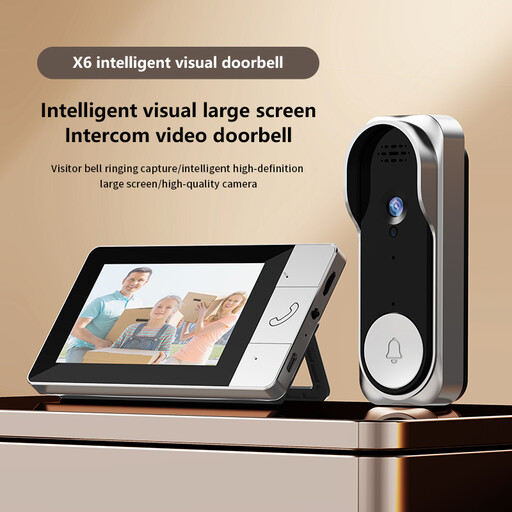 Image unavailable
Verbex NT601A video doorbell
Its listing describes an indoor screen and two-way intercom use without a phone app, making it a route to consider when the resident will answer visitors independently.
The listing says the display switches off after 30 seconds and needs a button press to wake it. Try that action with the intended resident, and check the alert volume and wireless reach where the screen will be used.
If recordings matter, confirm whether a TF card is included.
Joybuy
Questions before you choose
Can my parent answer a Ring doorbell without using a smartphone?
They can answer through a compatible, configured Echo Show rather than handling a phone for each visitor call. Amazon describes automatic Ring live view on Echo Show and a voice command to answer, but Ring says home Wi-Fi, a phone or tablet and its app are required for setup and use. A family member needs to manage that connected arrangement.
Is a subscription needed just to answer the door?
Not for Ring’s live viewing and answering functions, according to Ring; a compatible subscription is needed to save, review and share its recordings. Other doorbells may offer local storage instead, so check the exact model and whether a required storage card is included.
What if the doorbell camera also sees a shared area?
For a UK domestic camera that captures images of people outside the boundary of private domestic property, GOV.UK’s domestic CCTV guidance says UK data-protection law applies. Check the view before fixing the camera and aim it towards your own doorway where possible; the Information Commissioner’s Office advises limiting capture to your property where possible.
Can a tenant or leaseholder fit a video doorbell?
Check the tenancy or lease and any rules for the building before drilling, replacing an entry unit or fixing equipment near a shared entrance. The permission needed depends on the property and the proposed installation; ask the relevant landlord, freeholder or building manager where required.
How can we tell whether an indoor screen will be usable?
Have the intended resident try the full visitor-call routine, from noticing the ring to recognising the image, answering, speaking and ending the call. Test it from their usual room and check whether the screen, controls and alert are comfortable for them; listed features alone cannot establish that individual fit.


