What matters when choosing?
For a household where the person answering the door does not use a smartphone, establish how they will see and speak to visitors before deciding whether door release or connected features are necessary.
Local wireless intercom
Choose when: A separate indoor viewer and conversation without routine app use are the priority.
Allow for: The radio link must work through the property, and the exact kit may need charging or replacement batteries. Aiphone UK says its WL-11 avoids wiring between stations.
Wired video entry
Choose when: A permanent indoor monitor and compatible door-release control are important.
Allow for: Plan the cable route, power and lock compatibility, and make sure the intended user can operate the monitor. Aiphone UK lists a 7-inch touchscreen and door release for its JP Series.
Smart doorbell with an indoor display
Choose when: Someone can maintain the app and network, and the exact indoor display provides a usable visitor-answering workflow.
Allow for: A chime may sound indoors without showing video. Reolink describes a plug-in chime for its cited doorbell, while TP-Link describes viewing through the Tapo app.
| Concern | What to check | Who this matters to |
|---|
| Seeing and speaking indoors |
Ask what appears when the bell rings and have the intended user try the answering controls and volume. |
If I cannot use a phone to answer the door, I need to recognise a caller and speak from an indoor screen. Around 42% of consumers put this standalone task first. |
| Fixed entry and door release |
Check the existing lock or gate hardware, compatible release contacts, power and cable route. |
When I also need to let someone through an electric entrance, talking alone is not enough. For around 33% of consumers, fixed entry control is the primary concern. |
| Maintaining a smart setup |
Identify who will manage the account and Wi-Fi, then confirm whether the indoor accessory displays and answers calls. |
I can use connected features if someone else can keep the system working and help after a network or account change. This is the main priority for around 25% of consumers. |
Joybuy options with an indoor screen
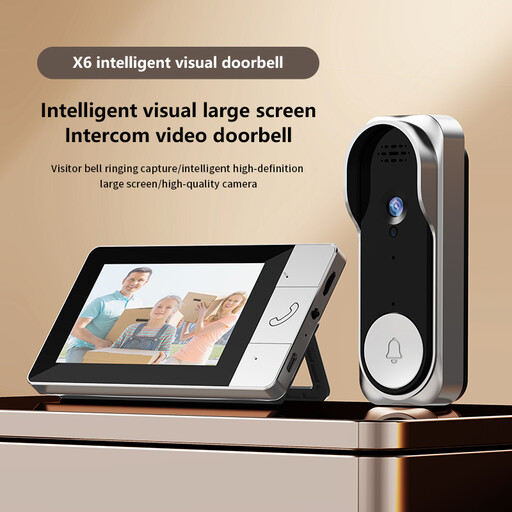
This option is for households considering a local wireless doorbell with an indoor viewer instead of making a smartphone app the everyday answering method.
 No image available
Verbex NT601A video doorbell
For a household wanting to see and speak to visitors without relying on a phone app, consider its described indoor-screen setup, but have the intended user try the viewing and talk controls.
Check reception at the intended screen position, the TF card requirements for recording and the battery-charging or replacement routine before ordering.
View on Joybuy
Common questions
Can someone use a video intercom without a smartphone?
Yes, a dedicated system can put the visitor image and conversation on a separate indoor station. Aiphone UK describes a wireless WL-11 system and a fixed-monitor JP Series; check the exact kit's answering controls and power requirements for the intended user.
Does a wireless intercom avoid installation altogether?
No. Wireless can avoid a cable between the door and indoor stations, as Aiphone UK says of the WL-11, but you still need suitable positions and power arrangements. Check reception at the property and how the stations will be mounted and maintained.
Will a smart doorbell chime let someone see visitors?
Not on its own: a chime provides an audible alert, not necessarily a visitor image. Reolink describes a plug-in chime for its cited doorbell; if indoor viewing is essential, confirm the exact compatible display and how answering works on it.
What should I check about the camera's view?
Aim to capture the household's own entrance without unnecessarily including neighbouring or shared areas. The Information Commissioner's Office advises positioning home cameras to capture only your own property where possible; check its guidance if the view extends beyond it.
Who looks after an app-based doorbell if the user has no smartphone?
Agree on a person to manage the account, Wi-Fi connection, alerts and updates before buying. This matters particularly for an app-led setup such as the Tapo D230S1, whose viewing TP-Link describes through the Tapo app.


