Bright-room handheld readers
If dialogue text and dark scenes are difficult to see under strong room lighting, screen size, brightness controls and the option to move to TV play are worth considering alongside game availability.


Choose Steam Deck OLED if your intended visual novels are available through your PC-game setup and a published handheld brightness specification matters to you: Valve specifies 600 nits for standard dynamic range, but you still need to check each game’s compatibility and how the screen looks in your room. Nintendo Switch 2 offers a 7.9-inch handheld screen and TV play if your chosen games are available and compatible; the original Switch OLED model is another option for its own game library. PlayStation Portal makes sense only as a remote-play screen for someone who already has a PS5 and a suitable connection, not as a standalone console.
If dialogue text and dark scenes are difficult to see under strong room lighting, screen size, brightness controls and the option to move to TV play are worth considering alongside game availability.
If your intended titles are on Steam, Steam Deck OLED offers a handheld route to consider. Valve provides a compatibility rating for each game, so check your particular titles rather than assuming every one will work without adjustments.
If you already have a PS5, PlayStation Portal can let you play compatible installed games away from its TV. The connection where you plan to use it matters as much as the handheld screen.
For visual novels in a bright room, start with the games you want to play and whether you need a standalone device. Then weigh handheld readability against the option to use a TV.
Consider it when: Your intended visual novels are available through your PC-game setup and Valve’s published 600-nit standard-dynamic-range specification is useful to your screen assessment.
Bear in mind: Valve’s per-game compatibility ratings need checking, and a brightness specification cannot tell you how distracting reflections will be in your room.
Consider it when: You want handheld and TV play, and the visual novels you intend to play are available and compatible.
Bear in mind: Nintendo says some original Switch games are unsupported or not fully compatible on Switch 2.
Consider it when: Your chosen games are in the original Switch library and you want its 7-inch OLED handheld screen as well as TV play.
Bear in mind: Adjustable brightness does not establish how the screen will handle reflections in your particular room.
Consider it when: You already own a PS5 and want to play compatible installed games away from the television.
Bear in mind: Portal depends on the PS5 and a suitable connection; it does not provide a standalone game library.
| Concern | What to check | Who this matters to |
|---|---|---|
| Bright-room readability | Assess text and reflections under lighting like yours. Compare published standard-dynamic-range brightness where available, not an HDR peak against an SDR figure. | If dialogue is hard to follow in strong light, I need a screen I can read comfortably or the option to move to a TV. Around 46% of consumers put bright-room readability first. |
| Game library | Confirm each title’s platform availability and edition; check Valve’s Deck rating or Nintendo’s Switch 2 compatibility information where relevant. | I would rather keep access to particular visual novels than choose a screen on specifications alone. For around 36% of consumers, access to their intended games is the primary concern. |
| PS5 and connection | For Portal, confirm PS5 ownership, compatible installed games and the connection where you will play. PlayStation specifies at least 5 Mbps broadband and recommends 15 Mbps for a better Remote Play experience. | If I already own a PS5, I may want another screen instead of another standalone console, provided Remote Play works where I sit. That is the main need for around 18% of consumers. |
PlayStation Portal accesses compatible games on a PS5 over Wi-Fi; it is not an independent route to a game library.
Before choosing it, confirm that you own a PS5, that your intended games are compatible and installed, and that the connection is suitable where you plan to play.
Nintendo says some Switch games may be unsupported or not fully compatible on Switch 2.
Check each visual novel you already own or intend to buy against Nintendo’s compatibility information.
Valve specifies 1,000 nits peak HDR and 600 nits standard dynamic range for Steam Deck OLED. Neither figure measures reflections in your room.
Judge dialogue readability under similar lighting if you can, rather than choosing solely by the HDR peak number.
Valve provides game-specific compatibility ratings; some titles may need adjustments or may not be compatible.
Check the rating and any relevant controls or text-input requirements for each game you plan to play.
Steam Deck OLED is a portable PC-gaming option for readers whose visual novels are available through their PC-game setup.
Switch 2 and the original Switch OLED model offer distinct handheld-and-TV options for games available on their respective platforms.
PlayStation Portal is a remote-play accessory for people who already own a PS5, rather than a standalone console.
These choices cover two different ways to read visual novels away from a TV: Switch 2 as a handheld-and-TV console, and PlayStation Portal as a remote-play screen for an existing PS5. Check your intended games and the screen under your room lighting before deciding.
 No image available
Consider this if you want to read compatible visual novels in handheld mode and switch to TV play when that suits your room better.
Nintendo specifies a 7.9-inch, 1920 × 1080 LCD with HDR10 support. Check each intended game, particularly an original Switch title, for availability and compatibility; assess the screen under similar lighting if glare is decisive.
 No image available
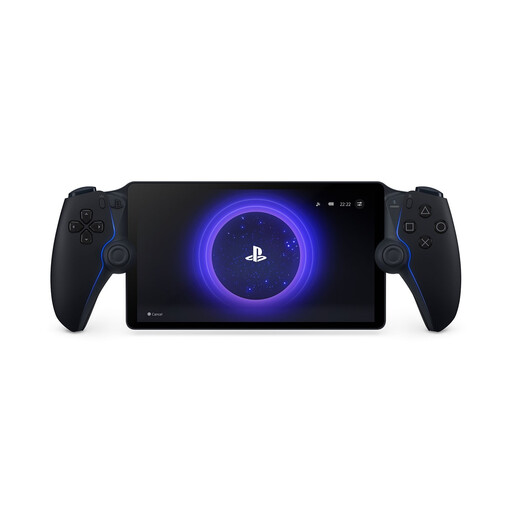
Consider this if you already own a PS5 and want to play compatible installed visual novels away from its TV.
Portal has an 8-inch, 1080p screen but is not a standalone console. Confirm that your game works with Remote Play, that the connection is suitable where you will sit, and that you can read the screen comfortably under your room lighting.
No. Panel type alone cannot tell you how reflections and room lighting will affect reading. Valve specifies 600 nits standard dynamic range for Steam Deck OLED, but that figure is not a direct glare comparison with Switch 2, Switch OLED or PlayStation Portal; assess a screen under lighting like yours where possible.
Switch 2 can play compatible original Switch games, but Nintendo says some titles are unsupported or not fully compatible. Check each particular game before buying Switch 2 for an existing library.
No, not for standard PS5 Remote Play. PlayStation Portal uses a PS5 to access compatible installed games over Wi-Fi, so it suits an existing PS5 owner rather than someone seeking an independent game library.
PlayStation specifies at least 5 Mbps broadband for Remote Play and recommends at least 15 Mbps for a better experience. Check the connection where you intend to play, because local Wi-Fi conditions also affect remote play.