
24/7 全天候客户支持

免费退货

当日/次日达

品质保障

开启新人专享福利: 全场免邮 | 低至 2 折 | 免费试用 30 天 JoyPlus 会员
下载 Joybuy
Struggling with a video call that keeps freezing in your home office? Or perhaps the signal vanishes completely when you try to stream a film in the loft conversion? These are classic signs of Wi-Fi dead zones, a common frustration in many UK homes, especially those with multiple floors or thick, solid walls.
Your router can only broadcast its signal so far. When it can't reach every corner, you're left with frustratingly slow or non-existent internet. This guide is designed to help you understand the different solutions available, from a simple Wi-Fi extender to a more comprehensive mesh Wi-Fi system, so you can find a practical option to achieve reliable whole home Wi-Fi.
Before you buy, it's helpful to understand the technology. Navigating the options is simpler when you know what to look for.
The terms can be confusing, but the technologies serve different needs.
For a noticeable improvement in performance, look for devices that support the Wi-Fi 6 standard (also known as 802.11ax). A Wi-Fi 6 extender not only offers faster potential speeds but is also much more efficient at handling multiple devices at once—ideal for a busy family home full of smartphones, laptops and smart gadgets.
Also, check for compatibility features. Some brands offer technologies like TP-Link OneMesh, which allows an extender to work with a compatible router to create a unified mesh-like network, providing smoother roaming than a standard extender.
Consider the size of your property and your daily internet habits. A small, single-floor flat might only need a basic extender. A multi-storey townhouse with numerous users who enjoy gaming, streaming and remote working will benefit far more from the robust coverage of a mesh system or the wall-penetrating ability of a powerline adapter.
Here are a few options that address different needs and home layouts, helping you to finally fix Wi-Fi dead zones.
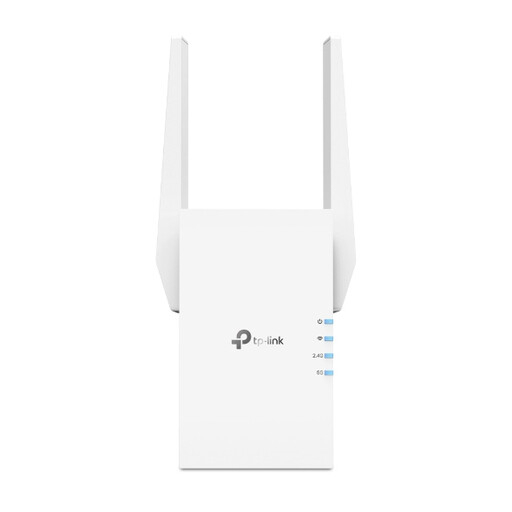
Why It Stands Out: The RE705X is a powerful and flexible choice that brings modern Wi-Fi 6 speeds to your existing network. It functions as a traditional range extender but also supports TP-Link OneMesh technology. When paired with a compatible TP-Link router, it creates a unified network, allowing you to move from room to room without your connection dropping and reconnecting.
Pros:
Who is it for? Those living in small to medium-sized homes who want a significant performance upgrade and the flexibility to build a simple mesh network without replacing their entire setup.
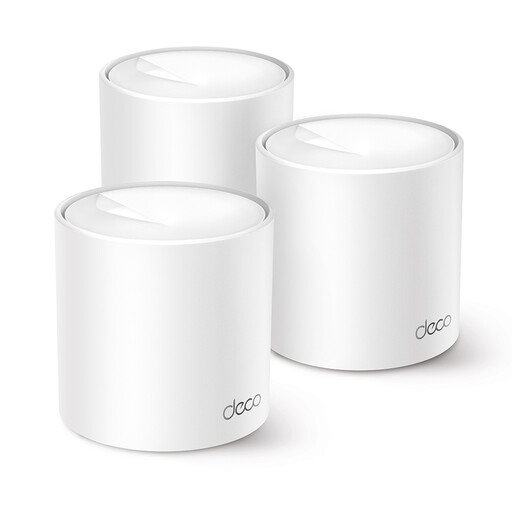
Why It Stands Out: For complete coverage in larger properties, the Deco X1500 mesh Wi-Fi system is a comprehensive solution. This three-unit kit is designed to blanket your entire home in a single, intelligent Wi-Fi network. The system automatically routes your traffic along the fastest path, ensuring a stable connection for dozens of devices simultaneously, from laptops to smart lights.
Pros:
Who is it for? Families and individuals in larger, multi-storey homes who need consistent, reliable Wi-Fi everywhere for streaming, gaming and a growing number of smart home devices.
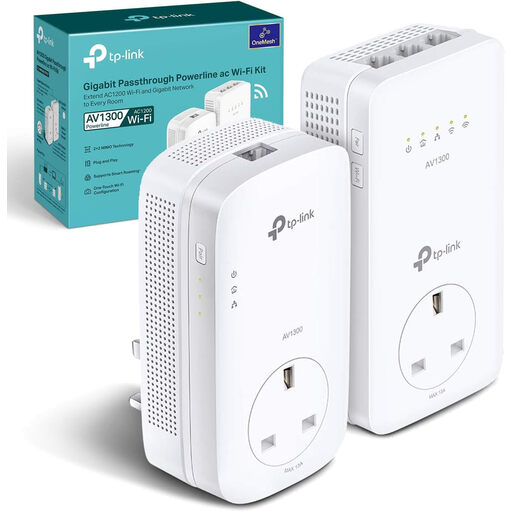
Why It Stands Out: This powerline adapter kit is the ideal problem-solver for homes where Wi-Fi signals struggle to pass through thick stone or concrete walls. It uses your electrical circuit to carry a high-speed internet connection to any room. The extender unit then creates a powerful dual-band Wi-Fi hotspot and provides three Gigabit Ethernet ports for wired devices. The integrated power socket means you don't lose a valuable plug.
Pros:
Who is it for? Anyone living in a property with challenging construction (like an old house or basement flat) where standard wireless extenders are ineffective.
If these recommendations don't quite fit your specific requirements, or if you're considering a full router upgrade, there are many other solutions available.
A traditional Wi-Fi extender works by receiving and then rebroadcasting a signal, which can sometimes result in a reduction in speed compared to being connected directly to your router. However, modern dual-band and Wi-Fi 6 extender models are designed to minimise this by using separate frequency bands for communication, which significantly improves performance. For the most speed-conscious users, a mesh Wi-Fi system or a powerline adapter often provides a faster and more stable connection in remote areas.
For optimal performance, a Wi-Fi booster should be placed roughly halfway between your main router and the area you want to cover. It needs to be close enough to the router to receive a strong, stable signal to rebroadcast. Avoid placing it in the dead zone itself, as it won't have a good signal to extend. Most extenders have a signal strength indicator light to help you find the ideal spot.
The terms Wi-Fi extender and Wi-Fi booster are generally used interchangeably in the market. Both refer to a device that takes an existing Wi-Fi signal from a router and rebroadcasts it to increase the overall coverage area of your wireless network.