
24/7 Customer Support

Free returns

Same-day & Next-day Delivery

Quality Guaranteed

Unlock Your Welcome Offers: FREE Delivery | Up to 80% OFF | Free 30-day JoyPlus trial
Download the APP
A wireless microphone can make spoken audio clearer and easier to manage, whether you are filming a vlog, conducting interviews or hosting a live stream. However, product listings often highlight impressive-sounding features without explaining the practical limitations.
Before buying, watch for these common traps:
The receiver is the part that connects to your recording device. A USB-C wireless microphone is suitable for many Android phones, tablets, laptops and newer iPhone models, provided the device supports audio input through USB-C.
A Lightning wireless microphone is designed for compatible iPhone and iPad models. It is not interchangeable with USB-C equipment, so confirm your phone’s port before ordering. For cameras, check whether the receiver uses a 3.5mm output, USB connection or a proprietary adapter.
A plug-and-play microphone can reduce setup time, but “plug and play” does not remove the need to select the correct input in your phone, computer or streaming software.
Most compact wireless lavalier microphone systems use a transmitter clipped to clothing and a receiver connected to the phone or camera. Look for:
For example, a stated 100m range should be treated as an open-area specification rather than a guarantee inside a house, office or venue. Battery claims also vary depending on volume, noise reduction and charging habits.
A lavalier microphone is discreet and useful when you need to move naturally on camera. Omnidirectional models can capture speech from different angles, but may also pick up more surrounding sound.
Desktop dynamic microphones are more suitable for gaming, podcasting and voice-over work at a fixed desk. A cardioid or unidirectional pattern focuses more on sound in front of the microphone and can help reduce off-axis room noise. Position remains important: the FIFINE desktop models specify a suggested recording distance of roughly 2 to 6 inches.
If you plan to develop a home studio, a USB/XLR microphone offers two connection routes. USB is convenient for a computer, while XLR can connect to a mixer or audio interface. Remember that XLR cables and interfaces may need to be purchased separately.
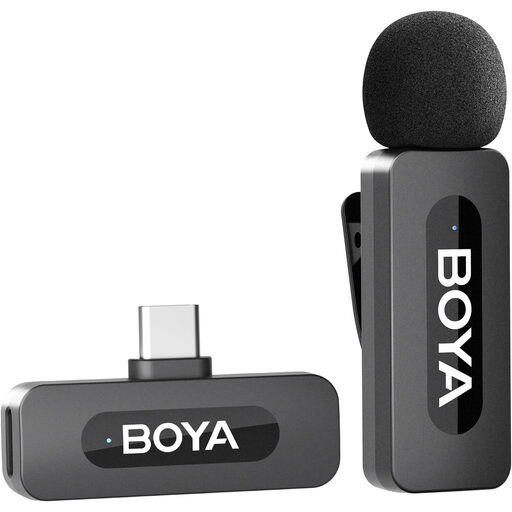
Why This Fits Their Persona: A compact one-transmitter, one-receiver setup suits new vloggers, smartphone users and online teachers who want a straightforward way to improve spoken audio.
The USB-C format is clearly specified, while one-click noise cancellation and a quoted 9-hour battery life make the feature set easier to assess.
USB-C receiver; one transmitter and one receiver; stated 9-hour battery life; one-click noise cancellation.
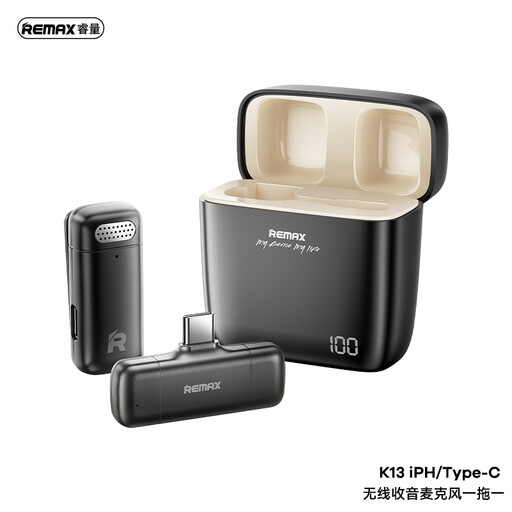
Why This Fits Their Persona: This is a practical match for creators who want monitoring, outdoor recording accessories and a compact system for interviews, live streams or regular mobile production.
It lists a USB-C receiver, 3.5mm headphone monitoring and a furry wind muff, addressing compatibility, checking audio and outdoor wind concerns.
2.4G wireless transmission; 3.5mm monitoring output; included furry wind muff; one-touch mute control.
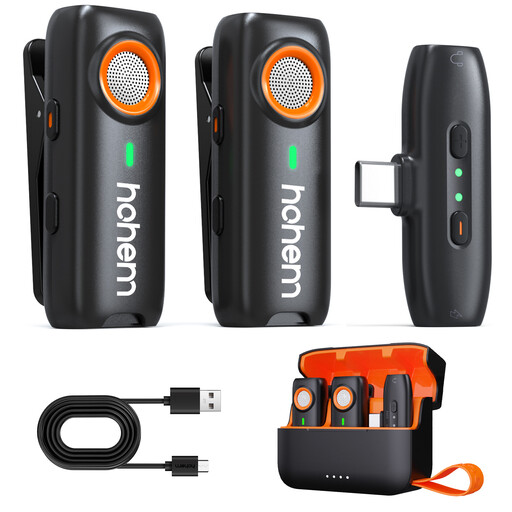
Why This Fits Their Persona: Journalists, interviewers and frequent outdoor creators may value adjustable DSP modes, a charging case and local backup recording for important sessions.
Three noise-reduction levels give more control than a fixed mode, while TF backup recording provides a separate local copy. The TF card is not included.
Up to 20 hours with charging case; stated 100m open-space range; TF backup recording; remote shutter function.

Why This Fits Their Persona: Podcasters, gamers and YouTubers recording at a desk can use the included boom arm for positioning and choose USB or XLR as their setup develops.
The listing separates USB and XLR functions clearly. USB controls work with USB connection; an XLR cable is not included and controls must be handled through compatible equipment.
USB-C and XLR connectivity; boom arm, shock mount and clamp included; headphone monitoring and mute control through USB.
We have compiled a complete, real-time list of products that fully satisfy these strict selection criteria and UK safety regulations.
It can offer more consistent positioning and greater freedom of movement, especially when the phone is placed several metres away. Results still depend on placement, background noise, transmission conditions and the recording app. A phone microphone may be sufficient for casual clips, while a wireless lavalier microphone is more practical for interviews, presentations and walking videos.
Not necessarily. Confirm whether the receiver uses USB-C or Lightning and check compatibility with your specific phone. A USB-C model generally suits compatible Android devices and newer iPhones, while Lightning models are intended for compatible older iPhone and iPad devices. Avoid assuming that an adapter will support audio input.
Battery life varies by model and usage. Compact systems may offer around nine hours from the transmitter, while charging-case systems can provide longer combined operation. For long recordings, choose a model with a charging case, charging while recording or local backup recording, and check the stated figures against your usual session length.