
24/7 Customer Support

Free returns

Same-day & Next-day Delivery

Quality Guaranteed

Unlock Your Welcome Offers: FREE Delivery | Up to 80% OFF | Free 30-day JoyPlus trial
Download the APP
By Joybuy Product Recommendation Officer
Filming dynamic, engaging video content on your own can be a real challenge. Whether you are demonstrating a workout, presenting a lecture or vlogging your daily life, keeping yourself perfectly in frame while moving around is often a two-person job. This is where an auto tracking tripod comes in, acting as your personal camera operator.
This guide is designed to help you understand what to look for in a face tracking phone holder and provide practical advice to help you choose a model that suits your needs. We will explore key features and offer a recommendation to help you elevate your content creation.
Before you decide, it is helpful to understand the features that make these devices so useful. Considering these points will help you find a reliable tool for your projects.
Many smart tripods require you to download a specific application to function. While these can offer advanced features, they can also lead to compatibility issues, privacy concerns or simply add an extra, inconvenient step to your workflow. A smart tripod no app model offers a significant advantage. These devices have built-in AI and camera systems that work straight out of the box, connecting seamlessly with any phone's native camera app or third-party apps like TikTok and Instagram. This plug-and-play functionality saves time and avoids potential software headaches.
The entire point of an automated tripod is to achieve hands-free filming. Look for models that offer intuitive control methods. A gesture control phone stand allows you to start or stop tracking with a simple hand signal, which is incredibly useful when you are in the middle of a take. Additionally, a phone holder with remote provides another layer of control, letting you manage the device from a distance without having to walk back and forth to your phone.
For creators who move around a lot, a 360 phone holder for vlogging is essential. Full 360-degree rotation ensures the device can follow you without interruption, no matter where you go in the room. Also, check the mounting options. A standard 1/4-inch screw connector at the base is a valuable feature, as it allows you to attach the tracking head to a larger, more stable tripod for different height and angle requirements.
After reviewing various models based on the criteria above, one device stands out for its blend of functionality, ease of use and thoughtful design.
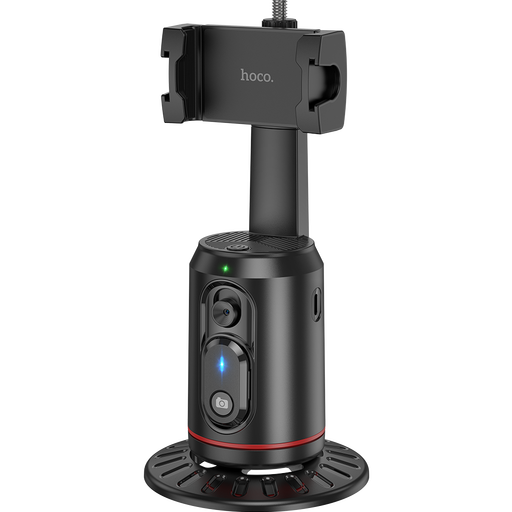
Why It Stands Out
The HOCO K23 is a strong candidate for content creators seeking a reliable and straightforward tracking solution. Its main appeal is the app-free operation; the built-in AI tracking system works independently, so you can simply place your phone and start recording. The device also supports gesture controls—an "OK" gesture to start tracking and a "PALM" gesture to stop—which simplifies solo filming sessions.
Pros
Who is it for? This device is well-suited for vloggers, live streamers, educators and professionals who need a dependable, hands-free camera solution for presentations, tutorials or dynamic video content. Its ease of use makes it accessible for beginners, while its feature set is robust enough for established creators.
A great video is not just about smooth camera work; the environment matters too. A tidy, organised background appears more professional and keeps the focus on you and your content. Many creators film in multi-purpose spaces, such as bedrooms or even bathrooms for beauty tutorials, where clutter can be a distraction.
Smart storage solutions can help maintain a clean and camera-ready space. Here are a couple of practical ideas for organising your filming area, particularly for those using a bathroom setting.
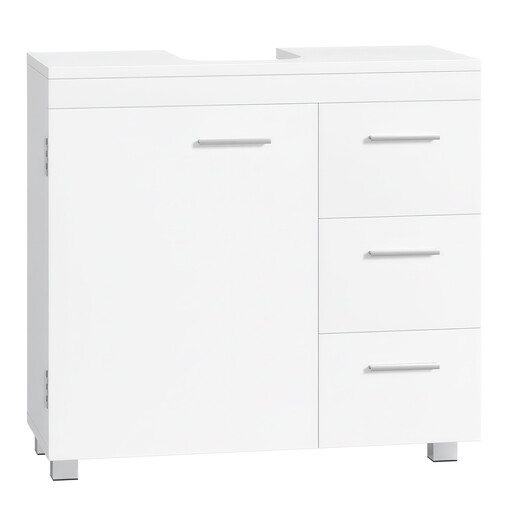
This cabinet is designed to fit neatly under most washbasins, turning unused space into valuable storage. With a mix of drawers and an adjustable shelf, it helps conceal toiletries, towels and other items, ensuring your background remains uncluttered. Its matte white finish provides a neutral, clean look that works well on camera.
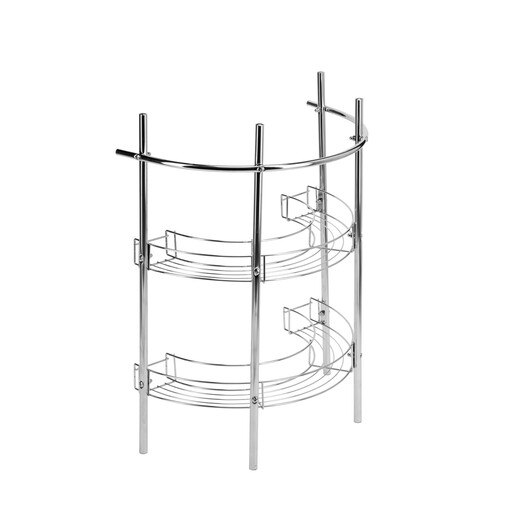
If you prefer open storage for easy access, this chrome unit is a great option. It fits around a sink pedestal and offers two shelves for essentials, plus an integrated towel rail. The open design is modern and ensures frequently used items are within reach but still organised. Its rust-resistant finish makes it a durable choice for a bathroom environment.
If you are inspired to get your space in order, you can explore a wider variety of options. Check out our full range of pedestal units to find the perfect fit for your bathroom or studio.
1. How does an auto tracking tripod work without an app? An auto tracking tripod with no app requirement has a small, built-in camera and an AI processor. This hardware identifies human shapes and movement, instructing the motor to pan and tilt to keep the subject centred in its own field of view. Because your phone is just mounted on top, the tripod's tracking function is completely independent of your phone's software.
2. Can a face tracking phone holder follow more than one person? Most consumer-grade tracking holders are designed to lock onto a single person to avoid erratic movements. If multiple people are in the frame, the device will typically follow the first person it recognised or the one who is most prominent. The HOCO K23, for example, notes that its tracking may be affected when multiple users are present.
3. What is the difference between an auto tracking tripod and a gimbal? While both help create smooth video, they serve different purposes. An auto tracking tripod is a stationary device that rotates to keep a subject in the frame. A gimbal is a handheld stabiliser designed to counteract shakes and jitters while the camera operator is moving. Some gimbals have tracking features, but their primary function is stabilisation on the move, whereas a tracking tripod's function is automated framing from a fixed position.