One-handed bedtime readers
If you often reposition a tablet while lying down, a manageable device may matter more to you than fitting more text on each page. Compare the weight of the exact model as well as its screen size.


For novels read while holding a tablet in bed, start by considering a compact screen rather than assuming a larger page will be more comfortable. A Fire HD 8 suits Kindle-focused reading if its app selection meets your needs; the iPad mini offers a compact, light Wi-Fi model, while the Galaxy Tab A9 offers a compact Android option with expandable media storage. Whichever route you choose, check your reading apps and bedtime display and notification controls before buying.
If you often reposition a tablet while lying down, a manageable device may matter more to you than fitting more text on each page. Compare the weight of the exact model as well as its screen size.
If your novels are chiefly in Kindle and you also want casual media use, a Fire tablet may fit. Check that any other essential reading, library or accessibility apps are available through its supported app store.
If the same device will handle novels, downloads, video or other apps, consider app availability and internal storage alongside reading comfort. A larger screen may help with other tasks but changes how the tablet feels when held in bed.
Decide how you normally hold the tablet, then check the reading experience and the apps you need. Screen size alone cannot settle all three choices.
| Concern | What to check | Who this matters to |
|---|---|---|
| Holding comfort | Compare screen size and the stated weight of the exact variant; consider whether you will hold it or use a stand. | If I read lying down and frequently change position, I want a tablet I can support without making page size the only priority. Around 45% of consumers put holding comfort first. |
| Wind-down controls | Check brightness, warm or night display settings, reading-app themes and notification controls on the device you plan to use. | When a novel is part of my bedtime routine, I want to manage screen light and interruptions rather than rely on a dark theme alone. For around 33% of consumers, limiting those disruptions is the primary concern. |
| Apps and wider use | Confirm essential reading apps and internal storage; check separately which files, if any, can use a microSD card. | If I also use my tablet for audiobooks, downloads or other apps, it needs to cover those tasks as well as display a novel. That wider use comes first for around 22% of consumers. |
A comfortable screen is little help if the library, subscription or accessibility app you rely on cannot be installed. Amazon states that Google Play is not supported on Fire tablets.
Check each essential app in the device's supported app store and consult the app publisher's current compatibility information before ordering.
A larger page view changes the holding trade-off. Apple specifies 477 g for its Wi-Fi 11-inch iPad, compared with 293 g for the Wi-Fi iPad mini; those figures describe those models and variants, not every large or compact tablet.
If you read while lying down, compare model weights and consider whether you can use a stand or a two-handed grip comfortably.
Oxford Health NHS Foundation Trust advises that dimming a screen or using a filter can help, but notifications and engaging on-screen content can still interrupt winding down.
Lower the brightness, use suitable display settings, silence notifications and choose a stopping point that fits your routine.
Samsung states that Galaxy Tab A9 external storage is for media, not applications. A card therefore does not replace enough internal space for the apps you intend to install.
Choose internal storage with your reading and audiobook apps in mind, then check which compatible media files can be kept on microSD.
Using expandable storage also requires a separate compatible microSD card.
These tablet lines illustrate different ways to balance a compact reading screen with other uses; compare the exact model and configuration before choosing.
The iPad mini is a compact general-purpose tablet option for readers who prioritise stated weight and display detail.
The Fire HD 8 is an 8-inch option for readers whose essential books and apps are available in Amazon's ecosystem.
The Galaxy Tab A9 is a compact Android option for readers who also want expandable storage for compatible media.
These choices include compact general-purpose tablets and a larger E-Ink note-taking tablet. For reading in bed, compare how you will hold each one, whether your required apps work and, for the E-Ink model, how you will light the page.
 No image available
Consider this compact iPad if you want to hold or reposition your reading device in bed; check that your essential reading apps and preferred bedtime controls meet your needs.
Apple specifies an 8.3-inch display for the iPad mini. This listed variant has 512GB storage and a Space Grey finish.
 No image available
Consider this larger E-Ink tablet if its screen and document-focused format suit your reading position; check that the reading apps you need are compatible.
The listed screen is 10.65 inches. The product information states that the tablet has no reading light, so bedtime reading requires enough ambient light.
 No image available
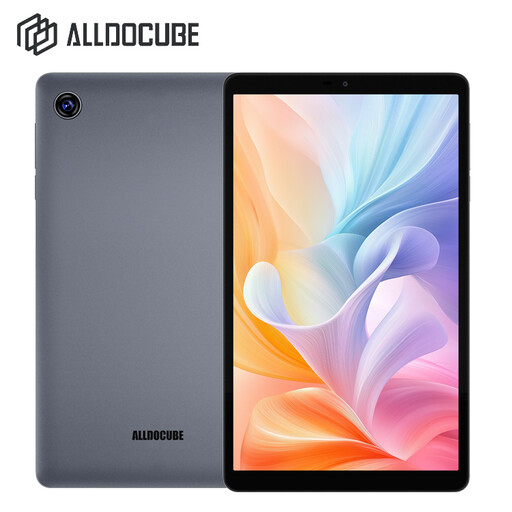
Consider this compact-size Android tablet for bedside reading if your required apps work on it; check its weight and display controls for your usual reading position.
The product title specifies an 8.68-inch display, 4GB RAM, 64GB storage and Android 15. It also states that no charger is included.
Not necessarily: an 11-inch screen may suit you if page area or other tablet tasks matter more than holding it one-handed. Apple specifies 477 g for its Wi-Fi 11-inch iPad and 293 g for its Wi-Fi iPad mini, so consider your reading position and whether you would use a stand.
No. Oxford Health NHS Foundation Trust advises that dimming and screen filters can help, while screen light, stimulating content and interruptions can still affect winding down. Check the controls available on your device and app, and decide when to put the screen away.
Check the exact app before buying a Fire tablet. Amazon states that Google Play is not supported on Fire tablets, so availability on another Android device does not establish that the app will work on a Fire model.
Not for every purpose. Samsung states that Galaxy Tab A9 external storage can hold media but not applications, so choose enough internal storage for the apps you need and check which downloads can use a card.