
24/7 Customer Support

Free returns

Same-day & Next-day Delivery

Quality Guaranteed

Unlock Your Welcome Offers: FREE Delivery | Up to 80% OFF | Free 30-day JoyPlus trial
Download the APP
Your car’s built-in screen is sharp, responsive and perfectly integrated. Yet, for many drivers of vehicles from 2016 onwards, it feels locked down. While factory-wired Apple CarPlay is useful for navigation and music, it doesn't allow you to watch Netflix in the car during a long wait or let your passengers enjoy YouTube on a road trip.
A CarPlay AI box promises to unlock this potential, transforming your car's display into a full-featured Android tablet. However, the market is flooded with options and making the wrong choice can lead to frustration and wasted money. Before you buy, be aware of these common pitfalls that catch out many UK drivers.
To avoid these issues, focus on the technical specifications, not just the marketing promises. Here are the three non-negotiable factors to verify before adding any CarPlay AI box to your basket.
Think of the processor and RAM as the engine of your AI box. For a smooth, responsive experience that can handle multitasking (e.g., running Google Maps while a passenger watches a video), you need capable hardware.
The software is just as important as the hardware. An outdated operating system can lead to app incompatibility and security vulnerabilities.
A good AI box should offer flexible connectivity options to suit different needs, from family entertainment to solo commuting.
We've analysed the market to find devices that address the common pitfalls and meet the essential criteria. Here are our recommendations, matched to different types of UK drivers.

Why This Fits Their Persona: This user doesn't need a full Android system. They simply want to stop plugging their phone in every time they get in the car. This adapter offers a simple, plug-and-play solution to convert wired CarPlay and Android Auto into a seamless wireless experience.
It focuses on one job and does it well. By not running a heavy Android OS, its Linux-based firmware is highly stable and avoids the lag associated with underpowered AI boxes. It also supports FOTA updates for long-term reliability.
Uses 5.8GHz Wi-Fi for a fast and stable connection. It automatically reconnects when you start the car and maintains all original controls (steering wheel buttons, knobs and touchscreen).
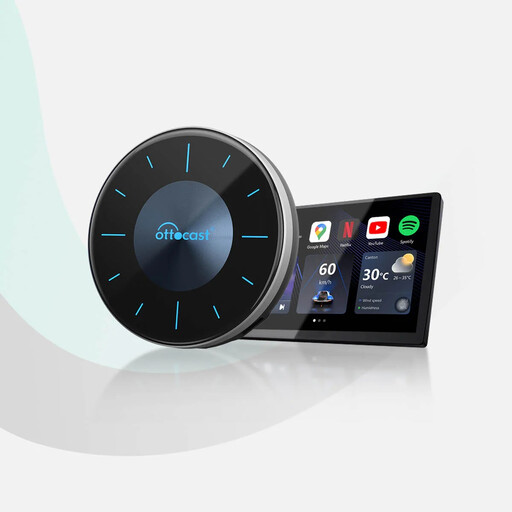
Why This Fits Their Persona: This user wants it all: streaming, apps and rear-seat entertainment. The Ottocast P3 is a powerful device for families on long journeys or anyone who wants a full-featured Android experience, allowing them to use apps like YouTube, Netflix and Disney+ directly on the car screen.
It directly counters the performance trap with a Qualcomm 8-core processor, 8GB RAM and 128GB ROM. Running on Android 12 with the OttoDrive 2.0 interface, it's built for smooth multitasking and long-term app support.
The dedicated car HDMI output is its standout feature, enabling dual-screen entertainment. It also includes a SIM card slot for independent internet and a Micro SD slot for up to 256GB of extra storage.
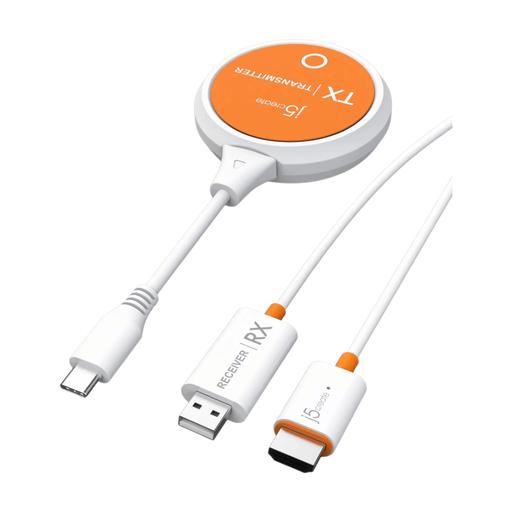
Why This Fits Their Persona: This user needs a simple way to mirror their laptop or phone screen, not just in the car but also for work presentations. This device acts as a versatile car screen mirroring adapter and a tool for the office, wirelessly extending a device's display to any HDMI screen.
It sidesteps the complexity and potential lag of a full Android OS. As a dedicated wireless display extender, it requires no software and avoids compatibility issues tied to specific car infotainment systems, as long as there is an HDMI input.
True plug-and-play simplicity. It works with any USB-C device that supports DisplayPort Alternate Mode and any screen with an HDMI input, offering a reliable 1080p stream for both work and play.
We have compiled a complete, real-time list of products that fully satisfy these strict selection criteria and UK safety regulations.
Generally, no. These devices are plug-and-play and do not modify your car's original software or hardware. They simply use the existing wired CarPlay protocol to function. When you unplug the device, your car's infotainment system reverts to its factory state. To be safe, it is always a good practice to remove the device before taking your car to a dealership for service.
You have two main options for internet connectivity. You can either connect the AI box to your smartphone's mobile hotspot, which uses your phone's data plan, or you can use a model with a built-in SIM card slot. A dedicated SIM card provides a more stable, independent connection for the box and prevents draining your phone's battery and data allowance, which is ideal for frequent users.
This is a critical point: no. A CarPlay AI box requires your vehicle to have factory-installed, wired Apple CarPlay. The device uses the data channel from this specific protocol to project its Android interface onto your car's screen. It will not work with vehicles that only have Android Auto, nor is it compatible with most aftermarket head units or systems that only support wireless CarPlay from the factory (such as those in BMW vehicles). Always check your vehicle's specifications first.