
24/7 全天候客户支持

免费退货

当日/次日达

品质保障

开启新人专享福利: 全场免邮 | 低至 2 折 | 免费试用 30 天 JoyPlus 会员
下载 Joybuy
A suitable mount can free desk space, improve viewing position and keep cables under control. The wrong one can create the opposite result: an unstable screen, blocked ports, difficult installation or a mount that does not fit your Dell equipment at all.
For UK offices, schools, reception desks, retail counters and home workstations, the main challenge is separating useful specifications from vague promises. Before choosing Dell monitor stands and mounts, watch for these common buying traps.
Dell monitors can use different fixing systems, including VESA 75 × 75 mm and VESA 100 × 100 mm patterns, while some models may use a Dell Quick Release connection. A stand designed for one system may not attach directly to another.
Check your monitor’s manual or rear panel before ordering. Confirm the VESA pattern, monitor weight and whether an adapter is required. A product described as a Dell VESA mount is not automatically compatible with every Dell screen.
A monitor may fall within a stand’s stated screen-size range but still exceed its weight limit. This matters particularly with dual-monitor setups, larger displays and older office monitors.
For example, the MDS19 supports two monitors from 19 to 27 inches, with a maximum load of 6 kg per monitor. These figures should be checked against the actual weight of each display, excluding or including the stand as specified by the manufacturer.
A mount may save desk space while leaving power, video and peripheral cables hanging between the screen and desk. This can make cleaning harder and create snagging points in busy workplaces.
Look for a monitor stand with cable management, such as integrated channels, clips or a concealed cable route. Also check whether the mount leaves enough room to access HDMI, DisplayPort, USB and power connections after installation.
The VESA monitor bracket standard describes the distance between the mounting holes on the back of a display. The most relevant sizes for many office monitors are 75 × 75 mm and 100 × 100 mm.
Do not rely on the product title alone. Confirm:
For a Dell OptiPlex Micro or Dell thin client mount, compatibility also includes the computer chassis, not just the monitor. A mount may support the correct VESA pattern but still be unsuitable for a particular computer model.
For a Dell dual monitor stand, check the number of displays, supported screen sizes and per-monitor weight capacity. Independent adjustment is useful when two screens have different heights or are used at slightly different angles.
The MDS19 provides independent height, tilt, swivel and pivot adjustment. Its stated lift range is up to 130 mm, with tilt from -5° to +24°, swivel from -10° to +15° and pivot from -90° to +90°. These objective figures help you judge whether it suits spreadsheets, portrait documents, shared desks or customer-facing displays.
A desk monitor stand should suit the available surface, not merely fit the screens. Measure the desk depth and consider nearby walls, shelves, docking stations and cable sockets.
For shared offices and school environments, a stable metal construction may be preferable to a lightweight design. Check the base dimensions, installation method and whether the desk can safely support the combined load. Always place a free-standing stand on a stable, flat surface and follow the supplied instructions.
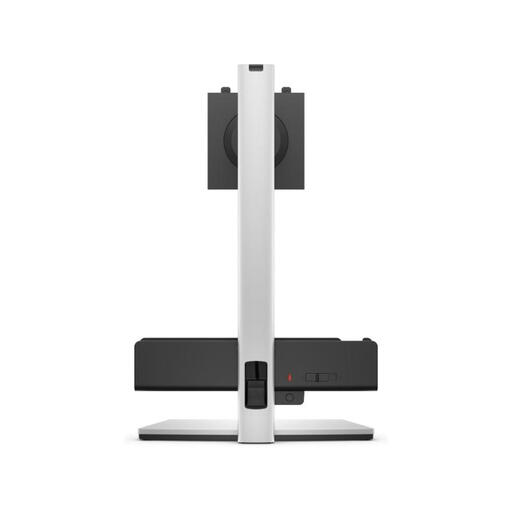
Why This Fits Their Persona: A practical choice for a single compatible Dell all-in-one workstation in a home office, reception area or small business desk where a compact footprint matters.
It is designed for compatible Dell Pro Slim and Pro Max Slim AIO modules, helping buyers avoid choosing a generic stand without checking device fit. Its slim profile and integrated cable management address desk clutter.
Supports compatible Pro Slim and Pro Max Slim modules; includes a stable metal base, cable management and mounting hardware.
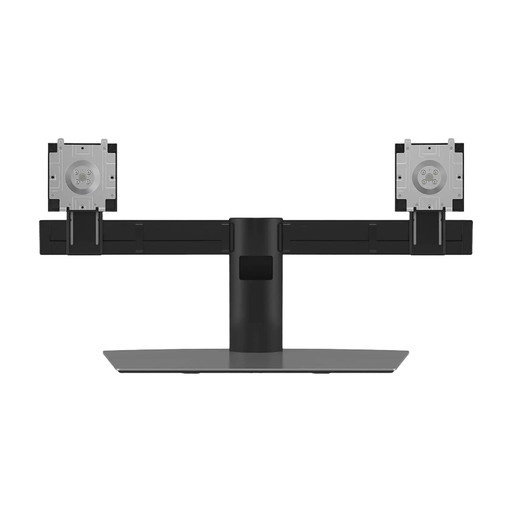
Why This Fits Their Persona: Suitable for professionals who want a structured two-screen desk arrangement for office work, finance, design or home working without using two separate bases.
Its published capacity, VESA support and adjustment ranges make compatibility easier to verify than relying on general claims about flexibility. Integrated cable channels and clips help address untidy wiring.
Supports two 19–27-inch monitors up to 6 kg each; offers height, tilt, swivel and pivot adjustment with a desk footprint of 577 mm by 249 mm.
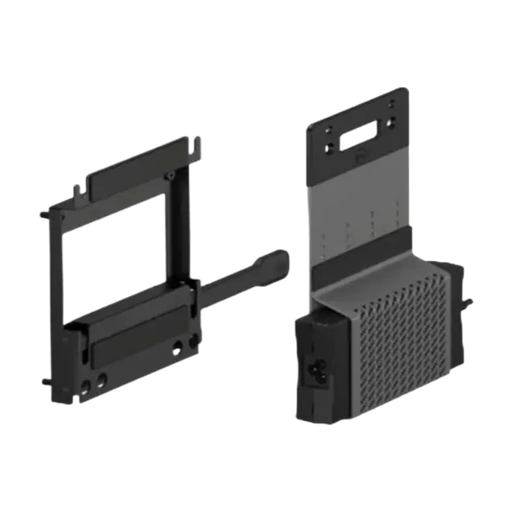
Why This Fits Their Persona: Designed for corporate IT roll-outs, classrooms, kiosks and point-of-sale desks that need to position a small computer behind a monitor or on a compatible bracket.
It identifies the intended Dell OptiPlex Micro and thin client use rather than presenting a universal computer mount. The included power adapter enclosure also helps prevent the power brick becoming loose desk clutter.
Supports VESA 75 × 75 mm and 100 × 100 mm patterns; permits horizontal or vertical positioning and includes a durable metal adapter bracket.
Before installation, confirm that the desk, wall or monitor arm can support the combined weight. Keep ventilation openings clear on mounted computers and leave access to essential ports. Tighten fixings according to the instructions without forcing screws into incompatible holes.
After fitting the screen or computer, check that:
For larger deployments, record the monitor model, VESA pattern and mounting accessory used at each desk. This can simplify replacements and reduce compatibility errors during future IT upgrades.
We have compiled a complete, real-time list of products that fully satisfy these strict selection criteria and UK safety regulations.
Potentially, provided the monitors match the stand’s VESA pattern, screen-size range and weight capacity. The MDS19 supports up to 100 × 100 mm VESA mounting and two monitors between 19 and 27 inches, but you should still confirm each display’s weight and attachment method.
This varies by product. The OSS25 listing includes mounting hardware and documentation, while monitor and computer mounting requirements can differ by model. Check the product contents and compare the supplied fixings with your device manual before installation.
A space-saving monitor mount can be useful where desk depth is limited or where you need room for a keyboard, notebook or docking station. A dual-arm design can also replace two individual bases. Measure the desk first and confirm that the mounting method suits your surface and monitor.