A four-socket extension lead with a short cable is a straightforward choice when the wall socket is close to the router and modem. Consider a surge-protected strip if you want that additional feature for connected electronics, or individual switches if separate socket control would help. Whichever you choose, check the lead’s marked rating and do not connect it to another extension lead.
Who is this for?
Safety-conscious students in rented rooms
If you are adding sockets in a hall or rented room, check the lead’s rating, plug and condition before use. Electrical Safety First also advises students to look for overloaded sockets or extension leads when moving in.
Students with a compact router and modem setup
If both devices sit near a wall socket, a short four-socket lead may provide the outlets you need without a longer cable across the room. Masterplug, for example, documents a four-socket model with a 1 m cable and wall-fixing capability.
Students sharing a desk with other devices
If the router and modem share a lead with study equipment, you may also want separate switches or a surge-protected model. Count every connected device when checking the lead’s total rating.
What should you check?
Start with a suitable UK plug and the lead’s marked rating, then measure the cable route and count the sockets you need. Treat surge protection and separate switching as choices for a specific desk setup, not substitutes for safe loading.
| Concern | What to check | Who this matters to |
|---|
| Connection and loading |
Check for a UK three-pin fused plug and a marked current rating. Include every connected device when assessing the total load. |
In a rented room, I need to avoid an unsuitable or overloaded connection before adding more devices. Around 46% of consumers put a safe, UK-compatible setup first. |
| Reach and socket layout |
Measure the route from the wall socket and count the outlets required for the router, modem and any planned accessories. |
When my networking equipment is on a desk or shelf, the cable needs to reach without stretching or crossing a walkway. Roughly 36% of consumers prioritise reach and outlet layout. |
| Protection and control |
Check whether the particular model offers surge protection or individual switches, and follow its maker’s guidance for those features. |
If other electronics share my study desk, I may want surge protection or control over separate sockets. About 18% of consumers make those additional features their primary concern. |
Mistakes to avoid
-
Assuming extra sockets provide extra power
Electrical Safety First advises that the combined load must stay within an extension lead’s maximum current rating; overloading can cause overheating.
Check the rating against everything connected to the lead, including devices you expect to add later. Keep high-power appliances such as heaters and kettles off the networking lead.
-
Adding a second lead when the cable will not reach
Connecting one extension lead to another creates an avoidable overheating risk.
Measure the route before buying and choose one lead that reaches without tension. If the room regularly lacks suitable sockets, raise that with the accommodation provider rather than building a chain.
-
Treating surge protection as permanent
Protective components can wear after over-voltage events, while the strip’s marked load limit still applies.
Follow the guidance for your particular model and check any protection-status indicator it provides. Belkin advises replacement after a major over-voltage event or after three years for its cited six-outlet strip.
Brands to consider for this setup
Masterplug
Its documented four-socket models provide a choice between a short basic lead and a longer, individually switched surge-protected lead.
- Masterplug specifies a 1 m cable and wall-fixing capability for the BFG110N-MP, and a 2 m cable with individual switches for the SWSRG4210N-MP.
- Choose by the cable route and controls you actually need; the listed features do not increase the permitted total load.
Belkin
A relevant option if the router and modem share power with a wider collection of desk electronics.
- Belkin describes a six-outlet surge-protected strip with a 2 m cord.
- Six outlets may be unnecessary for the router and modem alone. Follow Belkin’s replacement advice for the particular surge-protected model.
Energenie
Its ENER010 is a feature-led option where the sockets are difficult to reach.
- Energenie specifies four sockets, a 1.8 m cable and individual radio-remote control for the ENER010.
- Remote control adds little to a setup whose sockets are already easy to reach; check its operation in the intended room.
Joybuy product choices
These four-socket STATUS leads offer different cable lengths and, on some models, surge protection or individual switching for a router-and-modem setup. Before choosing any of them for a UK wall socket, confirm the fitted plug is a standard UK three-pin fused plug and measure the cable route.
 No image available
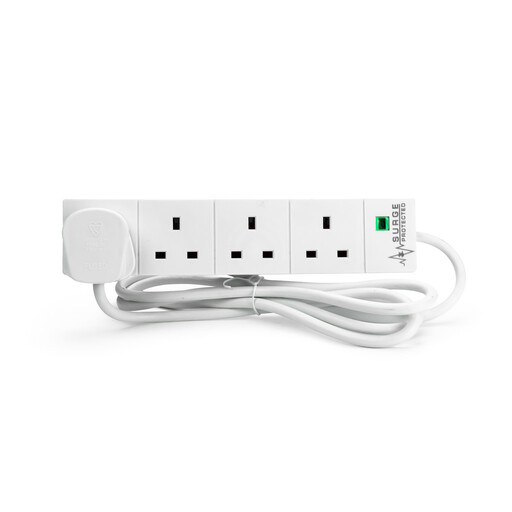
STATUS four-socket surge-protected extension lead, 2 m, white
Consider this model if the wall socket is farther from the router and modem and you want a surge-protected lead. Measure the route and check the maker’s guidance for the surge-protection feature.
View on Joybuy
 No image available
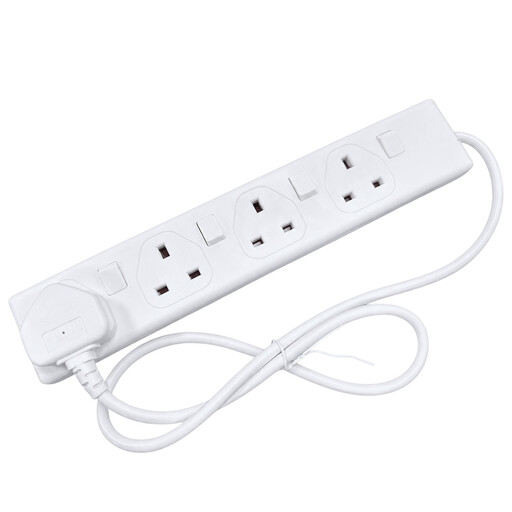
STATUS four-socket individually switched extension lead, 1 m, white
The 1 m cable suits a nearby socket if you also want to control the four outlets separately. Check that it reaches the intended position without tension.
View on Joybuy
 No image available
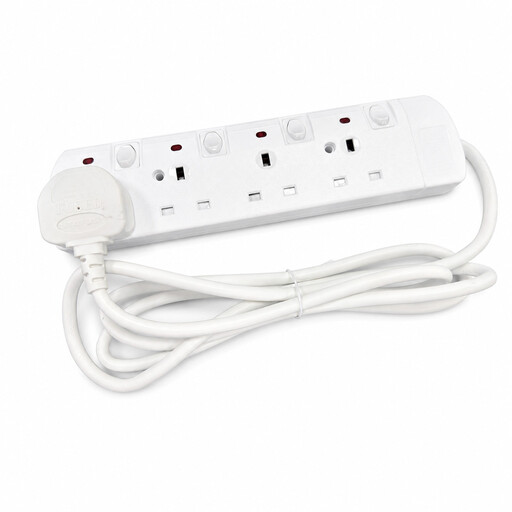
STATUS four-socket individually switched extension lead, 2 m, white
Choose the 2 m variant if you need both a longer route to the networking equipment and separate socket switches. Keep the cable clear of walking routes.
View on Joybuy
 No image available
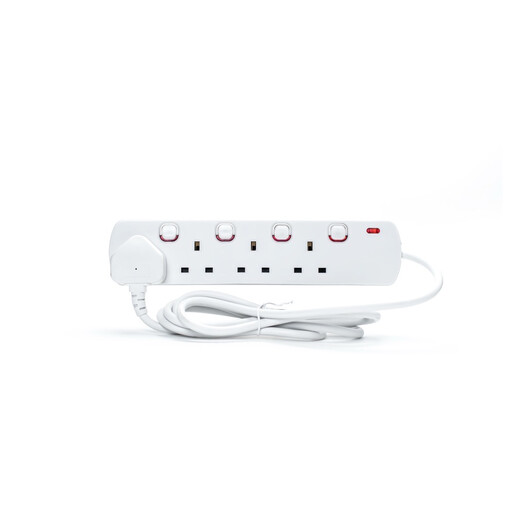
STATUS four-socket 13 A extension lead, 1 m, white
This short lead is an option when the router and modem are close to the wall socket and separate switching is not a priority. Its name specifies four sockets, a 1 m cable and 13 A; check the combined load of everything you connect.
View on Joybuy
Frequently asked questions
Can I connect two extension leads if the router is too far from the socket?
No; use one lead of a suitable length instead of connecting extension devices together. Measure the route first, and speak to the accommodation provider if the fixed socket arrangement remains unsuitable.
Does a router and modem need a surge-protected strip?
Not necessarily: a standard lead can meet the need for nearby extra sockets, while a surge-protected model adds a feature you may want for connected electronics. Neither choice removes the need to stay within the marked rating.
What if the lead or wall socket gets hot or smells of burning plastic?
Stop using the affected equipment. Report heat, scorch marks, a burning smell or repeated tripping to your accommodation provider rather than attempting electrical repairs yourself.
When should I replace a surge-protected lead?
Follow the instructions for the particular model and inspect it for damage or heat distress. For its cited six-outlet strip, Belkin advises replacement after a major over-voltage event or after three years; that timetable should not be assumed for every brand.


