For exploration games, choose a controller that works with your main console or PC and the games you play before comparing extra features. An Xbox Wireless Controller is a route for Xbox and Windows PC, DualSense suits PS5 with feature limits on PC, and the original Nintendo Switch Pro Controller is designed for Switch TV or tabletop play. In a student room, weigh wireless charging against cable reach, and check the console generation carefully: the Switch 2 Pro Controller is a different model.
Who is this for?
PC and Steam explorers
If you mainly play on a Windows PC, Steam Deck or similar setup, check both the controller’s connection method and support in the games you play. Microsoft Xbox, 8BitDo and Valve describe different controller and game-support routes; none makes every feature available in every game.
Console-first explorers
If PS5, Xbox or Nintendo Switch is your main platform, start with a controller intended for that console. PlayStation, Microsoft Xbox and Nintendo describe distinct compatibility routes, so a controller that also works elsewhere should not displace the main-console check.
Small-room setup simplifiers
If desk space and cable paths shape your choice, compare a wireless charging routine with the reach of a wired controller. A connection that suits the room still needs to suit the device and game.
What matters when choosing?
Settle the platform and game first, then decide how the controller will connect and where it will sit between sessions. The percentages below describe consumers by their primary concern when making this choice.
| Concern |
What to check |
Who this matters to |
| Platform and game compatibility |
Confirm the exact controller, primary device and connection method; check the individual game’s controller support. |
If I move between a console and PC, I need controls that work in the games I actually play, not just a device-pairing claim. Around 42% of consumers put compatibility first. |
| Connection and charging |
Check the available wireless or wired modes and what is needed to charge or connect the controller. |
With little room around my desk, I want a manageable cable path or a charging routine I can keep up with. For around 25% of consumers, that setup is the primary concern. |
| Comfort and feedback |
Consider grip and weight where you can, and confirm that your game and connection support any feedback feature you want. |
During a longer exploration session, I care about how the controller feels and whether the game uses its feedback features. Around 17% of consumers make comfort or supported feedback their first priority. |
| Custom controls |
Check the remappable inputs, required software and whether the control features work on your platform. |
I want extra actions within reach while moving and looking around, but only if I will use the mapping options. Custom controls come first for around 16% of consumers. |
Mistakes to avoid
-
Assuming every feature works in every PC game
PlayStation says DualSense haptic feedback on PC requires USB and a supporting game. General controller support does not establish that a particular game uses haptics, adaptive triggers or other optional controls.
Check the game’s feature information alongside the manufacturer’s notes for the exact controller and connection.
-
Choosing for several devices before checking the main one
Xbox, PlayStation and Nintendo controllers have different stated platform routes. Broad device compatibility is of little use if your main console or preferred connection is not supported.
Write down the console or PC you play on most, then check that platform and the intended connection method before comparing extras.
-
Treating estimated battery life as a promise
Nintendo UK estimates approximately 40 hours for the original Switch Pro Controller and says battery life varies with use. That figure does not describe the separate Switch 2 Pro Controller.
Plan a charging arrangement that suits your room rather than assuming an estimated runtime will hold for every session.
-
Putting an old controller or battery in household rubbish
GOV.UK advises that unwanted electrical products and batteries should go to an appropriate recycling collection point rather than household rubbish.
Use a suitable electrical-waste or battery collection route when the controller or its removable batteries reach the end of use.
Relevant brands to consider
Xbox
The Xbox Wireless Controller is a first-party route for Xbox and Windows PC play, with Android and iOS use also listed by Microsoft Xbox.
- Microsoft Xbox lists Xbox Wireless, Bluetooth, device switching, textured grips, button mapping and a compatible 3.5 mm headset jack for this controller.
- Check the device and game before assuming the same controls or features work across every setup.
PlayStation
DualSense is the first-party PS5 route and can connect to listed PCs, Macs and mobile devices.
- PlayStation documents USB-C and Bluetooth connection options for supported devices.
- On PC, haptic feedback requires USB and a supporting game; PlayStation says haptic feedback is not compatible with Mac or mobile devices.
Nintendo
The original Switch Pro Controller is a full-size option for Nintendo Switch play in TV or tabletop mode.
- Nintendo UK lists motion controls, HD rumble and USB-C charging for that controller.
- Nintendo UK’s approximately 40-hour battery-life figure is an estimate that varies with use. Do not apply the original Switch Pro Controller’s specifications to the Switch 2 Pro Controller.
8BitDo
The Ultimate 2.4G Controller is a PC- and SteamOS-oriented multi-device option.
- 8BitDo lists 2.4 GHz connectivity, a charging dock, two back buttons and software customisation for this named model.
- Its listed operating-system and control features are model-specific; check the exact version and game.
Razer
The Wolverine V3 Tournament Edition is a wired route for Xbox and PC players interested in configurable inputs.
- Razer describes this model as Xbox-licensed, with six remappable buttons and adjustable trigger behaviour.
- Its fixed cable and additional controls may not suit someone who wants a simpler setup for exploration games.
Controllers on Joybuy
These controllers cover different setups, from PS5 and Xbox or PC play to Switch 2 and wired desk use. Match the exact model to your main platform; the original Switch Pro Controller discussed above is not the Switch 2 product shown here.
 Image unavailable
Sony DualSense HYPERPOP Techno Red Wireless Controller
Consider this DualSense variant for PS5 exploration games or a PC setup that supports the controller. If PC haptics matter to you, PlayStation says they require USB and a supporting game; check the game before choosing it for that feature.
View on Joybuy
 Image unavailable
Machenike G3 V2 Tri-mode Controller White
This tri-mode model is worth considering if you want a choice of connection styles at your desk. Confirm which modes work with your device and game, and check what connection accessories come in the box.
View on Joybuy
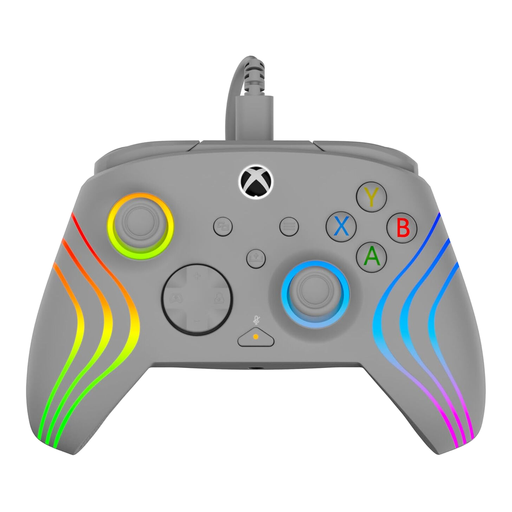 Image unavailable
Turtle Beach Afterglow Wave Wired Controller Xbox Grey
This wired Xbox controller suits a desk where a cable can reach without crossing a walkway. If you want to use its configurable controls, check support for your game and device before buying.
View on Joybuy
 Image unavailable
Nintendo Switch 2 Pro Controller Black
Choose this model only after confirming that Switch 2 is the console you play on. It is distinct from the original Nintendo Switch Pro Controller, so check compatibility and charging details for this exact model.
View on Joybuy
 Image unavailable
Xbox Wireless Controller Carbon Black
This Xbox Wireless Controller is a route for Xbox and Windows PC exploration games. Microsoft Xbox lists wireless and Bluetooth connection options for the controller; check your device and game, along with the batteries supplied with this listing.
View on Joybuy
Common questions
What if I have not chosen my main gaming platform yet?
Decide which console or PC you will use most before choosing a controller. Xbox Wireless Controller is a route for Xbox and Windows PC, DualSense for PS5, and the original Switch Pro Controller for Nintendo Switch TV or tabletop play; PC-focused alternatives need checks against the exact device and game. Valve encourages controller support on Steam, but that does not guarantee support in an individual game.
Will DualSense haptics work wirelessly on a PC?
Do not rely on wireless PC play for DualSense haptic feedback. PlayStation says PC haptics require a USB connection and a supporting game; adaptive triggers also depend on game support.
Is a wired controller impractical in a student room?
A wired controller can suit a student room if its cable reaches safely and does not obstruct your desk or walkway. It also avoids a wireless charging routine, but gives you less freedom to change where you sit; check the layout before choosing a wired model.
What should I check about warranty and after-sales support?
Check the seller’s terms for the exact controller, including warranty coverage, how to request support and how returns are handled. Also confirm included connection accessories and any companion-app requirements before purchase; do not assume arrangements are identical across models or sellers.


