Study-and-game commuters
If you need one computer at home and in other places, weigh portability alongside the requirements of the games you want to play. Box.co.uk’s overview describes the different setups of gaming laptops and desktop PCs.


Start with the games you want to play, the settings you expect and whether the computer needs to travel with you. A gaming laptop suits a one-device study-and-play setup; a desktop suits desk-based use, with a pre-built system and a self-built PC differing in how much assembly and compatibility checking you take on. An ordinary laptop or desktop may suit lighter games if its exact configuration meets the requirements for those games and settings.
If you need one computer at home and in other places, weigh portability alongside the requirements of the games you want to play. Box.co.uk’s overview describes the different setups of gaming laptops and desktop PCs.
If the computer will stay in one place, compare an assembled desktop with building a PC yourself, including which parts and peripherals you will need. Scan 3XS offers configurable desktop systems to consider alongside a proposed parts list.
If you have particular games or settings in mind, check the requirements for those titles before choosing a computer. Epic Games and CD PROJEKT RED publish game-specific PC requirements.
Choose when: You need the same computer for gaming and study or work in more than one place, and its exact configuration meets your games’ requirements.
Trade-off: Check the particular model’s weight, connections and display; a gaming label alone does not establish whether it will suit daily travel.
Choose when: You mainly play at a desk and want an assembled system rather than taking on the build yourself.
Trade-off: The tower is not portable and may need a separate display and input devices; check what the particular system includes.
Choose when: You want to select the components and are prepared to check compatibility, assemble the PC and troubleshoot the build.
Trade-off: No general saving or performance advantage over a pre-built PC is established; compare systems with equivalent specifications.
Choose when: Your named games run acceptably on the computer’s actual hardware and the settings you are willing to use.
Trade-off: Minimum requirements are a starting point, not a promise of high-settings performance.
| Concern | What to check when buying | Who this matters to |
|---|---|---|
| Portability | Check the laptop’s weight, display and connections, as well as its game requirements. | If I need one computer at home and for study or work elsewhere, I would weigh carrying it against the games it can run. Around 36% of consumers put portability first. |
| Games and settings | List your games and intended settings, then compare them with the exact computer configuration and the publishers’ requirements. | If a particular game or graphics setting matters to me, I would check the components against that title rather than rely on a gaming label. Around 29% of consumers prioritise game and setting requirements. |
| A complete first setup | Check which components and peripherals are included, and whether you want to assemble the PC yourself. | When setting up my first computer, I would want to know what is needed to use it and whether I am responsible for building it. Around 21% of consumers prioritise a clear route to a working setup. |
| Unnecessary gaming hardware | Check the requirements for your games, including the stated minimum and recommended specifications. | If my games are less demanding, I would check whether a standard study computer meets their requirements before choosing gaming-specific hardware. Around 14% of consumers prioritise avoiding hardware they do not need. |
Epic Games distinguishes Fortnite’s minimum, recommended and Epic-quality requirements. CD PROJEKT RED also specifies Cyberpunk 2077 configurations by preset, resolution and expected frame rate.
Choose the settings you want, then compare them with the requirements for the exact game and PC configuration.
A laptop integrates a screen and keyboard, while a desktop tower is only one part of a desk setup.
Check whether the desktop purchase includes a display and input devices before comparing what each option provides.
HP’s UK listings show different processors, graphics and storage configurations within the Victus range.
Match the full model or configuration code and its stated specifications to the games you intend to play.
HP’s UK gaming range includes Victus and OMEN laptops. Compare the individual configuration rather than treating either line as a fixed specification.
Lenovo’s UK gaming-laptop range includes LOQ and Legion configurations to examine if portability is essential.
Scan 3XS offers configurable gaming desktops to consider when the computer can remain at a desk.
These options cover portable gaming laptops, a pre-built desktop bundle and a compact computer described for lighter gaming and study.
 No image available
A portable gaming-laptop option for a study-and-play setup; compare its exact configuration with your games.
32GB RAM, 2TB SSD and RTX 5060.
 No image available
A gaming laptop option for one computer used for study and gaming; check the exact configuration against your chosen titles.
AMD Ryzen 7 170, 16GB RAM, 1TB SSD and GeForce RTX 5050; 15.6-inch FHD 144Hz display.
 No image available
A 14-inch gaming-laptop option; check the full configuration against your games and study needs.
AMD Ryzen AI 9 HX 370, 32GB LPDDR5x, 2TB SSD, GeForce RTX 5070 Ti and Wi-Fi 7.
 No image available
A pre-built desktop bundle for a desk-based setup; check the included items and the configuration against your games.
Windows 11 Home; bundle includes a monitor, keyboard, mouse, headset and mousepad.
 No image available
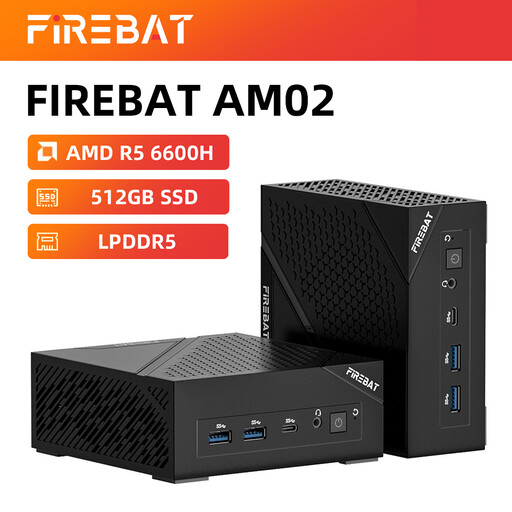
A compact computer described for study and lighter gaming; check each game and its settings against the actual configuration.
16GB LPDDR5, 512GB M.2 NVMe SSD, Windows 11 Home, HDMI 2.1 and DisplayPort 1.4.
Possibly, depending on its exact hardware and your settings. Epic Games lists integrated graphics among Fortnite’s minimum PC options, while its recommended and Epic-quality presets specify different hardware; compare the computer’s CPU, graphics, RAM and operating system with the relevant tier.
Some games specify both a drive type and installation space. CD PROJEKT RED’s published Cyberpunk 2077 configurations specify a 70 GB SSD for its listed minimum and recommended presets, so check available space as well as the drive specification; that figure applies to this game, not every PC.
Check what the particular desktop includes. A tower does not have the integrated screen and keyboard of a laptop, so you may need a display and input devices; also check the connections required by your study equipment.
No. GOV.UK guidance lists UKCA or CE for relevant electrical equipment placed on the Great Britain market, and CE or UKNI-and-CE for the Northern Ireland market. These market-placement rules do not mean that every buyer should require one particular mark.