For a desktop setup inside a dry garden office, choose a surge-protected strip with enough sockets for your equipment, a suitable load rating and a lead that reaches without joining extension leads. Keep an indoor strip away from damp: if the supply route includes an outdoor section, address outdoor equipment suitability and RCD protection before adding desk sockets. If you regularly need more extension sockets, ask a qualified electrician about fixed sockets.
Who needs to consider what?
Fixed desktop workstation owners
If your PC or dock, monitors, router and peripherals stay connected inside a dry office, count their plugs and check the combined load. Plan where the strip will sit, whether its lead reaches and whether you want a visible surge-protection indicator.
Garden-office users with an exposed supply route
If a cable, plug or connection is outdoors or could become damp, settle the supply arrangement before choosing a desktop strip. Electrical Safety First advises RCD protection for outdoor electrical equipment; an indoor surge protector does not make an exposed connection suitable for outdoor use.
Multi-device desk users
When peripherals share the desk with devices that need charging, compare the AC outlet layout, any USB ports, placement options and the strip's marked load rating. A larger socket count does not increase the load the strip can safely carry.
What matters when choosing a surge protector?
Check the route supplying the garden office before choosing a strip for the desk. Then count the equipment you will connect and decide which charging and placement features you will use.
| Concern | What to check | Who this matters to |
|---|
| Supply-route safety |
Identify any outdoor or damp-exposed cable or connection. Check that outdoor equipment is suitable for its location and has RCD protection. |
If part of my office supply runs outdoors, I need to deal with that exposure before choosing a desk strip. Around 44% of consumers put supply-route safety first. |
| Sockets and load |
Count plugs, including power bricks, and check the strip's marked current rating against the total connected load. Do not join extension leads. |
A desktop, displays and network equipment all need space, but I do not want to overload one supply point; around 33% of consumers prioritise workstation capacity. |
| Charging and placement |
Check lead reach and placement, the USB port types you need, and whether an indicator shows surge-protection status rather than power alone. |
I want charging and cables arranged without losing track of whether surge protection is active. Convenient charging and placement come first for around 23% of consumers. |
Common mistakes to avoid
-
Treating any power strip as surge protection
An extension block can provide extra sockets without surge suppression. Socket count and an on/off switch do not establish that it is a surge protector.
Check that the exact model states a surge-protection function; if you want to monitor it, check what its indicator actually shows.
-
Using an indoor strip on an exposed supply route
A desktop surge protector does not address moisture or damage affecting an outdoor cable or connection. Electrical Safety First advises RCD protection for outdoor electrical equipment.
Keep the desk strip indoors and dry. Use equipment suitable for any outdoor section, and seek professional advice if the garden-office supply needs a fixed installation.
-
Adding outlets by linking extension leads
More sockets do not raise the rating of the lead or wall socket. Electrical Safety First advises against plugging one extension lead into another.
Connect one suitable extension device to the wall socket, check its marked rating and keep the combined load within it. Consider fixed sockets if this remains insufficient.
-
Assuming surge protection lasts indefinitely
A strip supplying power does not, by itself, show that its surge protection is still active.
If the model has a protection-status light, check it and follow that model's replacement instructions. Belkin says to replace its cited models if their protection light goes off.
Belkin also recommends replacing those models after three years, even if the protection light remains on.
Brands and product ranges to consider
Belkin
Belkin lists UK desktop surge-protector models with six or eight AC outlets and USB charging options.
- Belkin states that its cited six-outlet USB-C/USB-A model has 650 J surge protection and its eight-outlet dual-USB-C model has 900 J; both have a 2 m lead and a protection indicator.
- Those specifications apply to the named models, not every Belkin strip. Follow the replacement guidance for the exact model you choose.
Masterplug
Masterplug lists UK surge-protected extension leads in several socket counts, including individually switched desk formats.
- Its six-socket SWSRG6210N-MP is specified with individual switches, a power and surge indicator, wall-fixing capability and a 2 m cable.
- That model is rated IP20. Do not choose it as the weather-exposed part of a garden-office supply.
Brennenstuhl
UK distributor CPC Farnell lists Brennenstuhl surge-protected strips, including the six-outlet model 1150543620.
- CPC Farnell specifies six UK outlets, a 13A rating and a 2 m cable for model 1150543620.
- Check the exact model, plug, marked rating and suitability for its intended location; the listed specifications do not establish outdoor suitability.
Joybuy options for a dry garden-office desk
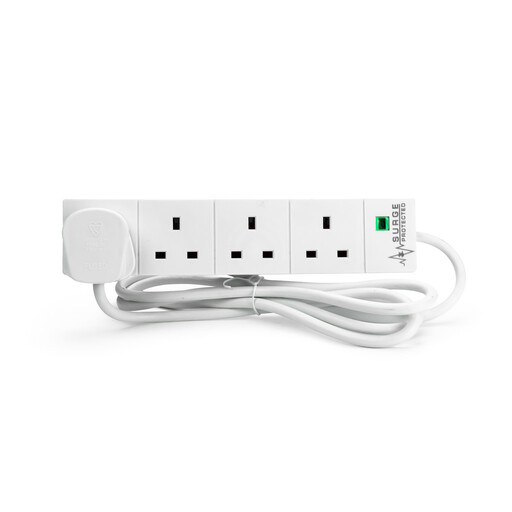
This four-socket option suits consideration for a compact desktop setup when the extension lead remains inside a dry garden office. Check the office supply separately if any part of its route is outdoors.
 No image available
STATUS four-socket surge-protected extension lead, 2 m, white
Consider this for a compact desktop setup where the strip can stay indoors and dry. Check the marked load against your connected equipment, and do not plug it into another extension lead. If monitoring surge protection matters to you, confirm whether the model has a protection-status indicator rather than only a power-on light.
View on Joybuy
Questions about garden-office surge protectors
Can I use an indoor surge protector in a garden office?
Yes, for a desk inside a dry garden office, provided the office's power supply is suitable and the strip stays away from damp. An indoor strip is not a weatherproof solution for an outdoor plug, connection or cable; Electrical Safety First advises RCD protection for outdoor electrical equipment.
How many devices can I connect to one strip?
The safe number depends on the devices' combined load and the specific strip's marked rating, not just its socket count. Electrical Safety First notes that many UK extension leads are rated at 13A, but some leads and cable reels have lower ratings, so check the one you intend to use.
Can I plug a surge protector into another extension lead?
No. Electrical Safety First advises against joining extension leads. If your garden-office desk regularly needs more sockets than one suitably rated strip provides, ask a qualified electrician about adding fixed sockets.
Is a protection-status light worth checking?
Yes, if you want an indication of whether the model's surge protection remains active; check that the light reports protection status rather than power alone. Follow the exact model's instructions: Belkin says to replace its cited strips if their protection light goes off and recommends replacement after three years even if it stays on.


