Who is each laptop route for?

Students checking course-software compatibility

If your institution requires a particular Windows utility, driver or peripheral, start with its stated operating-system and processor requirements. A conventional Windows x64 laptop avoids the additional Arm-specific checks described by Microsoft, though the exact software still needs confirming.

Students coding at a compact desk

If you expect to use an editor, documentation and course materials together, compare the keyboard, screen, memory and storage of the exact configuration. A 14-inch model is one format to consider when both desk space and built-in workspace matter.

Students considering macOS or Windows on Arm

These routes merit a closer look when you prefer macOS or want to consider an Arm-based Windows laptop. Confirm your course applications and accessories first, particularly any Windows-only tools or device drivers.

What matters when choosing?

Conventional Windows x64

Consider it when: Your course specifies Windows software or its specialist requirements are not yet clear.

Keep in mind: Windows x64 does not replace a check of the exact applications and peripherals your course uses.

MacBook Air with Apple silicon

Consider it when: Your course accepts macOS and you are comfortable working in it.

Keep in mind: Check Windows-only tasks and your accessories; Apple lists two Thunderbolt 4/USB-C ports and MagSafe on its M5 MacBook Air specification.

Windows on Arm

Consider it when: You have confirmed that your course tools and peripherals work with the particular Arm-based model.

Keep in mind: Microsoft says x86 and x64 app emulation carries performance overhead, and certain drivers require native Arm64 versions.

Concern What to check Who this matters to
Course-software compatibility Compare the course software list with the exact operating system and processor architecture; check required drivers and virtualisation tools. If my module needs a specialist utility or lab device, I want to know it will run before choosing a lighter laptop. Around 42% of consumers put course-tool compatibility first.
Study workspace and multitasking Check the exact model's screen and keyboard, plus its memory and storage for the applications and files you expect to use together. Working from one small desk, I need room to code and read course material without making the setup awkward. For around 33% of consumers, usable workspace and multitasking are the primary concern.
Portability and charging Check the laptop's weight, supplied charger and connections for the accessories you already use. When I move between my room, lectures and the library, carrying the laptop and managing its charger matter most. Portability and charging come first for around 25% of consumers.

Buying pitfalls to avoid

  • Assuming all Windows laptops handle specialist tools alike

    Microsoft says Windows on Arm can emulate x86 and x64 applications, but emulation has performance overhead and certain drivers need native Arm64 versions.

    Get your course software list and confirm the exact applications, drivers, peripherals and virtualisation requirements before ordering. If those requirements remain unclear, consider a conventional Windows x64 model.

    An architecture mismatch can also mean time spent troubleshooting a required tool.

  • Choosing by series name rather than configuration

    Memory, storage and other details belong to a particular model or part number, not necessarily every laptop in the same series.

    Match the full model or part number against the screen, memory, storage, operating system, charger and warranty details on the product page before ordering.

  • Treating a battery claim as your coding-day runtime

    A manufacturer's battery figure may reflect different applications and settings from an editor, browser and video calls used together.

    Check how the exact laptop charges and plan around the sockets available where you study, rather than relying on a claimed runtime alone.

  • Forgetting the connections at your desk

    A monitor or existing USB accessory may need a connection that differs from the laptop's available ports.

    List the display, mouse, storage and other devices you intend to use, then compare their connections with the exact laptop's port specification.

    Your setup may require an adaptor or hub to connect an existing device.

Relevant brands for reference

Lenovo

The IdeaPad Slim 5i Gen 10 example is a conventional Windows laptop to compare if you want a 14-inch format.

  • Lenovo UK lists the 83HR004TUK configuration with Windows 11 Home, 16 GB memory, a 512 GB SSD and a 14-inch 1920 × 1200 display.
  • Those specifications apply to that configuration, not every IdeaPad Slim 5i; check the exact part number and current availability.

Apple

MacBook Air is a macOS option for students whose course tools support that platform.

  • Apple UK lists M5 MacBook Air configurations with 16 GB unified memory, a 512 GB SSD, two Thunderbolt 4/USB-C ports and MagSafe.
  • Check Windows-only coursework and whether your existing accessories need an adaptor.

Acer

The Aspire 14 AI Snapdragon example is worth examining if you are considering Windows on Arm.

  • Acer United Kingdom lists the A14-11M-X2N7 configuration with 16 GB memory, a 512 GB SSD and a 14-inch 1920 × 1200 display.
  • Confirm the exact course software, drivers and peripherals for Arm; do not assume conventional Windows x64 behaviour is identical.

Laptop choices on Joybuy

These models cover Windows-on-Arm, conventional Windows x64 and macOS choices for Python study. Compare each configuration with your course requirements and the space available at your desk.

ASUS Vivobook 14 X1407QA-LY003W in Quiet Blue

ASUS Vivobook 14 X1407QA-LY003W, Quiet Blue

Consider this Windows-on-Arm option if you can confirm that your course applications, drivers and peripherals work with its Snapdragon X processor.

The listed configuration has 16 GB RAM and a 512 GB SSD. Check any required virtualisation or specialist Python-package workflow before buying.

View on Joybuy

ASUS Vivobook 15 X1504VA in Cool Silver

ASUS Vivobook 15 X1504VA, Cool Silver

Consider this conventional Windows x64 route if you want a 15.6-inch laptop and have room for it on your desk.

Its listed configuration includes an Intel Core 5 120U, 24 GB memory and a 1 TB SSD. Confirm your course software and peripheral requirements before ordering.

View on Joybuy

MSI Summit 16 AI Evo laptop

MSI Summit 16 AI Evo, Core Ultra 7 255H

Consider this conventional Windows x64 model if a 16-inch screen fits your desk and you want to compare a higher-memory configuration.

The title specifies a QHD+ 165 Hz display, Intel Arc graphics, 32 GB LPDDR5 memory and a 1 TB SSD. Check the exact course applications before buying.

View on Joybuy

HP OmniBook X Flip 16-as0004na laptop

HP OmniBook X Flip 16-as0004na

Consider this conventional Windows x64 model if a convertible touchscreen would suit the way you study and a 16-inch device fits your desk.

The listed variant has an Intel Core Ultra 5 226V, 16 GB RAM, a 512 GB SSD and Windows 11 Home. Check your required applications and peripherals against the exact configuration.

View on Joybuy
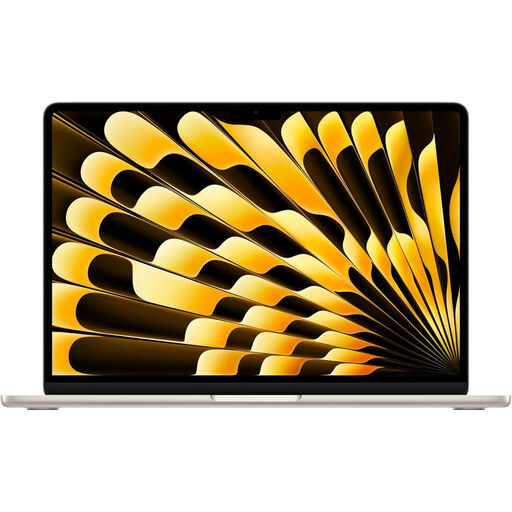
Apple 15-inch MacBook Air with M5 in Starlight

Apple 15-inch MacBook Air (2026), M5, Starlight

Consider this macOS option if your course supports it and you want a 15-inch built-in display for study.

The listed variant has an M5 chip with a 10-core CPU and 10-core GPU, 16 GB memory and a 512 GB SSD. Confirm any Windows-only coursework and accessory connections before buying.

View on Joybuy

Questions about Python-study laptops

Do I need a gaming laptop to learn Python?

Not for ordinary beginner Python work alone. Microsoft's published VS Code recommendation is a 1.6 GHz or faster processor and 1 GB RAM for the editor, not for your entire study setup. Check whether later modules require virtual machines, local databases or other demanding tools before deciding on a configuration.

Can I learn Python on a MacBook Air?

Yes, if your course applications support macOS. VS Code is available for macOS, but you should confirm any Windows-only teaching software, required drivers and assessment environment with your institution before choosing a MacBook Air.

What should I check before choosing Windows on Arm?

Confirm that your exact course tools, Python packages, drivers and peripherals work on the model you intend to buy. Microsoft says Windows on Arm can emulate x86 and x64 applications with performance overhead, while certain drivers require native Arm64 versions.

What should I check about the supplied charger?

Check the supplied adaptor, plug and charging connection for the exact laptop before ordering for a student room. GOV.UK guidance from the Office for Product Safety & Standards says electrical equipment placed on the Great Britain market must meet applicable safety requirements; if you are buying for Northern Ireland, confirm the requirements that apply there rather than assuming Great Britain guidance is identical.

Can I return an online laptop purchase if it is unsuitable?

An online change-of-mind cancellation and a remedy for a faulty or misdescribed laptop are separate matters. Coventry City Council Trading Standards says online buyers generally have up to 14 days after receiving goods to change their mind in most cases. GOV.UK also explains that consumer law protects purchases made remotely and in person; check the rules applicable to your purchase and keep the order and product description.