Who this is for

PS5 and Xbox Series X players

If you play supported current-generation games, check 4K/120Hz, VRR, ALLM and the HDMI input used by the console instead of assuming every 4K TV offers them. Xbox Support and PlayStation both make these features dependent on the connected display and game.

Shared living-room viewers

For a screen used for games and everyday television, consider the sofa layout, screen position and viewing comfort before prioritising the highest gaming specification. Which? and TCL UK both highlight room fit as part of TV selection.

Owners replacing an older TV

A standard HDMI connection is enough to connect a console, but high-frame-rate modes have additional conditions. This matters when a household uses a mix of Xbox Series, Xbox One, PS4 and newer PlayStation consoles.

What to check before buying

Gaming-focused 4K TV

Choose it when: You use a PS5 or Xbox Series X for supported high-frame-rate games and value responsive play and reduced tearing.

Trade-off: The console, game, cable, TV input and settings must all support the intended mode before 4K/120Hz or VRR can be used.

General 4K television

Choose it when: You mainly play at 60Hz, use an older console, or place films and shared television viewing ahead of high-frame-rate gaming.

Trade-off: It may not provide 4K/120Hz, VRR or automatic low-latency switching, so check the game mode and HDMI capability.

Monitor-style setup

Choose it when: You have close-range, individual seating with suitable desk placement rather than a shared sofa-based room.

Trade-off: A monitor is usually less practical as the main household screen and may need separate audio or a different layout.

Priority What to check Your needs
Console compatibility Check the TV input used by the console; confirm 4K/120Hz, VRR and ALLM for the exact model; use an Ultra High Speed HDMI cable where Xbox Series X 4K/120Hz requires one. I want the picture mode my console and games can actually output, rather than relying on a headline specification.
Room fit Measure from the usual eye position to the screen location; account for all regular seats; check stand depth or wall placement before choosing a diagonal size. The screen should feel comfortable from the sofa and work for people watching from more than one position.
Variable frame rates Confirm VRR support on the relevant HDMI port; check whether an enhanced-input setting is required; enable game mode or ALLM where supported. I play games whose frame rate can vary, so I want a setup designed to reduce visible tearing and keep play responsive.
Connection chain Test the console directly with the TV first; check receiver or soundbar pass-through capability; use a suitably certified longer HDMI cable if the connection needs one. I want to add sound without unintentionally limiting the video signal available to the console.

Buying pitfalls to avoid

  • Assuming 4K means 4K gaming at 120Hz

    For Xbox Series X, 4K at 120Hz requires the combined conditions specified by Xbox Support, including a compatible HDMI 2.1 TV and Ultra High Speed HDMI cable. PS5 120Hz and VRR output also depend on the display and supported game.

    Check the exact UK model, the HDMI port allocated to the console, cable requirements and the game settings before paying extra for high-frame-rate features.

  • Choosing a diagonal size without measuring

    A screen that suits one sofa position can feel overwhelming or too distant from another. TCL UK describes its viewing-distance examples as non-binding, so they are a starting point rather than a rule.

    Measure from normal seating to the planned screen position, then consider the full seating area, furniture and whether the TV will also be used for shared viewing.

  • Adding a soundbar or receiver without checking pass-through

    Xbox Support notes that a device placed between the console and TV can affect video features and picture quality, which can prevent the intended gaming mode from reaching the screen.

    Start with a direct console-to-TV HDMI connection, then check the receiver or soundbar specification before adding it to a 4K/120Hz or VRR setup.

    A longer connection may require a certified Ultra High Speed HDMI cable for the intended Xbox Series X mode.

  • Applying a range-level gaming claim to every model

    HDMI ports, refresh capabilities and gaming features can differ between screen sizes and model lines. Sony notes that VRR support can depend on the model and HDMI port, while TCL lists different features across product pages.

    Use range pages to shortlist, then check the complete UK model number, its specification sheet and the relevant HDMI-port details before purchase.

Relevant TV brand references

LG

An OLED route for buyers considering compact premium screen sizes and high-end gaming specifications in a living-room TV.

  • According to LG UK, the OLED48G66LS supports up to 165Hz in 4K with G-SYNC compatibility and FreeSync Premium.
  • These are manufacturer specifications for this model; check the exact HDMI feature set and the selected screen size before buying.

Samsung

An OLED option for buyers considering a range of living-room sizes and Samsung's advertised gaming-feature package.

  • Samsung UK states that its OLED range supports HDMI 2.1, 4K at 120Hz or higher, VRR and ALLM.
  • Confirm the selected model, HDMI-port allocation and its own specification rather than applying a range statement to every TV.

TCL

A QD-Mini LED route for shoppers considering larger screens with gaming-oriented features.

  • TCL UK lists the C7L range from 55 to 98 inches and advertises Game Master and a 288 VRR Game Accelerator.
  • Input features vary by series and model, so check the precise model sheet for HDMI 2.1, ALLM, VRR and 4K/120Hz support.

Sony

A television route for PS5 users who value PlayStation-oriented setup guidance and BRAVIA gaming integration.

  • Sony UK explains that compatible BRAVIA TVs can use ALLM, 4K/120Hz and VRR, depending on the model and setup.
  • Sony's guidance does not mean every BRAVIA model supports these modes, and the relevant HDMI port may need Enhanced Format enabled.

Joybuy product options

These Joybuy options are gaming-oriented televisions for living-room console use, with a choice of 50-inch, 55-inch and 65-inch screen sizes. Compare their stated HDMI and gaming features with your intended console setup, then measure for your room.
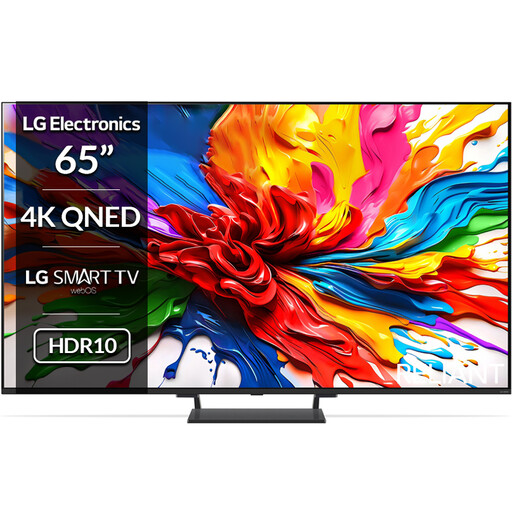
LG 65QNED93A6A 65-inch QNED Evo MiniLED 4K Smart TV

LG 65QNED93A6A 65-inch QNED Evo MiniLED 4K TV

A 65-inch option for a larger shared living-room setup where current-generation console connectivity is important.

Stated features include four HDMI 2.1 inputs, 4K at 120Hz/144Hz, VRR, ALLM, AMD FreeSync and 40W 2.2-channel audio.

Measure for the sofa layout, then check the chosen HDMI input, cable, game and TV settings for the mode you plan to use.

Joybuy

Hisense 65U7QTUK Pro 65-inch MiniLED QLED Smart TV

Hisense 65U7QTUK Pro 65-inch MiniLED QLED TV

A 65-inch main-room TV for PS5 or Xbox Series X|S players who also want a screen for everyday household viewing.

The listing states four HDMI 2.1 ports, ALLM, VRR at 165Hz on all ports, Game Mode Pro and 2.1.2-channel audio.

Check the selected console, cable, game and game-mode settings before expecting a particular output mode.

Joybuy

Hisense 55U7QTUK Pro 55-inch MiniLED QLED Smart TV

Hisense 55U7QTUK Pro 55-inch MiniLED QLED TV

A more compact 55-inch alternative for a living room that still needs stated console-focused connections.

The listing specifies HDMI 2.1, ALLM, 165Hz VRR on all ports, Game Mode Pro and 2.1.2-channel audio.

Compare its dimensions with the room and usual sofa positions, and verify the console setup for the output mode you want.

Joybuy

TCL 50Q6C 50-inch QD-Mini LED 4K Google TV

TCL 50Q6C 50-inch QD-Mini LED 4K Google TV

A 50-inch option for a more limited living-room position where television and console use share one screen.

The listing states HDMI 2.1, VRR, ALLM, AMD FreeSync Premium Pro, a 144Hz gaming mode and 30W Onkyo audio.

Check the exact input specification and console behaviour for 4K at 120Hz, and measure before choosing the screen size.

Joybuy

TCL 55P8K 55-inch QLED 4K HDR Pro Smart TV

TCL 55P8K 55-inch QLED 4K HDR Pro Smart TV

A 55-inch TV for combined household viewing and console play where the stated Game Master Pro features are relevant.

The listing specifies four HDMI 2.1 ports, ALLM, VRR up to 144Hz, FreeSync Premium and 35W 2.1-channel Onkyo audio.

Verify the required console mode on the intended HDMI input, then check the stand depth and room measurement before buying.

Joybuy

Frequently asked questions

Do I need HDMI 2.1 for every console in a living-room TV?

No. Any HDMI-input TV can connect a console, but Xbox Support specifies HDMI 2.1 for Xbox Series X 4K gaming at 120Hz. Xbox Series S can use 120Hz at a lower resolution on a TV without HDMI 2.1, while PS5 120Hz, VRR and HDR depend on the connected display and supported game.

How should I choose TV size for sofa-based gaming?

Measure from your normal eye position on the sofa to the planned screen location, then use distance charts as a starting point rather than a rule. TCL UK gives non-binding examples of 1.68m for 55 inches and 1.98m for 65 inches, but shared seating and personal comfort can justify a different size.

Can I route my console through a soundbar or AV receiver?

You can, but Xbox Support warns that an AV receiver, soundbar or other device between the console and TV can affect video features and picture quality. Connect the console directly to the TV first, then check the audio device's pass-through specification for the gaming mode you want.

Why does a high refresh-rate TV not show 4K/120Hz or VRR from my console?

Check the specific HDMI input and the TV's input-format setting. Sony UK notes that VRR can be limited to particular HDMI ports and that Enhanced Format may need to be enabled on the port connected to the console for 4K/120Hz.

What should I do with an old TV in the United Kingdom?

Treat it as electrical waste rather than ordinary household rubbish. GOV.UK states that waste electrical products can go to a local household waste recycling centre, and retailers must accept an old product free on a like-for-like basis when a new electrical product is bought, including online.