Nearby-peripheral desk users
If your keyboard, mouse, headset or speaker stays around the standing desk, a compact nano adapter may be enough. Check operating-system support and the functions your devices require before choosing one.


Choose a general-purpose USB Bluetooth adapter that supports your mini PC’s operating system and the devices you want to connect. A nano adapter suits nearby peripherals and an accessible port; an antenna-equipped model gives you more positioning options if the mini PC is tucked beneath the desk. Neither a newer Bluetooth version nor an advertised open-space range guarantees a stable connection through furniture or beside interfering USB equipment.
If your keyboard, mouse, headset or speaker stays around the standing desk, a compact nano adapter may be enough. Check operating-system support and the functions your devices require before choosing one.
A mini PC mounted below or behind the desktop gives its adapter a less direct position relative to your peripherals. An adjustable antenna may offer more flexibility; if connections drop near USB equipment, try a clearer adapter position too. Microsoft warns that unshielded USB devices can interfere with Bluetooth.
If headphones or speakers are your main reason for adding Bluetooth, check the required audio functions on both devices. A dedicated audio transmitter serves a different purpose from a general PC adapter for keyboards, mice and other peripherals.
Start with operating-system support and the devices you need to pair. Then decide where the adapter can sit: a small dongle keeps an accessible port tidy, while an antenna-equipped design offers more positioning flexibility beneath a desk.
| Concern | What to check | Who this matters to |
|---|---|---|
| Under-desk connection | Check the USB port’s position and whether an adjustable antenna can face towards the peripherals. Treat open-space range claims as conditional. | If my mini PC is below the desktop, I want the connection to remain usable at desk level; around 29% of consumers put placement and range first. |
| OS support and setup | Confirm support for the installed operating system and exact adapter revision. Check the manufacturer’s driver instructions if installation needs attention. | Before adding another device to my mini PC, I need to know it will work with its operating system; roughly 36% of consumers make compatibility and setup their primary concern. |
| USB interference | Consider whether another port can separate the adapter from USB 3.0 drives, hubs or cables. Microsoft warns that unshielded USB devices can interfere with Bluetooth. | When a peripheral drops out beside crowded USB ports, I would rather try a clearer radio position than replace the wrong part; around 21% of consumers prioritise interference avoidance. |
| Device functions | Check the required Bluetooth functions on the adapter and peripheral, and distinguish a general PC adapter from an audio-only transmitter. | If I need both a headset and input devices, the adapter must serve more than an audio-only role; approximately 14% of consumers put device and audio functions first. |
An audio-focused USB transmitter may be intended to send sound to headphones rather than pair a keyboard, mouse or controller with the PC.
Decide whether you need headphone audio alone or general Bluetooth connectivity, then check the supported device roles and profiles.
If you also need input devices, an audio-only transmitter could leave you needing a separate general-purpose adapter.
A stated maximum does not describe every under-desk setup. StarTech.com notes that obstacles, interference and the paired device can limit the usable range.
Give the adapter a clearer position where possible, and consider an adjustable antenna if the mini PC is concealed.
Microsoft warns that unshielded USB devices can interfere with Bluetooth. A crowded port area may therefore matter even when the adapter and peripheral are close together.
Try another port and move the adapter away from nearby USB 3.0 equipment before deciding that it needs replacing.
TP-Link’s support instructions cover cases where its nano adapter does not install successfully, so stated OS support does not remove every setup step.
Check the exact model and operating system, and use the manufacturer’s instructions if the adapter is detected but not working.
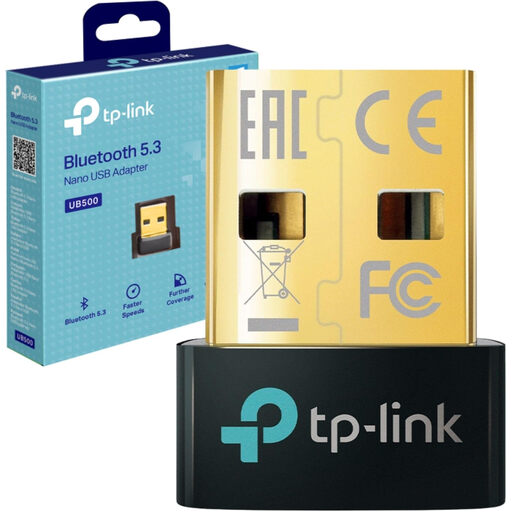
Its UB500 is a compact nano adapter, while the UB500 Plus has an adjustable antenna for layouts where orientation matters.
The USB-BT500 is a compact option for buyers comparing published connection and operating-system specifications.
The AV53C1-USB-BLUETOOTH is an antenna-equipped model for buyers who need to check its stated Bluetooth class, profiles and OS support.
For a mini PC with an accessible USB port and peripherals used around the standing desk, this compact adapter is a general-purpose option. If the PC is concealed, consider whether its port position gives the adapter a clear enough location.
 No image available
A compact option for nearby Bluetooth peripherals when the mini PC has a suitable USB port. TP-Link lists Bluetooth 5.0 and support for Windows 7, 8.1, 10 and 11 for the UB500. Check your installed OS and where the adapter will sit if the PC is beneath the desk or beside USB equipment.
Yes, but check whether the built-in Bluetooth is disabled or malfunctioning before adding hardware. Microsoft recommends checking the PC’s specifications and Bluetooth settings; if you install a separate adapter, follow the PC and adapter manufacturers’ instructions for managing the existing one.
Place it where it has a clearer path to the peripherals rather than beside crowded USB equipment. Microsoft warns that unshielded USB devices near USB 3.0 can interfere with Bluetooth; an adjustable antenna offers another positioning option when the mini PC is under the desk.
Not on version number alone. A Bluetooth 5.0 adapter can suit nearby peripherals when its OS support and required functions match your setup; adapter placement, interference and the paired device also affect the practical connection.
Check that the adapter is offered for your delivery region and that its manufacturer or importer information and accompanying documentation are clear. If delivery or use is in Northern Ireland, check the information applicable there rather than assuming guidance for Great Britain is identical.