Glass or glossy-desk planners
If you work directly on a reflective tabletop, look for a tracking claim for the exact mouse model and read its surface conditions. A DPI figure alone does not tell you whether a mouse will track on glass.


A bright window alone is not a reason to buy a specialist mouse: check the desk surface and try a non-glossy mouse mat if tracking is inconsistent. If you work directly on glass, look for a glass-tracking claim for the exact model and check its conditions; then weigh hand fit, controls and device connections against the way you plan your renovation.
The desk surface, length of a planning session and number of devices you use point towards different checks; none calls for the same mouse shape in every setup.
If you work directly on a reflective tabletop, look for a tracking claim for the exact mouse model and read its surface conditions. A DPI figure alone does not tell you whether a mouse will track on glass.
If you spend extended periods moving between drawings, supplier pages and spreadsheets, check whether your hand reaches the wheel and controls comfortably. Shortcuts matter most when they serve actions you repeat.
If plans, photos and shopping lists move between devices, check the mouse's stated connection and switching options. A compact shape may be easier to move between workspaces, but still needs to fit your grip.
Start with the surface under the mouse, then decide which controls and shape suit your planning sessions.
| Concern | What to check | Who this matters to |
|---|---|---|
| Tracking on the desk | Identify the surface; for glass, check the exact model's claim and any thickness condition. Try a non-glossy mat if tracking is inconsistent. | If my desk is reflective, I need reliable pointer movement before extra controls; around 50% of consumers would put surface reliability first. |
| Planning workflow | Check control reach and software compatibility; if you switch devices, confirm pairing options and receiver contents. | Moving between plans, documents and devices makes repeated navigation my main concern; roughly 30% of consumers would prioritise workflow controls. |
| Hand fit | Check hand-size guidance, handedness and button reach before choosing a conventional, vertical or trackball shape. | During longer sessions, I need a shape whose controls I can reach without stretching; about 20% of consumers would place hand fit first. |
A bright room does not, by itself, establish that a different sensor is needed. A glass or glossy surface may be the more useful place to investigate.
Check the desk material and try your current mouse on a non-glossy mat before deciding to replace it. If you need direct glass use, check the new model's stated capability.
Logitech specifies a minimum glass thickness of 4 mm for the MX Master 3S claim. The phrase ‘tracks on glass’ should not be separated from that condition.
Check your tabletop before relying on the claim; otherwise, plan to use a mouse mat or assess another model's stated conditions.
Logitech positions Lift for small to medium hands and MX Ergo S for medium to large hands. Their different shapes also call for a check of handedness and control reach.
Use the maker's hand-size guidance and check whether your fingers and thumb can reach the controls. If you cannot try the shape beforehand, check the applicable return terms.
Logitech says MX Anywhere 3S can use a compatible Logi Bolt receiver, but that receiver is not included.
Check whether Bluetooth suits your computer and confirm the box contents if you intend to use a receiver.
Using a receiver with this model may require obtaining one separately.
These model ranges illustrate different approaches to surface tracking, controls and shape; check the exact model rather than treating a brand name as a surface guarantee.
Its MX mice include models with stated glass-tracking capability, while Lift and MX Ergo S offer different comfort-led shapes.
Pro Click V2 is a productivity-oriented mouse for which Razer states a glass-tracking capability.
WheelMouse is a wired, ambidextrous alternative if you do not need device switching or confirmed direct glass use.
These choices cover a vertical shape, wired use with a mouse mat, and wireless connection options for a planning setup. If the mouse must work directly on glass, check a model-specific tracking claim before choosing it.
 No image available
Consider the vertical shape if hand position matters during longer planning sessions; check its fit and button reach before buying.
The named variant has six buttons, adjustable sensitivity up to 1600 DPI, and Bluetooth or 2.4GHz wireless connection. For direct use on glass or a glossy desk, check its tracking suitability separately.
 No image available
Consider this wired model for plan and browser navigation if you can use a dedicated mouse mat on a reflective desk.
Its product name identifies adjustable sensitivity and programmable buttons. The listing advises against direct use on highly reflective or glass surfaces, so do not treat the mat as optional for that setup.
 No image available
This is a connection-led option if renovation plans and lists move between devices; confirm that its switching arrangement fits yours.
The white-grey variant is named for 2.4G and Bluetooth use and a 1xAA battery. Check hand fit for longer sessions and confirm tracking suitability if you intend to work directly on glass.
 No image available
Consider its connection choices if your planning setup calls for both wireless and wired use; check device-switching requirements separately.
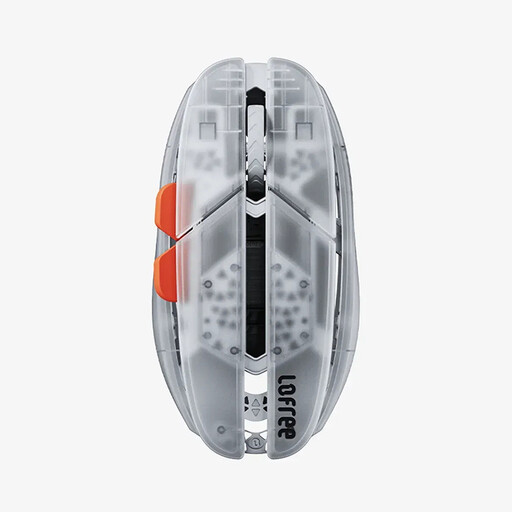
This named version specifies Bluetooth, 2.4G wireless and wired modes, a PAW3950 sensor, a magnesium-alloy frame and a PC shell. Check hand fit and direct-glass tracking against your intended setup before relying on either.
No particular DPI level follows from the window alone. Check whether the mouse is struggling on the desk surface, try a non-glossy mat if needed, and choose pointer sensitivity for your screen and preferred movement rather than for room brightness.
Logitech states that MX Master 3S tracks on glass, provided the glass is at least 4 mm thick. Check the tabletop and confirm that the product you choose is the MX Master 3S model covered by that claim.
Choose by hand fit and how you want to move the pointer: Logitech positions the 57-degree Lift vertical mouse for small to medium hands, while its thumb-controlled MX Ergo S trackball is positioned for medium to large hands and stays in one place during use. Neither shape establishes that the model tracks directly on glass.
Try the mouse on another surface before replacing it. Razer Support also advises cleaning the sensor with a handheld blower or compressed air, without using liquid on the sensor; follow the guidance for your particular mouse when cleaning it.
Consider reuse or an electrical-recycling route rather than putting it in ordinary rubbish. Recycle Your Electricals says items with a plug, battery or cable can be reused or recycled and provides a way to find UK drop-off points.