
24/7 Customer Support

Free returns

Same-day & Next-day Delivery

Quality Guaranteed

Unlock Your Welcome Offers: FREE Delivery | Up to 80% OFF | Free 30-day JoyPlus trial
Download the APP
Driving an older car you love doesn't mean you have to miss out on modern conveniences like seamless navigation, hands-free calls and your favourite playlists. A portable CarPlay screen offers a brilliant way to upgrade your vehicle's technology without the cost and hassle of a permanent installation. However, the market is filled with options that can be confusing.
As a Joybuy Product Recommendation Officer, my role is to help you navigate these choices. Many drivers are drawn in by flashy features, only to be disappointed by poor performance. Before you buy, let's look at the common pitfalls that can lead to a frustrating experience and wasted money.
The "Wireless" Adapter Trap: Many products are advertised as offering a wireless CarPlay display. A common point of confusion is that some of these are simply adapters, not complete screens. These small dongles are designed for cars that already have a factory-fitted, wired CarPlay system. If your car has no existing screen or smart system, an adapter alone is useless. You need a full, standalone portable car stereo unit with its own screen.
The Audio Lag Nightmare: How will you hear your navigation prompts or music? The most common complaint with low-quality units is poor audio. Many rely on a tinny built-in speaker or a weak FM transmitter that is prone to static and interference, especially in urban areas. This results in a noticeable delay and poor sound quality, making music unlistenable and phone calls difficult.
Dashboard Glare and Overheating: A screen mounted on your dashboard is in direct sunlight for much of the day. Units made with cheap materials can overheat and shut down on warm days. Furthermore, a highly reflective, glossy screen can create so much glare that it becomes unreadable and, more importantly, a dangerous distraction while driving.
To ensure you get a device that genuinely enhances your driving experience, focus on these non-negotiable parameters.
This is the most critical factor for performance. First, confirm you are buying a complete plug and play CarPlay unit with a screen, not just an adapter.
Next, check the audio output options. A good unit will offer multiple ways to connect to your car's speakers for clear, lag-free sound:
A larger screen, such as a 10 inch car display, offers better visibility for maps and menus. However, size isn't everything. Look for a screen with a good resolution (e.g., 1600x600 pixels or higher) for sharp, clear visuals. A matte or anti-glare finish is also highly desirable to minimise reflections.
The mounting system is equally important. Whether it uses a suction cup for the windscreen or an adhesive base for the dashboard, it must be sturdy enough to prevent wobbling or falling during your journey. Ensure it can be positioned without obstructing your view of the road.
The most practical solutions often combine several functions into one device. A CarPlay screen with dash cam integration is an excellent example. This reduces clutter on your dashboard and simplifies wiring. Look for models that include both a front-facing camera and a dash cam with rear camera and CarPlay functionality. This not only records your journeys for security but also assists with parking. Reliable voice control car kit functionality, using Siri or Google Assistant, is also essential for safe, hands-free operation.
We've matched a few distinct options to different driver needs, helping you find a suitable fit.
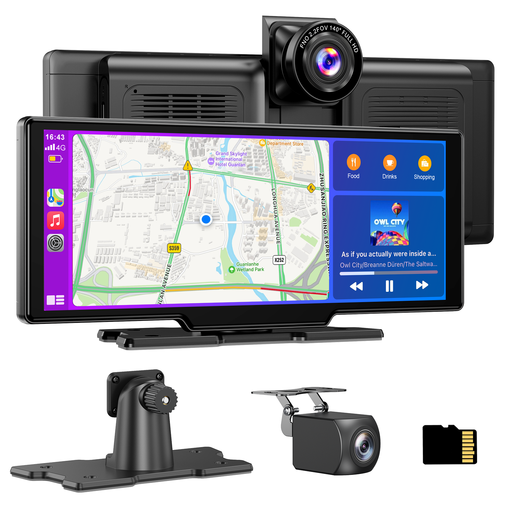
Why This Fits Their Persona: This is for the driver who wants a complete, no-compromise upgrade. It provides a large screen for navigation and media, plus the added security of a high-quality dual dash cam system, all in one easy-to-install package.
It's a true standalone unit, not an adapter. It also offers four audio output options (Bluetooth, AUX, FM, built-in speaker), directly addressing the audio lag pitfall.
Combines a 10.26-inch HD screen with a 4K front dash cam and 1080P rear camera. It supports both wireless CarPlay and Android Auto, making it a versatile all-in-one solution.

Why This Fits Their Persona: This is for the driver whose car already has a built-in screen with wired Apple CarPlay or Android Auto, but they are tired of plugging their phone in for every trip. It's a simple, discreet solution to go cable-free.
This product is the perfect illustration of the "adapter trap." By recommending it for the correct use case, we help users understand its specific purpose and avoid buying it by mistake.
Offers a true plug-and-play experience. Once paired, it connects your phone automatically and wirelessly, maintaining all original steering wheel and knob controls.
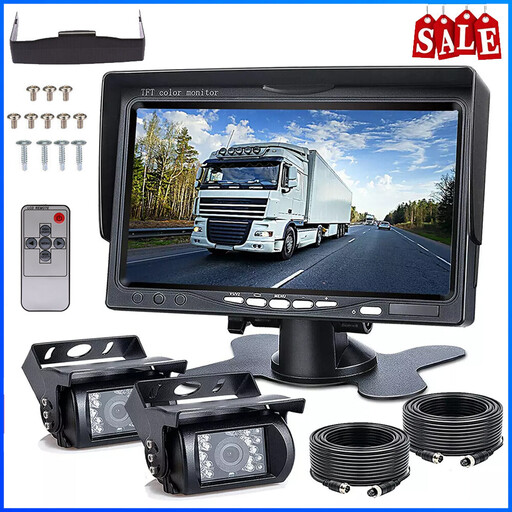
Why This Fits Their Persona: Ideal for van, truck, or caravan owners where visibility is the main concern. This system prioritises a clear, reliable view for reversing and manoeuvring over smart media features. It's a practical tool for professional and safety-conscious drivers.
It doesn't over-promise. This is a dedicated reversing and monitoring system, not a CarPlay unit. It focuses on doing one job well: providing a clear camera feed to a dedicated monitor.
The kit includes two IP67 waterproof cameras with night vision and a 7-inch monitor. It supports both 12V and 24V systems, making it suitable for a wide range of commercial and large vehicles.
We have compiled a complete, real-time list of products that fully satisfy these strict selection criteria and UK safety regulations.
Most portable units are designed for simplicity and are powered directly from your car's 12V cigarette lighter socket. They come with a suitable power adapter, making it a true plug and play CarPlay installation that requires no technical skill or permanent wiring.
These devices are designed to power on when you start your car and power off when you turn the ignition off. Their power draw is minimal, comparable to charging a smartphone. Even models with a "parking monitor" feature for the dash cam are typically equipped with voltage detection to shut down before they can drain your battery.
The majority of modern portable screens are built to support both platforms. A device will usually advertise support for both "Wireless CarPlay" (for iPhones) and "Wireless Android Auto screen" (for Android phones). However, it is always wise to double-check the product's specifications to confirm compatibility with your specific smartphone model and operating system version.