Choose the device category for the shared task: a smart speaker for voice-led routines, a connected TV for shared viewing, or a home platform or hub when several people need access to compatible devices. Before buying, check the exact model’s account permissions, privacy controls, required services and stated security-update period. A connected toy also calls for a child-data and toy-safety check.
Who is this for?
People coordinating shared access
If several residents use the same devices, named invitations and appropriate permissions can be more useful than sharing the primary account password. Google, Apple and Samsung describe different ways to share control, so the roles need checking on the platform you choose.
Households concerned about shared-space privacy
Microphones, cameras and connected screens can affect people who did not buy the device. The Information Commissioner’s Office advises consumers to consider how smart products use personal information; check recording, activity-visibility and optional data-use settings for the device in question.
Caregivers considering connected toys
Where a child’s toy connects to an app or network, adults need to assess its data practices and age suitability as well as its ordinary toy-safety information. The Information Commissioner’s Office highlights the privacy risks of collecting data in children’s private spaces.
What matters when choosing?
Start with what the household wants the device to do, then decide who will manage it and what others should be able to see or change.
Smart speaker
Choose it when: Voice-led music, timers or control of compatible devices is the main shared task.
Consider: Agree who manages the account and voice-history settings; check for a microphone-off control if that matters in the room.
Connected TV
Choose it when: Shared streaming and TV apps matter more than controlling other household devices.
Consider: Check the exact UK model’s apps, accounts and choices about viewing-data use.
Home hub or shared-control platform
Choose it when: Several residents need access to compatible devices through one home setup.
Consider: Member permissions can differ from owner permissions, and some remote or guest functions require a hub.
Connected toy
Choose it when: The online feature adds something the child and caregiver actually want.
Consider: Review data collection, adult oversight and applicable toy-safety information; a non-connected toy may meet the same play need.
Home-network equipment
Choose it when: The household is deliberately reviewing the network used by its connected devices.
Consider: Router controls do not replace each device’s account, privacy and update checks.
| Concern |
What to check |
Who this matters to |
| Shared access |
Check named invitations and what owners, administrators and members can view or change. |
I want other residents to use our devices without giving everyone control of the household account. Around 31% of consumers put appropriately limited shared access first. |
| Privacy in shared rooms |
Review recording and activity settings, optional data uses, and physical microphone or camera controls where relevant. |
When a device sits in a common room, I want to know what it collects about everyone there. Limiting that exposure is the primary concern for around 31% of consumers. |
| Security-update support |
Find the manufacturer’s stated minimum security-update period for the exact model and check how updates are delivered. |
I expect to keep a connected device in use and need to know how long security updates are promised. Around 25% of consumers place that support period first. |
| Connected-toy suitability |
Check age guidance, data practices and the applicable toy-safety information before enabling online features. |
If a child will use the toy, I need to understand its connected functions before deciding whether they are suitable. This is the leading need for around 13% of consumers. |
Mistakes to avoid
-
Giving everyone the primary account password
The primary account may control devices, invitations, settings and activity that not every resident needs to access.
Use named invitations where available, and check a member’s permissions before granting administrator access.
-
Assuming security updates continue indefinitely
The UK rules for relevant consumer connectable products call for a defined minimum support period, not one duration that applies to every model. The period matters when deciding how long to keep a device in use.
Compare the manufacturer’s support-period statement for each exact model on your shortlist and revisit the device as that period ends.
-
Accepting every privacy choice during set-up
A device in a shared room can affect residents and visitors as well as the person completing set-up.
Review collection, sharing and recording choices together; enable the functions the household wants and check physical controls where appropriate.
-
Judging a connected toy only by its online feature
A connected toy can collect data in a child’s private space. Internet access also does not replace an assessment of its ordinary toy safety.
Consider whether a non-connected toy would meet the play need. Otherwise, check age guidance, data practices, supervision options and safety information for the place where it is supplied.
Relevant brands to consider
Amazon
Echo and Alexa may suit a household considering a voice-led speaker or display.
- Check the exact Echo model’s microphone control and Alexa settings for voice history and linked devices.
- Agree who will manage the account and review what linked services make visible to other users.
Google
Google Home and Nest are relevant when several people need access to compatible devices.
- Google documents Admin and Member roles, with configurable access to settings or activity for members.
- Admin access is broader; decide who needs it and check which activity a member may see.
Apple
Apple Home is relevant to households using Apple Accounts to share control of compatible accessories.
- Apple Support describes Resident and scheduled Guest roles for different kinds of access.
- Check account, hub and software requirements for the particular remote or guest access you want; some additions remain owner-only.
Samsung
SmartThings is a shared-control option for compatible Samsung and other supported devices.
- Samsung describes sharing device-control permissions with household members.
- Check compatibility and available functions for each model and the household’s location.
LG
LG webOS is relevant when comparing connected TVs for shared viewing and app access.
- LG describes webOS TV apps and settings that households can assess against their viewing needs.
- LG says content availability varies by region; confirm required services on the exact UK TV model.
Joybuy network-device choices
These routers are relevant if your household is reviewing the network used by its connected devices. Choose between their stated connection and hardware configurations, then check the access controls and security-update period of the exact model; neither router replaces privacy checks on individual smart devices.
 No image available
NETGEAR Orbi 370 RBE373 WiFi 7 Mesh System, 3-Pack
Consider this three-pack when the household wants a mesh-router configuration for its connected-device network.
The stated configuration is dual-band BE3600 with 2.5Gbps Ethernet. Check the access settings and the manufacturer’s security-update period for the RBE373 before buying.
View on Joybuy
 No image available
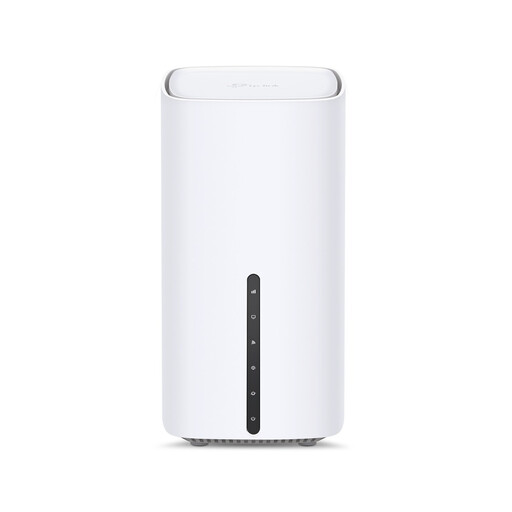
TP-Link Archer NX500 5G AX3000 Dual-Band Router
Consider this router if the household needs to assess a 5G connection alongside its network-access requirements.
The stated configuration is AX3000 dual-band with Gigabit connectivity. A compatible SIM and mobile service are needed for 5G or 4G use; check household access controls and the NX500’s security-update period before buying.
View on Joybuy
Frequently asked questions
Can everyone use the same smart-home setup without sharing a password?
Several platforms offer individual invitations, but the access each person receives differs. Google documents Admin and Member roles, Apple documents Resident and Guest roles, and Samsung describes shared SmartThings control; check device and activity permissions before inviting residents.
Does UK law promise a fixed number of years of security updates?
No single duration applies to every relevant connected product. UK product-security regulations define a support period as the manufacturer’s stated minimum period for security updates, expressed with an end date; compare that statement for the exact models you are considering.
What privacy choices should we make when setting up a shared device?
Decide which data-collecting features the household wants before enabling optional permissions. Review recording and history controls, who can see activity, and any microphone-off or camera-cover control on the exact device; revisit those choices after set-up.
What extra checks matter for a connected toy?
Check both the toy’s data practices and its ordinary safety information. The Information Commissioner’s Office highlights risks when connected toys collect data in private spaces; for toys supplied in Great Britain, the Office for Product Safety and Standards identifies essential requirements under the Toys (Safety) Regulations 2011. Check the applicable supply route for a toy supplied in Northern Ireland.


