
24/7 全天候客户支持

免费退货

当日/次日达

品质保障

开启新人专享福利: 全场免邮 | 低至 2 折 | 免费试用 30 天 JoyPlus 会员
下载 Joybuy
Navigating the world of high-end mechanical keyboards can be a complex task. For professionals, gamers and enthusiasts, the search often leads to a desire for a device that offers more than just basic functionality. It's about finding a keyboard that delivers a superior typing experience, robust build quality and features that genuinely enhance your daily workflow or gaming sessions. The Siukie CTRL100 mechanical keyboard has emerged as a notable option, packing a unique combination of premium specifications.
This guide is designed to provide an objective overview of the Siukie CTRL100. We will break down its key features, discuss what to look for in a high-end keyboard and present our recommendations to help you determine if this is the right fit for your desk setup.
Before diving into a specific model, it helps to understand the features that define a modern, high-performance keyboard. Here are a few key considerations for your next purchase.
Keyboard layouts significantly impact usability. While a full-size board offers a dedicated number pad, it consumes considerable desk space. A tenkeyless (TKL) board saves space but sacrifices the numpad entirely. The 96% mechanical keyboard layout offers a clever solution. It retains the number pad and nearly all the keys of a full-size board but condenses them into a more compact frame, saving valuable desk real estate without losing functionality. This makes it an excellent choice for users who frequently work with spreadsheets or require a numpad for gaming macros.
The construction of a keyboard is paramount to its longevity and typing feel. A CNC aluminium keyboard case is machined from a solid block of metal, resulting in exceptional durability, a satisfying weight and a premium finish that plastic cases cannot match. This process ensures precise tolerances and a rigid structure that eliminates flex.
Internally, the mounting style is just as important. A gasket mount keyboard uses strips of cushioning material (like silicone or foam) to suspend the plate and PCB assembly between the top and bottom halves of the case. This isolates keystrokes, resulting in a softer, more cushioned typing feel and a deeper, more muted sound profile compared to more common tray or top-mount designs.
In a multi-device ecosystem, flexible connectivity is essential. A tri-mode wireless keyboard provides the ultimate versatility. You can connect via low-latency Bluetooth to a laptop or tablet, use a dedicated 2.4GHz wireless dongle for lag-free gaming on a desktop and switch to a USB-C wired connection for charging or when a zero-latency connection is non-negotiable. This adaptability ensures your keyboard can seamlessly integrate with all your devices.
The Siukie CTRL100 integrates all the features mentioned above and adds a few unique innovations. It is available in several finishes to suit different aesthetic preferences.
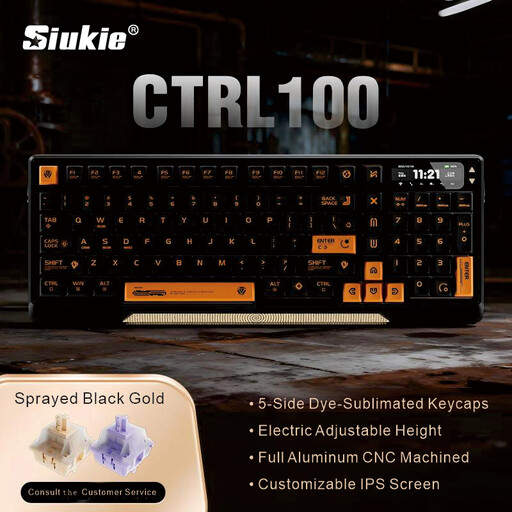
Why It Stands Out: The Sparkling Black finish offers a classic, professional look that fits seamlessly into any office or gaming environment. The standout feature is the motorised lift keyboard mechanism, which allows you to electronically adjust the typing angle for optimal ergonomics. This is complemented by a customisable IPS keyboard with screen, which can display system information, custom GIFs or other useful data. The pre-lubricated HMX Cream Taro switches provide a remarkably smooth linear feel straight out of the box.
Pros:
Who is it for? This model is ideal for the professional or enthusiast who values understated aesthetics but demands high-end performance and innovative features.
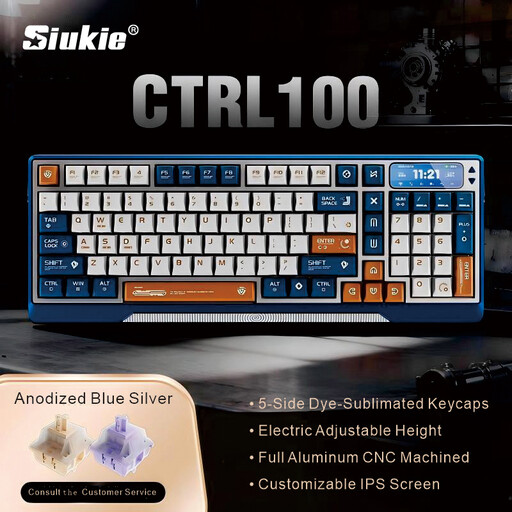
Why It Stands Out: The Klein Blue variant makes a bold statement. This vibrant colour turns the keyboard from a simple peripheral into a centrepiece for your desk. It shares all the core features of the CTRL100 line, including the gasket mount design for a cushioned typing feel and the fully customisable on-board screen. The combination of its striking colour and advanced feature set makes it a unique piece of hardware.
Pros:
Who is it for? Perfect for the creative professional, streamer or keyboard enthusiast who wants their equipment to reflect their personality and stand out from the crowd.

Why It Stands Out: The Brown colourway offers a warm, sophisticated alternative to standard black or silver finishes. It pairs well with wooden desks and minimalist setups, providing a touch of elegance. Like its siblings, it features the full suite of CTRL100 innovations, from the solid aluminium body to the versatile tri-mode connectivity. This model balances a unique aesthetic with the top-tier functionality expected from a custom mechanical keyboard-level product.
Pros:
Who is it for? Suited for users who appreciate a refined, modern aesthetic and want a high-performance keyboard that complements a thoughtfully designed workspace.
The innovative motorised lift keyboard feature of the CTRL100 is powered by sophisticated internal components. For those in the custom mechanical keyboard community or DIY electronics enthusiasts interested in the technology behind such mechanisms, exploring the components can be just as fascinating. If you are working on your own projects that require precise motion control, you may find our selection of geared motor components a useful resource.
HMX Cream Taro switches are a type of linear mechanical switch. "Linear" means the keystroke is smooth and consistent from top to bottom, without a tactile bump or audible click. They are highly regarded for their smoothness, often enhanced by being pre-lubricated from the factory and produce a pleasant, deep sound profile that many enthusiasts find satisfying for both typing and gaming.
A gasket mount keyboard is often considered excellent for long typing sessions. The flexible mounting structure absorbs the impact of each keystroke, creating a softer, less fatiguing typing experience. This cushioning also contributes to a more muted and deeper sound, which can be preferable in an office or shared environment.
The motorised lift is an integrated electronic system that allows the user to change the keyboard's typing angle automatically, usually via a dedicated button or software control. This provides a wider and more precise range of ergonomic adjustments than traditional flip-out feet. When using this feature, it is important to follow safety guidelines: keep fingers, hair and other objects clear of the moving parts to avoid pinching. Always refer to the manufacturer's instructions for safe operation.