Comfort-first puzzle solvers
If you spend longer sessions reading clues and filling grids, screen space and a comfortable position may matter more than a compact device. Compare the display and consider whether you will use a stand or case.


For word puzzles, choose a tablet around 10–11 inches if you want more room for grids, clues and touch controls; consider a smaller tablet if carrying and holding it matters more. Check that your preferred puzzle apps work on the operating system you choose, then compare the exact model’s display, storage, connectivity and included accessories. Cellular connectivity is worth considering only if you need online features away from Wi-Fi.
If you spend longer sessions reading clues and filling grids, screen space and a comfortable position may matter more than a compact device. Compare the display and consider whether you will use a stand or case.
If you play during breaks or travel, weigh screen area against the tablet’s size and weight. Think about access to charging and whether your chosen app needs a connection while you are away.
If word puzzles and everyday browsing are your main uses, start with your preferred apps and operating system. Compare complete configurations and the accessories you would actually use rather than assuming gaming-oriented specifications are necessary.
Start with the space you want for reading and tapping a puzzle, then check app compatibility and how you will carry and connect the tablet. Each concern below describes consumers who put that need first.
| Concern | What to check | Who this matters to |
|---|---|---|
| Readable puzzle layout | Compare screen size, resolution and display finish on the exact model. If possible, try your preferred puzzle app on a display unit. | For longer sessions, I want enough room to read clues and select letters without feeling cramped. Around 40% of consumers put a comfortable, readable layout first. |
| App and configuration fit | Confirm that your puzzle apps are available for the operating system, then check internal storage and what the bundle includes. | I mainly play word puzzles, so my apps and accounts need to work on the tablet I choose. For around 30% of consumers, app and configuration fit is the primary concern. |
| Portability and charging | Compare the exact variant’s weight and dimensions, and read the conditions behind any stated battery-life figure. | When I take a tablet on journeys or use it away from a socket, it needs to be manageable to carry and hold. Portability and charging come first for around 20% of consumers. |
| Connection away from Wi-Fi | Check whether the tablet has cellular capability and whether the app functions you use require internet access. | If I want online puzzle features where Wi-Fi is unavailable, I need a suitable connection. Around 10% of consumers prioritise connectivity away from Wi-Fi. |
Samsung says the Galaxy Tab A9+ supports microSD cards for media files, not applications. A card therefore does not replace the internal storage needed for installed puzzle apps.
Check the exact model’s internal storage and app-storage rules before choosing a configuration.
A cellular variant helps with online features away from Wi-Fi only when you have suitable coverage and mobile-data service. It does not change the puzzle interface itself.
If you normally play on Wi-Fi, consider a Wi-Fi model. Otherwise, check the exact cellular variant, local coverage and your app’s connection needs.
Storage, memory, connectivity and included accessories can differ between variants and bundles of a tablet line.
Compare the exact model and included items. The Lenovo Tab M11 tablet-and-pen configuration, for example, should not be taken to mean that every Tab M11 bundle includes a pen, case or charger.
UK government guidance says electrical waste should go to an appropriate collection point rather than household rubbish.
Use an electrical-waste collection or take-back route, and remove your personal data before handing over the tablet.
These examples show how particular tablet lines address different word-puzzle needs; check the precise variant before choosing.
The iPad (A16) is an 11-inch iPadOS option for consumers who prefer Apple’s tablet ecosystem.
The Galaxy Tab A9+ offers an 11-inch Android route, with a 5G-capable variant for consumers who need mobile connectivity.
The cited Tab M11 tablet-and-pen configuration is an 11-inch Android option with an anti-glare display.
These tablets have displays of around 11 inches for consumers who want room for word-puzzle grids and clues. The choices include Wi-Fi models, a listing with 4G connectivity and a tablet-and-earbuds bundle; check your preferred apps and the exact configuration before ordering.
 No image available
Consider this model if you want an 11-inch screen for puzzles and expect to play on Wi-Fi. Check your preferred app, included accessories and the applicable UK warranty before ordering.
 No image available
Consider its 11-inch screen if you prefer a larger puzzle workspace. The product title also specifies an 8,580mAh battery and 90Hz IPS screen; battery capacity alone does not establish puzzle-play runtime. Check app compatibility and the included accessories.
 No image available
This is another 11-inch option for a larger puzzle layout. Its title specifies 5GHz Wi-Fi, but the title and detailed description name different processors; confirm the exact processor if it matters to your choice. Check your preferred app and the included accessories too.
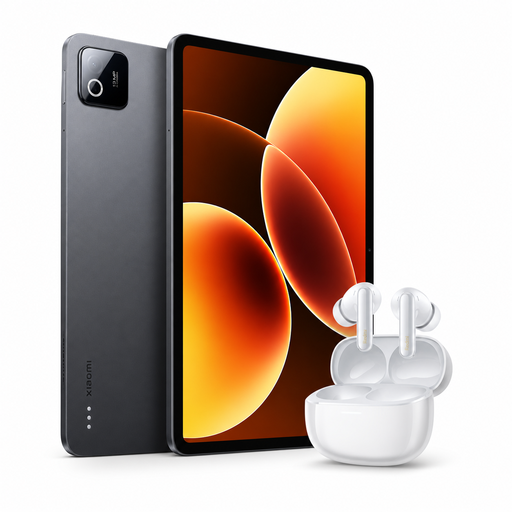 No image available
Consider this Wi-Fi bundle if you want a larger tablet and would use the included earbuds. The tablet is listed with an 11.2-inch display. Battery-capacity and processor details differ between the listing’s sections, so confirm the exact tablet specification before ordering.
 No image available
Consider this model if you want an 11-inch puzzle workspace and may need mobile connectivity away from Wi-Fi. Check coverage and service for 4G LTE use. Its battery-capacity figures conflict across the listing, and the charger is stated to be sold separately.
Not necessarily: choose a screen and operating system that work well for your preferred puzzle apps before considering gaming-oriented specifications. A 10-inch screen is commonly described as suitable for games and apps, but the requirements of a particular puzzle app should guide your final choice.
Choose Wi-Fi if you normally play where you have a reliable connection; consider cellular if the online features you use need access elsewhere. Check the exact variant, coverage and service arrangement. Samsung specifies 5G for the Galaxy Tab A9+ 5G variant, not every Galaxy Tab A9+.
No: Samsung says external memory on the Galaxy Tab A9+ can store media files but not applications. Choose enough internal storage for the apps you intend to install.
Take it to an appropriate electrical-waste collection point rather than putting it in household rubbish, as UK government recycling guidance advises. Remove your personal data before handing it over.