What matters when choosing?
Check your games on the intended platform before weighing screen and storage specifications. An iPad, a conventional Android tablet and a Fire tablet are different storefront choices; none guarantees access to a particular title without a title-by-title check.
iPad
Consider it when: Your games are listed for iPadOS and the iPad (A16) display specification suits you: Apple UK lists an 11-inch, 2360 × 1640 display.
Check first: A game listing on iPadOS does not by itself establish that purchases or saved progress from another platform will transfer.
Android tablet
Consider it when: Your chosen titles support the tablet and you want to compare configurations such as Lenovo UK's 11-inch Tab M11 or Samsung UK's Galaxy Tab A9+ storage options.
Check first: RAM, storage and included accessories depend on the exact model and variant.
Fire tablet
Consider it when: Every game you need is offered for your device through the Amazon Appstore.
Check first: Amazon says Fire tablets do not support Google Play and some apps may be unavailable.
| Concern | What to check | Who this matters to |
|---|
| Game access |
Check each title's current storefront listing and device requirements; check purchases and saved progress separately if changing platforms. |
If I have games I already want to play, access to those titles matters more than the tablet's other specifications; around 46% of consumers put game access first. |
| Screen and touch |
Compare the exact model's screen size and pixel resolution, then assess whether its touch controls suit your games. |
When I scan crowded scenes, I want details I can inspect comfortably without choosing a tablet too large for how I use it; roughly 36% of consumers prioritise the viewing experience. |
| Storage and time away from a charger |
Check internal storage, expansion support, the stated battery information and what accessories come in the box. |
If I keep several games installed or play away from a charger, I need to plan storage and charging before ordering; about 18% of consumers make those practical requirements their main concern. |
Joybuy tablets for this use
These Android tablet choices offer different screen sizes and storage configurations for hidden-object play. Check your chosen games against the exact device before deciding which configuration suits you.
 No image available
Samsung Galaxy Tab A11+ 11-inch 128GB Wi-Fi, Grey
Consider this 11-inch tablet if that screen size suits the scenes in your chosen games; confirm title and device compatibility before ordering.
The product name specifies 128GB storage and Wi-Fi.
View on Joybuy
 No image available
Xiaomi Pad 8 Pro, Grey, 12G RAM and 512G ROM
Consider this configuration if keeping games installed is a priority, after checking that your titles support the device.
The product name specifies 12G RAM and 512G ROM.
View on Joybuy
 No image available
TECLAST ArtPad Pro 2025 Edition, 12.7-inch, with stylus
Consider the larger screen if you prefer more display area for detailed scenes, while checking whether the size suits how you hold and carry a tablet.
The name specifies a 12.7-inch 2K display, Android 15 and 256GB storage. Its stated 20GB RAM comprises 8GB RAM plus 12GB virtual memory; a stylus is included.
View on Joybuy
 No image available
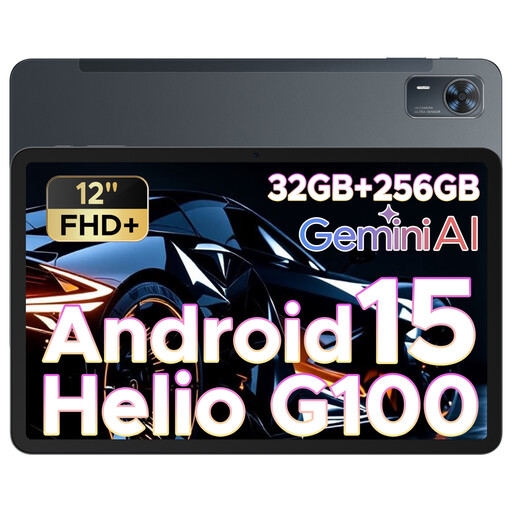
DOOGEE Tab E3+ 12-inch FHD+ Android 15, Grey
Consider the 12-inch format if you want a larger area for scenes, but check the selected variant's specifications and your games' device requirements.
The product name specifies an FHD+ display and a Helio G100 processor. Confirm the selected option's RAM and storage before ordering.
View on Joybuy
 No image available
DOOGEE Tab E3 11-inch FHD+ Android 15, Blue
Consider the 11-inch format if you want a screen for inspecting scenes without choosing the larger Tab E3+ listed above; check game compatibility on the exact device.
The product name specifies an FHD+ display and 90Hz refresh rate. Confirm the selected option's RAM and storage before ordering.
View on Joybuy
Frequently asked questions
Should I buy a Fire tablet for hidden-object games?
Consider one only if every must-play title is available for your device through the Amazon Appstore. Amazon says Google Play is not supported on Fire tablets and some apps may be unavailable; check each game's compatible-devices information.
Do hidden-object games require an 11-inch screen?
No particular screen size is established as a requirement for the category. Compare how easily you can inspect your games' scenes and use their touch controls, alongside portability; the cited tablets provide 10.1-inch and 11-inch comparison points with different stated resolutions.
What if my tablet arrives faulty?
Keep the order details, product listing and evidence of the fault, then contact the seller. GOV.UK states that consumer law protects purchases of goods made remotely or in person; a faulty-goods concern is distinct from a change-of-mind return under a retailer's policy.
Should I check UKCA or CE information before ordering?
For a tablet intended for Great Britain, check the product documentation and supplied charger against the relevant requirements. The Department for Business and Trade states that Great Britain continues to recognise CE marking alongside or in place of UKCA marking in relevant cases; do not assume that Great Britain guidance applies unchanged to Northern Ireland or that a marking alone confirms everything about a particular listing.


