
24/7 Customer Support

Free returns

Same-day & Next-day Delivery

Quality Guaranteed

Unlock Your Welcome Offers: FREE Delivery | Up to 80% OFF | Free 30-day JoyPlus trial
Download the APP
Is your current charging cable frayed, frustratingly slow or simply too short? With nearly every new device, from the iPhone 16 to the latest MacBook Pro, adopting the USB-C standard, choosing the right cable has become more important than ever. A mismatched cable can mean slow charging, sluggish data transfers or a lifespan measured in months, not years.
This guide is designed to help you navigate the options. We will break down the key features to look for in a USB C to USB C cable and highlight a few recommendations to suit different needs, whether you're after speed, durability or a specific length for your setup.
Before you add a cable to your basket, consider these three key factors. Getting them right will ensure your new cable meets the demands of your devices.
Not all USB-C cables charge at the same speed. The key is Power Delivery (PD), measured in watts (W). A standard cable might only offer 15W, which is fine for older devices but will charge a modern smartphone or laptop very slowly.
For a fast charging USB C cable, look for a higher wattage rating.
A charging cable is handled daily, so it needs to be robust. The material is a good indicator of its longevity. While basic plastic-coated cables are common, they are often prone to fraying at the connector joint.
For a truly durable charging cable, consider a braided USB C cable. Nylon braiding adds significant resistance to tangling, twisting and everyday wear and tear. Some cables are also reinforced with materials like Kevlar or feature a soft-touch silicone finish that resists kinking.
Cable length is a matter of convenience. A short 1-metre cable is great for portability and use with a laptop or power bank. However, a 2m USB C cable offers much more flexibility for charging from a wall socket that isn't right next to your desk or bed.
While most people use these cables for charging, it's also a USB C data cable. The majority of charging-focused cables transfer data at USB 2.0 speeds (around 480 Mbps), which is perfectly adequate for syncing photos and music. If you frequently transfer large video files, you may need to look for a specialised cable that supports faster standards like USB 3.1 or Thunderbolt, though these are often more expensive.
Based on features, materials and user needs, here are our recommendations for your next USB-C cable.
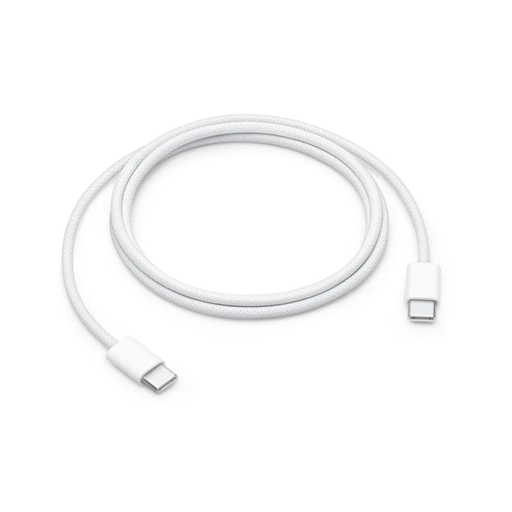
Why It Stands Out: This official Apple cable offers the seamless compatibility and build quality users expect. The woven design is a significant improvement in durability over Apple's previous standard cables, resisting tangles and fraying more effectively.
Pros:
Who is it for? This is an ideal choice for Apple users seeking a reliable, official USB C cable for iPhone 16, iPad or MacBook, who value the brand's ecosystem and design.
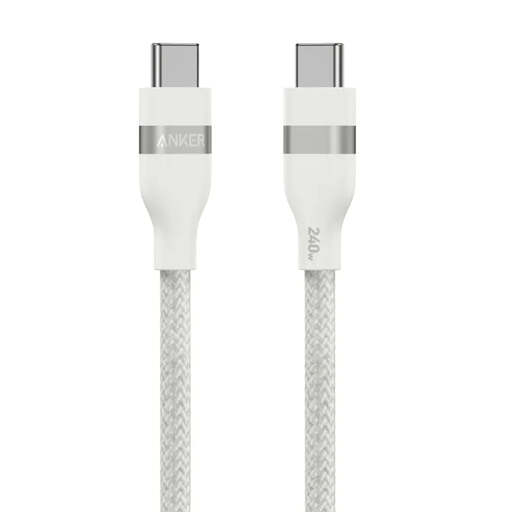
Why It Stands Out: This cable from Anker is built for power. With a massive 240W charging capability, it's designed to handle the most power-hungry devices on the market. According to Anker, its construction is also exceptionally durable, with a stated bend lifespan of over 30,000.
Pros:
Who is it for? Power users who need to charge high-wattage devices quickly and want a cable that is built to last. It's an excellent replacement or upgrade for a MacBook Pro charging cable.
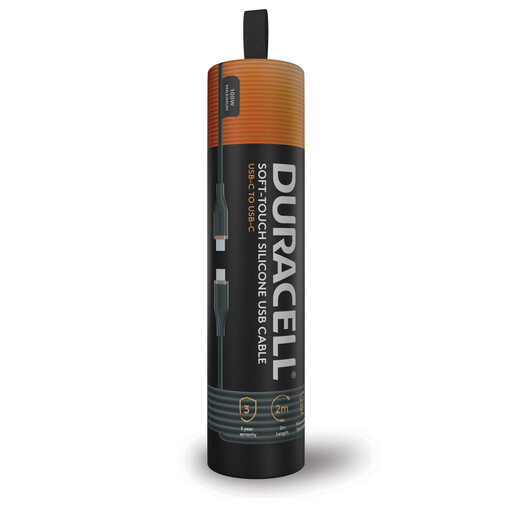
Why It Stands Out: This cable combines three highly sought-after features: a generous 2-metre length, powerful 100W charging and a unique soft-touch silicone finish that prevents tangling. It's a versatile and practical option for almost any situation.
Pros:
Who is it for? Anyone who values convenience and flexibility. The extra length makes it perfect for bedside tables, office desks or living rooms, while its 100W power makes it a great all-rounder for a wide range of devices.
While these three cables cover many common needs, the world of USB-C is vast. If you're looking for different lengths, colours or specific data transfer capabilities, there are many other choices available.
? Explore our full range of USB to USB charging cables to find the perfect match for your devices.
Q: Do all USB-C to USB-C cables support fast charging? A: No, they do not. A cable's ability to fast charge depends on its power delivery (wattage) rating. To ensure you get a fast charging USB C cable, check the product specifications for a wattage that matches or exceeds your device's requirements (e.g., 30W for a phone, 100W for a laptop).
Q: Can I use any USB-C cable for my iPhone 16? A: Yes, any standard USB-C cable will work with an iPhone 16. However, to achieve the fastest possible charging speeds, you should use a USB C cable for iPhone 16 that supports at least 20W USB Power Delivery (PD), paired with a compatible power adapter.
Q: What is the difference between a charging cable and a data cable? A: All USB-C charging cables can also transfer data, but the speed varies. Most standard cables, including many focused on charging, operate at USB 2.0 speeds (480 Mbps). A dedicated USB C data cable may support much faster standards like USB 3.1 (10 Gbps) or Thunderbolt 3/4 (40 Gbps), which are better for transferring very large files like 4K video. For everyday use like charging and syncing photos, a standard USB 2.0 cable is sufficient.