
24/7 Customer Support

Free returns

Same-day & Next-day Delivery

Quality Guaranteed

Unlock Your Welcome Offers: FREE Delivery | Up to 80% OFF | Free 30-day JoyPlus trial
Download the APP
Finding the right printer for your home office can feel like a chore. The market is filled with models boasting a dizzying array of features, and it’s difficult to know which ones you actually need. Whether you're a freelancer, a student, or running a small business from home, you need a reliable device that can print, scan and copy without fuss. The key is to find a balance between functionality, running costs and upfront price.
This guide is designed to help you navigate the choices. We will break down the essential features to look for in a modern home office all-in-one printer and highlight a few models that offer a great combination of performance and value for UK users.
Before you start comparing models, it helps to understand what features will make a real difference to your daily workflow.
Most all-in-one devices are '3-in-1', offering printing, scanning and copying. This is perfect for the majority of home and small office tasks. A '4-in-1' model adds fax capabilities. While less common now, faxing is still a requirement in some legal, medical and business sectors. A wireless printer scanner copier is the standard for a modern, clutter-free setup, allowing you to print from laptops, tablets and phones anywhere in your home.
Two features that significantly boost efficiency are the Automatic Document Feeder (ADF) and automatic duplexing.
The initial price of a printer is only part of the story. The long-term cost of ink is a major consideration. Look for printers that support high-yield (XL) ink cartridges, as these typically offer a lower cost per page. Many brands also now offer ink subscription services, which can be a convenient and cost-effective way to manage supplies, especially for a Brother printer with cheap ink options.
Here are our recommendations for versatile printers that cater to different home office needs, from occasional use to demanding small business workloads.

Why It Stands Out: The DCP-J1310DW is a sleek and compact 3-in-1 device that brings a key productivity feature—automatic duplex printing—to an accessible price point. Many printers in this category require you to flip pages manually for two-sided printing, but this model handles it for you, saving time and paper. Its dual-band Wi-Fi ensures a stable connection and the 4.5cm colour display makes it easy to manage jobs directly from the printer.
Pros:
Who is it for? Ideal for families, students and home workers who need a reliable multifunction printer for home use, and who will benefit from the convenience and savings of automatic two-sided printing.
View Details for the Brother DCP-J1310DW
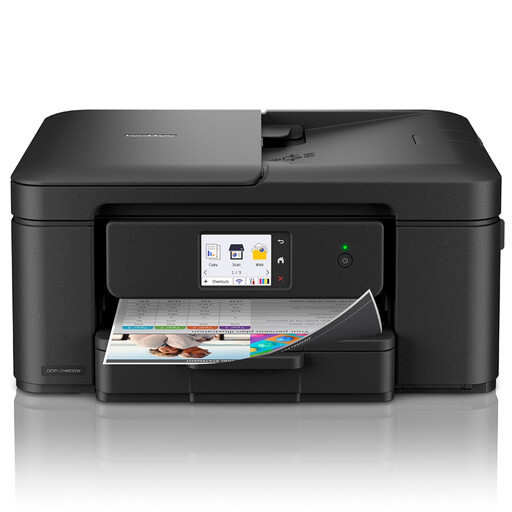
Why It Stands Out: The DCP-J1460DW steps up the productivity with the inclusion of a 20-sheet Automatic Document Feeder (ADF). This transforms the task of scanning or copying multi-page documents from a chore into a simple, hands-free operation. It also features a large 6.8cm colour touchscreen, providing an intuitive, smartphone-like experience for navigating settings. Combined with fast colour print speeds of 15.5 ipm, it’s a powerful tool for a busy home office.
Pros:
Who is it for? A great choice for freelancers and home offices that frequently handle multi-page documents and want the efficiency of an ADF and the ease of use of a large touchscreen.
View Details for the Brother DCP-J1460DW

Why It Stands Out: The MFC-J4350DW is a true workhorse, making it a contender for the best printer for small business UK users. It’s a 4-in-1 device that adds fax functionality and, crucially, supports high-yield ink cartridges that deliver up to 3,000 pages (black), significantly lowering the cost per page. Its print speeds are impressive at 20 ipm (mono) and 19 ipm (colour) and it features both a 20-sheet ADF and automatic duplex copying, a feature not always found on inkjet all-in-ones.
Pros:
Who is it for? Perfect for small businesses and power users who need a full suite of features, fast performance and want to minimise long-term ink costs without sacrificing quality.
View Details for the Brother MFC-J4350DW
Our recommendations cover a range of common home office needs, but the world of printing is vast. If you're looking for different features, a more compact design or a specific price point, we have more options available.
Explore our full collection of inkjet printers to find the perfect match for your workspace.
It depends on your primary use. Inkjet printers, like the ones featured here, are excellent for producing high-quality A4 colour printer documents and photos and generally have a lower upfront cost. Laser printers excel at printing large volumes of sharp, black-and-white text quickly and often have a lower cost per page for monochrome printing. If your work involves vibrant charts, presentations or photos, an inkjet is usually the better choice.
An Automatic Document Feeder (ADF) is a mechanism that feeds multiple pages into the scanner or copier one by one. If you only ever scan or copy single sheets, a standard flatbed scanner is fine. However, if you regularly handle multi-page documents like contracts, invoices or academic papers, a printer with an automatic document feeder (ADF) is a massive time-saver and a worthwhile investment in your productivity.
The most effective way is to choose a printer that is economical to run. Look for models that are compatible with high-yield (XL) cartridges, as they contain more ink and reduce the cost per page. Another option is to consider an ink subscription service. According to Brother, their EcoPro service can save on ink costs with automatic delivery. These plans often include benefits like free recycling and an ongoing warranty for your device, providing both convenience and peace of mind.