
24/7 Customer Support

Free returns

Same-day & Next-day Delivery

Quality Guaranteed

Unlock Your Welcome Offers: FREE Delivery | Up to 80% OFF | Free 30-day JoyPlus trial
Download the APP
That dreaded "Storage Full" notification always seems to appear at the worst possible moment. Whether you're trying to install the latest blockbuster game, save a large work project or simply back up your treasured family photos, running out of digital space is a common frustration. A portable external hard drive is a straightforward and effective solution, offering a massive capacity boost in a compact, travel-friendly package.
But with so many options available, how do you choose the right one? This guide is designed to help you understand the key features to look for, making it easier to select a drive that fits your specific needs, from expanding your console's library to securing your most important files.
Choosing the right drive goes beyond just picking the largest capacity. To find the perfect fit, consider how you plan to use it.
The first question is usually "how much space do I need?". For general use, like creating a backup hard drive for documents and photos, a 1TB or 2TB drive is often sufficient. However, if you're a content creator working with large video files or a gamer with an extensive library, a 4TB external hard drive or even a 5TB external hard drive provides much-needed breathing room. As a rough guide, a 5TB drive can hold over 120 average-sized games or hundreds of hours of high-definition video.
Your primary use case will determine the features you should prioritise.
Here are our recommendations, selected to meet a range of common storage needs, from high-performance gaming to secure, everyday backups.
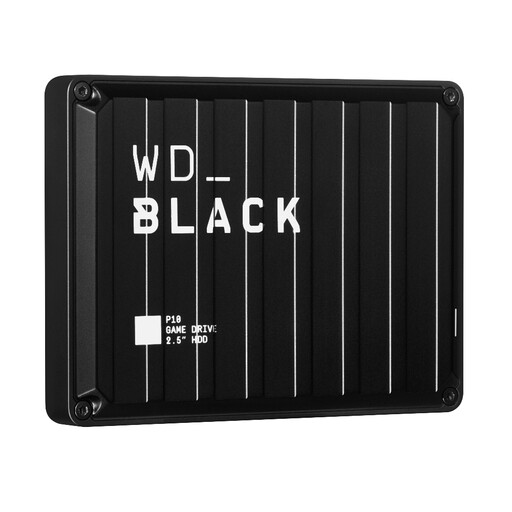
Why It Stands Out: The WD BLACK P10 is purpose-built for gamers. Its rugged, all-black metal top cover gives it a distinctive look and adds a layer of durability for taking your game library on the go. With a massive 5TB external hard drive capacity, it provides ample space to store a huge collection of games and it's specifically designed to work seamlessly with PC, PlayStation and Xbox consoles.
Pros:
Who is it for? This is an excellent choice for serious PC and console gamers who are constantly running out of space and need a reliable, high-capacity solution to expand their library.
View the WD BLACK P10 Game Drive

Why It Stands Out: The My Passport drive focuses on security and ease of use. It combines a generous 4TB external hard drive capacity with powerful security tools, including password protection and built-in 256-bit AES hardware encryption. It also comes with software to help you schedule automatic backups, making it a dependable set-and-forget solution for protecting your digital life. The enclosure is also made with over 50% post-consumer recycled plastic.
Pros:
Who is it for? Ideal for professionals, students and anyone who needs to back up sensitive or important files securely. Its combination of automated backups and robust encryption provides peace of mind.
Explore the WD My Passport 4TB

Why It Stands Out: The WD Elements drive is all about simplicity and value. It offers a straightforward plug-and-play experience: just connect it to your computer's USB port and you instantly have 4TB of additional storage. It forgoes complex software and security features in favour of providing reliable, high-capacity storage that is accessible and easy to use for anyone.
Pros:
Who is it for? Perfect for users who need a simple and affordable way to add more storage. If you just want a reliable backup hard drive for photos, videos and documents without needing advanced security, this is a solid choice.
If these recommendations don't quite match what you're looking for or if you're interested in different capacities or features, there are many other storage solutions available. Explore our full range to find the perfect drive for your computer or console.
Discover More Western Digital Accessories
You can store and archive PS5 and Xbox Series X|S games on a portable external hard drive (HDD) to free up valuable space on your console's internal SSD. However, to play these next-gen games, you must transfer them back to the internal drive. You can, however, play PS4 and Xbox One games directly from a compatible external HDD on these newer consoles.
The primary difference is the underlying technology. HDDs (Hard Disk Drives) use spinning magnetic platters to read and write data, which allows them to offer very large capacities, like a 4TB external hard drive, at a lower cost. SSDs (Solid State Drives) use flash memory, similar to a USB stick. This makes them significantly faster, more durable against drops and silent. For archiving large files or playing older games, an HDD provides excellent value.
Many external hard drives, including some Western Digital hard drive models, come pre-formatted for Windows systems (using the NTFS file system). To use such a drive as an external hard drive for Mac, you have two main options. You can reformat the drive using the Disk Utility app on your Mac, which will erase all its contents. Alternatively, you can install a special driver on your Mac that allows it to read and write to NTFS-formatted drives without reformatting. Always check the product's specifications for macOS compatibility.