
24/7 全天候客户支持

免费退货

当日/次日达

品质保障

开启新人专享福利: 全场免邮 | 低至 2 折 | 免费试用 30 天 JoyPlus 会员
下载 Joybuy
For any creative professional in the UK, from photographers and graphic designers to video editors, colour is everything. The frustration of spending hours perfecting a design, only to find the colours look completely different on a client's screen or in print, is a common and costly problem. A standard office monitor simply won't do; you need a display that renders colours with precision and consistency.
This guide is designed to cut through the marketing clutter and help you understand the key features of a colour accurate monitor. We will explore what to look for and provide a few recommendations to help you find the right tool for your creative work.
Choosing a monitor for creative work involves looking beyond just screen size. Here are the critical factors to consider to ensure your investment pays off.
A colour gamut is the range of colours a device can display. For professional work, you will frequently encounter three main standards:
Pixel density and panel technology directly impact image clarity and colour consistency.
A modern creative workflow demands seamless connectivity and comfort for long hours at the desk.
Here are a few monitors that stand out for their performance, features and suitability for creative professionals in the UK.

Why It Stands Out: The iiyama ProLite XUB2792UHSU-B6 offers a fantastic balance of professional features and value. Its 4K UHD resolution on a 27-inch IPS panel delivers exceptional sharpness and detail, while the 100% sRGB colour coverage ensures your digital work is displayed accurately. It’s a practical and powerful choice for a wide range of creative tasks.
Pros:
Who is it for? This monitor is ideal for web designers, digital illustrators and photographers who primarily work on content for digital platforms. Its combination of 4K clarity, reliable colour and ergonomic flexibility makes it a superb all-round monitor for digital artists in the UK.
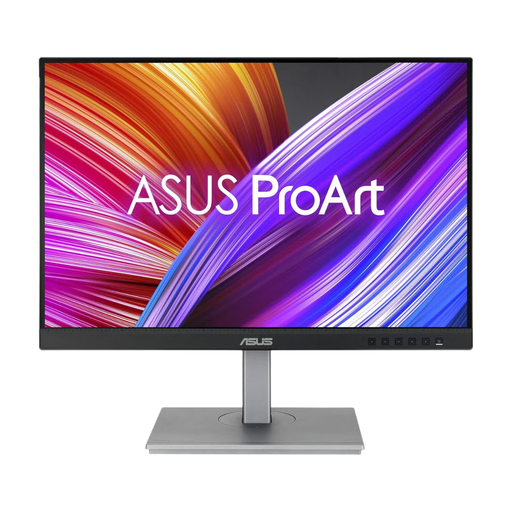
Why It Stands Out: The ASUS ProArt PA248CNV is built for workflow efficiency. While it has a WUXGA (1920x1200) resolution, its strength lies in its factory-calibrated colour accuracy and outstanding connectivity. According to ASUS, it is Calman Verified with a Delta E < 2 colour difference. The inclusion of a USB-C port with 90W Power Delivery, DisplayPort daisy-chaining and even an RJ45 LAN port makes it a true docking station monitor.
Pros:
Who is it for? This is an excellent graphic design monitor for professionals who value a streamlined workspace and verified colour accuracy straight out of the box. It's perfect for designers, developers and content creators who need a reliable hub to connect their laptop and peripherals with a single cable.

Why It Stands Out: For those who require top-tier performance, the ASUS ProArt PA32UCG-K is a formidable tool. This 32-inch monitor features a Mini LED backlight with 1,152 local dimming zones, enabling incredible contrast and a peak brightness of 1600 nits for true HDR workflows. With extensive colour gamut coverage including 99% Adobe RGB and 98% DCI-P3, plus a 120Hz variable refresh rate, it is equipped for the most demanding professional projects.
Pros:
Who is it for? This is a high-end 4K video editing monitor aimed at professional colourists, cinematographers and commercial photographers. Its feature set is designed for those working with HDR content and requiring the widest possible colour gamuts for cinema and high-end print production.
Finding the right monitor is the most critical step, but optimising your environment can further improve your workflow. Proper ambient lighting reduces eye strain and helps with colour perception. If you are looking to refine your desk setup, consider exploring our range of computer monitor LED lighting for practical and stylish solutions.
For work destined for the web, social media or general digital use, 100% sRGB coverage is perfectly sufficient and is the professional standard. However, if your work is primarily for high-quality print (like magazines or fine art), a monitor with a wider gamut that covers a high percentage of Adobe RGB will allow you to proof colours more accurately for the CMYK printing process.
An IPS panel is crucial for a graphic design monitor because it provides excellent colour consistency across the entire screen and from wide viewing angles. This means the colours you see on the top left corner will look the same as those on the bottom right, and they won't shift if you move your head. This consistency is vital for making reliable colour decisions.
While you can edit video on a lower-resolution screen, a 4K monitor offers significant advantages. It allows you to view your 4K footage at its native resolution without downscaling, showing you the full detail of your shot. It also provides much more screen space, so you can have a larger video preview alongside a full-featured timeline and other editing tools, which can greatly speed up your workflow.