A gaming laptop is the simpler choice if one accessible socket must power your main workstation and you need its built-in screen. A desktop remains an option if you already have a monitor and can power the complete setup safely; it also lets you choose a specific configuration. For Unreal Engine 5, compare the exact PC with Epic Developer Community’s recommended 32 GB RAM, at least 8 GB of graphics memory and DirectX 12-compatible graphics, rather than relying on a gaming label.
Who each setup suits
UE5 prototypers with an existing monitor
If you have room and safe power for a desktop setup, an exact PC configuration lets you check development specifications before buying. Epic Developer Community recommends 32 GB RAM, at least 8 GB of graphics memory and a DirectX 12-compatible graphics card for Unreal Engine 5.
Prototype builders with one accessible socket
A laptop combines the computer and screen, avoiding a separately powered monitor for the core setup. Unity supports its Editor on laptop form factors, subject to the chosen system meeting its requirements; Unity also says larger, more complex projects need additional RAM.
Buyers planning a configurable desktop
If you know which engine and tools you will use, selecting memory, graphics and storage deliberately may matter more than accepting a starting specification. PCSpecialist offers those configuration choices, while ASUS describes upgrade access for its ROG G700 line. Check the finished model rather than applying either product-line description to every build.
What to prioritise
Gaming laptop
Choose it when: The built-in screen helps you keep the main workstation to one mains-powered device.
Allow for: The exact laptop still needs enough memory, graphics capability and storage for your chosen engine.
Desktop and existing monitor
Choose it when: You can safely power both devices and want to select a specific desktop configuration.
Allow for: The tower and monitor each need space and power; a configurable starting build may not meet your development target.
| Concern |
What to check |
Who this matters to |
| Separate powered devices |
Count the computer, display and any other equipment needing mains power. |
If I have one accessible socket, I need a working screen without adding a separately powered monitor. Around 36% of consumers put that simpler core setup first. |
| Engine headroom |
For UE5, check installed RAM, graphics memory and DirectX 12 compatibility against Epic Developer Community’s recommendations: 32 GB RAM and at least 8 GB of graphics memory. |
When I am building a UE5 level alongside other development tools, I want the PC specification to match my intended workflow. Roughly 29% of consumers make engine headroom their primary concern. |
| Configuration control |
Check the final desktop configuration, including RAM, graphics, SSD capacity and connections for your monitor. |
If my prototype may grow, I want to choose the components now and understand my later upgrade options. About 21% of consumers prioritise that control. |
| Safe setup and upkeep |
Check lead condition and ratings, avoid stacked extensions and leave access for ventilation and cleaning. |
I need a compact workspace that I can power and maintain without overloading a socket. Around 14% of consumers put safe setup and upkeep first. |
Buying pitfalls
-
Assuming a gaming GPU makes 16 GB RAM a UE5-oriented specification
A gaming desktop can pair a capable graphics card with 16 GB RAM. That is below the 32 GB RAM in Epic Developer Community’s recommended Unreal Engine 5 hardware.
Check installed system RAM separately from the GPU name before choosing a PC for UE5 work.
If the installed memory does not suit your workload, changing the RAM later adds another task to the setup.
-
Adding adaptors until everything fits
London Fire Brigade identifies overloaded sockets as a common cause of electrical fires. A tower, monitor and other powered equipment still need a safe arrangement even if an extension lead makes their plugs fit.
Count the devices and follow the lead’s rating and instructions. Do not daisy-chain extensions; replace worn leads rather than repairing them with tape.
-
Treating a configurable PC’s starting build as the finished specification
PCSpecialist allows buyers to select components, but that choice does not mean every starting configuration meets Epic Developer Community’s UE5 recommendations.
Compare the completed order’s RAM, graphics memory and storage with the requirements of the engine and project you intend to use.
Brands to consider
HP OMEN
A ready-configured desktop option for buyers who want to assess an exact part number.
- HP Store UK lists the OMEN 35L configuration BT7W8EA#ABU with 32 GB RAM, a 1 TB SSD and an RTX 5070 with 12 GB of graphics memory. Its stated memory figures meet Epic Developer Community’s UE5 recommendations for RAM and graphics memory.
- That specification belongs to this configuration, not every OMEN desktop. Check the part number, monitor connections and supplied peripherals.
PCSpecialist
A configurable desktop route if you want to select components around your engine and prototype.
- PCSpecialist says buyers can choose the processor, graphics card, memory and storage.
- Its gaming-PC label alone does not establish UE5 suitability; assess the completed specification rather than the starting build.
ASUS ROG
The ROG G700 desktop line is relevant if later access for cleaning or component changes matters to you.
- ASUS describes ROG G700 options with air or water cooling, up to 64 GB DDR5 RAM, dust filters, tool-less access and standard-sized components.
- Those are product-line descriptions and maximums, not the installed specification of every G700. Check the exact RAM and GPU configuration before assessing it for UE5.
Gaming laptops for a socket-limited workspace
These laptops combine the computer and display, making them relevant when a separately powered monitor is difficult to accommodate. Check each exact configuration against your chosen engine; the desktop route remains an option if you can power an existing monitor safely.
 No image available
Stormforce Exobook 16 QHD+, Ultra 9, 32 GB, 4 TB, 5080
Consider this laptop if an integrated screen and the listed 32 GB RAM suit your compact prototyping setup.
- The product name specifies a 16-inch QHD+ display and 4 TB storage.
- For UE5, confirm DirectX 12 compatibility and the graphics-memory capacity. Check which power adaptor is supplied.
Joybuy
 No image available
MSI Stealth 18 AI Studio A1VGG-001UK, 18-inch, 32 GB, 2 TB, RTX 4070
The integrated display makes this a laptop option when you want to avoid powering a separate monitor.
- The product name specifies Intel Core Ultra 9, 32 GB RAM, a 2 TB SSD and an NVIDIA GeForce RTX 4070.
- For UE5, confirm the exact GPU’s graphics memory and DirectX 12 compatibility. Check whether the stated, usage-dependent battery runtime suits unplugged sessions.
Joybuy
 No image available
Lenovo Legion Pro 5 LEG P5 R9, 32 GB, 2 TB, 5060
This laptop pairs an integrated display with the 32 GB RAM stated in its product name.
- The product name also specifies 2 TB storage and 5060 graphics.
- If UE5 is your engine, confirm the GPU’s graphics-memory capacity and DirectX 12 compatibility. Check battery runtime if you plan to work unplugged.
Joybuy
 No image available
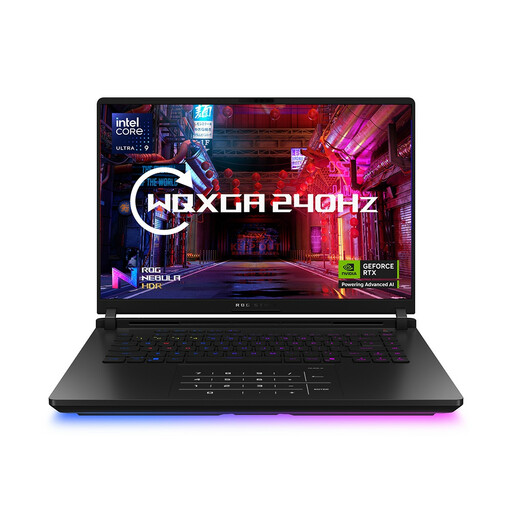
ASUS ROG Strix SCAR 16 G635LW WQXGA, 64 GB, 2 TB
Consider this integrated-screen laptop if the listed 64 GB RAM is relevant to your development workload.
- The product name specifies a 16-inch display, Intel Core Ultra 9, 64 GB RAM and a 2 TB SSD.
- The GPU information conflicts across the product details. Confirm the shipped GPU, graphics-memory capacity and DirectX 12 compatibility before assessing it for UE5.
Joybuy
 No image available
ASUS ROG Zephyrus G14 GA403WR-QS088W, 14-inch, 32 GB, 2 TB, RTX 5070 Ti
The integrated 14-inch display makes this a laptop choice when desk space and separate powered devices matter.
- The product name specifies AMD Ryzen AI 9 HX 370, 32 GB RAM, a 2 TB SSD and NVIDIA GeForce RTX 5070 Ti graphics.
- For UE5, confirm graphics-memory capacity and DirectX 12 compatibility. Check battery runtime if unplugged use matters, and confirm the colour if it affects your choice.
Joybuy
Questions before buying
Is 16 GB RAM enough to prototype a platform level?
It may suit a smaller Unity project, but it is below Epic Developer Community’s recommended 32 GB RAM for Unreal Engine 5. Unity says larger and more complex projects require additional RAM, so choose against your actual engine, project scope and other tools you expect to run.
Do limited plug sockets mean I have to buy a laptop?
No: a desktop can work if you already have a monitor and can safely power the whole setup. A laptop reduces the separately powered core devices by including the screen. London Fire Brigade warns about overloaded sockets, so do not use stacked extensions as a workaround.
What should I confirm before ordering a desktop for UE5?
Confirm the finished PC’s installed RAM, GPU graphics memory and DirectX 12 compatibility, then check its storage and connections for your monitor. Epic Developer Community recommends 32 GB RAM and at least 8 GB of graphics memory for UE5; a desktop’s gaming label or configurable starting build does not confirm those figures.


