For PC football games, choose a keyboard that fits your movement keys and shortcuts before choosing response-tuning features: Electronic Arts documents both WASD and arrow-key layouts for EA SPORTS FC 27 on PC. Adjustable actuation and Rapid Trigger suit players willing to tune their keys, while a conventional mechanical keyboard is a simpler choice if familiar controls matter more. Check keyboard support for your exact game and platform before buying.
Who these keyboards suit
Competitive PC football players
If you use keyboard controls regularly and are willing to adjust key settings, an adjustable-actuation board gives you more control over how presses register. Rapid Trigger is a keyboard feature to consider, not a promise of better match results.
Comfort-and-layout-first players
If you rely on WASD or arrow keys and use tactics shortcuts, the physical key arrangement may matter more to you than a polling-rate claim. Check that your preferred controls remain easy to reach during a long session.
Simple-upgrade buyers
If you are replacing a basic keyboard without wanting to configure individual keys, start with the layout and switch feel you prefer. Check the connection and support terms for the particular model you choose.
What matters when choosing
Start with your game, platform and control layout. Then decide whether adjustable key response is worth configuring or whether a straightforward mechanical keyboard better suits the way you play.
Adjustable-actuation keyboard
Choose it when: You play on PC and want to tune how far supported keys travel before registering.
Trade-off: Rapid Trigger and sensitive settings take adjustment; an unwanted press may mean you need to change the settings.
Conventional mechanical keyboard
Choose it when: A familiar key arrangement and straightforward controls matter more to you than per-key response tuning.
Trade-off: Check the exact model if adjustable actuation or Rapid Trigger is important; a conventional layout alone does not establish either feature.
| Concern |
What to check |
Who this matters to |
| Configurable response |
Check whether the exact switch version supports adjustable actuation and Rapid Trigger, and how you save your settings. |
If I want to tune repeated directional inputs, I need settings I can use without accidental presses. Around 33% of consumers put response tuning first. |
| Control layout |
Confirm keyboard support for your game and platform, then inspect the movement keys and shortcuts on the exact layout. |
When I play using WASD or arrows, I want my tactics shortcuts within comfortable reach. Layout is the primary concern for roughly 27% of consumers. |
| Comfort and desk space |
Compare the board’s footprint, key placement and case height; check which dedicated keys a compact layout retains. |
For longer sessions, I care about how the keyboard feels and fits beside my mouse. Around 20% of consumers put comfort and space first. |
| Simple setup |
Check the connection, required software and support terms for the model you are considering. |
If I want to start playing without tuning individual keys, straightforward operation matters most. That is the main concern for around 20% of consumers. |
Buying pitfalls
-
Choosing a compact board before checking your controls
Electronic Arts documents WASD and arrow-key layouts for EA SPORTS FC 27 on PC, alongside number-key and function-key shortcuts. A smaller keyboard may change how you reach some of those keys.
List the movement keys and shortcuts you use, then inspect the exact physical layout rather than relying on the keyboard’s size label.
-
Expecting a faster keyboard specification to improve match results
Adjustable actuation, Rapid Trigger and polling-rate figures describe keyboard features or manufacturer test conditions. They do not establish how you will perform in a football game.
Prioritise a usable layout and key feel; treat response tuning as an option if you are prepared to adjust it.
-
Assuming PC keyboard controls apply on every platform
Electronic Arts’ documented FC 27 keyboard layouts concern PC. A football game’s availability on another platform does not establish that the same keyboard-control setup works there.
Confirm input-device support for your exact game and platform before replacing a controller-based setup.
-
Putting an old keyboard in general waste
UK guidance from GOV.UK describes electrical-equipment recycling as a way to support recovery and reuse.
When replacing a keyboard, use a suitable electrical-recycling collection route for the old one.
Brands to consider for these features
Razer
The Huntsman V3 Pro Tenkeyless 8KHz is a wired TKL option for players interested in adjustable key response.
- Razer specifies 0.1–4.0 mm adjustable actuation and Rapid Trigger for this model.
- Razer’s responsiveness comparisons are manufacturer test claims, not evidence of better football-game results.
SteelSeries
The Apex Pro TKL Gen 3 is a TKL Hall Effect option with configurable actuation.
- SteelSeries specifies a 0.1–4.0 mm adjustment range and Rapid Trigger for this model.
- Check whether its configuration workflow and your preferred key sensitivity suit you; preset and latency statements are brand claims.
Logitech G
The PRO X TKL RAPID is a wired TKL analogue-keyboard option.
- Logitech G describes magnetic analogue switches, per-key adjustable actuation and Rapid Trigger.
- Check the exact configuration options and retailer terms for the model you choose.
Wooting
The 80HE is an 80% Hall Effect keyboard for players who want to configure actuation and key-reset behaviour.
- Wooting specifies Rapid Trigger, 0.1 mm actuation precision and 8 kHz polling for the 80HE.
- Check its key placement against your controls and confirm the configuration and delivery terms that apply to your order.
Joybuy keyboard choices
These keyboards cover two approaches to PC football-game controls: compact analogue models for players who want to tune key response, and mechanical models for players prioritising a familiar setup. Compare each physical layout with the movement keys and shortcuts you use.
 No image available
ASUS ROG Falchion Ace HFX 65 Analogue Keyboard, UK Layout
Consider this if you want an analogue keyboard in a compact layout for your PC controls.
The product name identifies the HFX 65 variant and UK layout. Check where your football-game shortcuts sit on its physical keys.
View on Joybuy
 No image available
Razer Huntsman V3 Pro Mini 60% Analogue Optical Keyboard
This compact model is worth considering if you want analogue key controls and do not rely on a dedicated arrow-key cluster.
Its named format is 60%. Check arrow-key access, shortcut placement and the exact physical layout before choosing it for your controls.
View on Joybuy
 No image available
Redragon M68 68-key Magnetic-Switch Keyboard, US Layout
Consider this compact magnetic-switch model if you want to assess adjustable-response options while retaining access to your preferred movement keys.
The product name specifies a metal top plate, 8,000 Hz polling and a US layout. Check the exact arrow-key positions and whether the US key arrangement suits you; the polling figure does not establish better match results.
View on Joybuy
 No image available
ASUS ROG Strix Scope II 96 Wireless Keyboard, White, UK Layout
This model may suit you if you prefer a more familiar key arrangement to a very compact board.
The product name identifies a 96-format wireless model in white with a UK layout. Inspect the exact movement-key and shortcut positions for your game.
View on Joybuy
 No image available
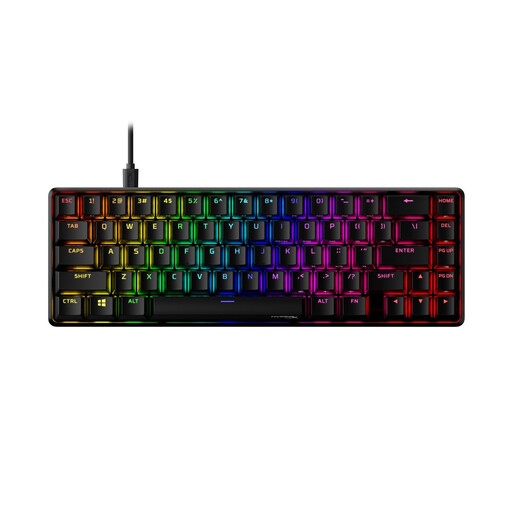
HyperX Alloy Origins 65 HX Red Mechanical Keyboard, US Layout
Consider this mechanical model if a compact keyboard appeals to you more than configuring analogue key response.
The product name identifies the Alloy Origins 65, HX Red variant and US layout. Check its physical key arrangement against your movement controls and shortcuts.
View on Joybuy
Questions about football-game keyboards
Can I use a gaming keyboard for EA SPORTS FC on PC?
Yes: Electronic Arts documents WASD and arrow-key layouts for EA SPORTS FC 27 on PC. Check the controls for your particular edition and make sure your keyboard has convenient access to the movement keys and shortcuts you use.
Do I need Rapid Trigger or 8,000 Hz polling for football games?
No. Rapid Trigger and high polling rates are optional keyboard features, not requirements for playing football games or guarantees of better results. Choose a compatible, comfortable layout first; consider adjustable response if you want to spend time tuning it.
What should I do with an old keyboard in the UK?
Use a suitable electrical-recycling route when replacing it. GOV.UK describes the UK’s waste electrical and electronic equipment rules as supporting recovery, reuse and recycling rather than disposal with general waste.


