
24/7 Customer Support

Free returns

Same-day & Next-day Delivery

Quality Guaranteed

Unlock Your Welcome Offers: FREE Delivery | Up to 80% OFF | Free 30-day JoyPlus trial
Download the APP
For busy UK households, a robot vacuum can reduce daily floor-care work, particularly where hard floors, carpets, pets and regular kitchen debris are involved. However, headline specifications do not always describe the complete ownership experience. A high suction figure may sound impressive, but navigation, dock maintenance and carpet handling can make a greater difference to everyday convenience.
The JONR T5 Pro robot vacuum cleaner combines vacuuming, mopping, LiDAR navigation and an all-in-one dock. Before buying, it is worth checking how these features address the most common robot vacuum pitfalls.
The JONR T5 Pro is listed with up to 8150Pa suction power. This provides a useful indication of the motor’s maximum setting, but real-world cleaning also depends on the brush design, airflow, filter condition, floor type and battery mode.
Higher suction can also use more battery power and may produce more operating noise. For everyday cleaning, buyers should look for adjustable settings, scheduled runs and a brush system that can collect hair without frequent manual intervention.
A robot vacuum with mop should not simply drag a wet cloth over every surface. Carpets need a clear separation between vacuuming and mopping, otherwise damp fibres and transfer of dirt can become a concern.
The T5 Pro includes an extendable wiping cloth or mop arm with automatic lift on carpet, plus carpet detection. This is designed to lift the mop when the robot identifies carpeted areas. Even so, users should create no-go or no-mop zones for thick rugs, delicate flooring and areas where detection may be less reliable.
“Hands-free” cleaning does not mean maintenance-free ownership. Dust bags need replacing, filters require cleaning, mop cloths need washing and brushes can collect hair. A dock that only charges the robot may still leave owners with frequent cleaning tasks.
The T5 Pro’s all-in-one dock provides automatic dust emptying, automatic mop cleaning and hot air drying. These functions can reduce routine handling, although consumables such as dust bags and mop cloths remain part of the running cost.
For homes with pets or high daily footfall, look beyond the Pa figure. Check whether the robot has:
The T5 Pro has an anti-tangle side brush design, which is intended to reduce hair wrapping around the side brush. It should still be inspected regularly, particularly in homes with long-haired pets.
A LiDAR robot vacuum cleaner uses laser-based mapping to detect room layouts and plan routes. The T5 Pro uses 360-degree LiDAR navigation, supporting mapped cleaning and scheduled runs.
The model also lists AI-supported obstacle avoidance. This can help the robot identify common objects, but users should still remove cables, socks, toys and loose clothing before starting a cycle. Obstacle avoidance is a convenience feature, not a substitute for preparing the floor.
For frequent use, the dock should do more than recharge. Automatic mop cleaning helps remove collected dirt from the wiping cloth, while hot air drying is designed to reduce lingering moisture between cleaning cycles.
A self-emptying robot vacuum can also transfer collected dust into a disposable bag. This is convenient for many households, but buyers should check the availability and price of compatible bags. The supplied JONR spare parts gift box includes four side brushes, five dust bags and three pairs of mopping cloths, which may be useful for planning future maintenance.
Always place the dock on a level, dry indoor surface with sufficient clearance. Do not use the appliance outdoors or on wet surfaces, and ensure filters and dust components are fully dry before refitting them.
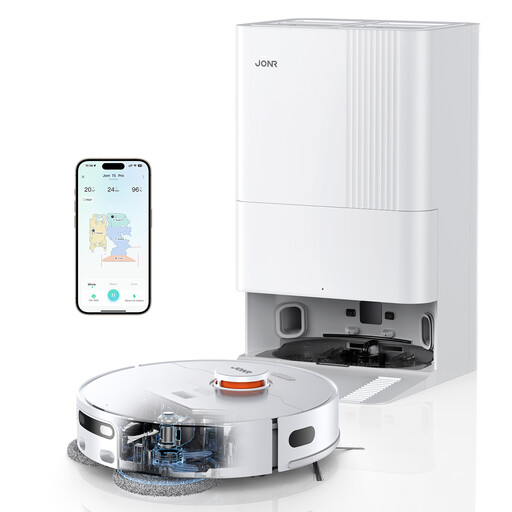
Why This Fits Their Persona: It combines vacuuming, mopping, mapping and dock automation in one appliance, avoiding the need to buy separate floor-cleaning devices.
The automatic mop lift helps separate carpet and hard-floor cleaning, while LiDAR mapping is more structured than random movement.
Up to 8150Pa suction; app control, scheduled cleaning and no-go zones; automatic dust emptying.
Why This Fits Their Persona: It suits tech-focused homeowners who value integrated automation, room mapping and control from a mobile app.
The all-in-one dock addresses the hidden maintenance burden through automatic dust emptying, mop cleaning and hot-air drying.
LiDAR mapping; app-controlled schedules and restricted zones; automatic mop care with hot-air drying.
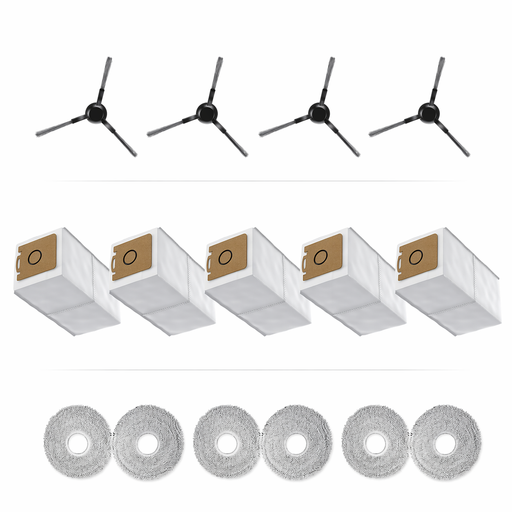
Why This Fits Their Persona: Frequent cleaners, pet owners and larger households can keep replacement components available instead of waiting for accessories to arrive.
It directly addresses the maintenance gap often overlooked when comparing automated cleaning systems.
Includes four side brushes, five dust bags and three pairs of mopping cloths.
Place the dock where the robot can approach it from the front without furniture blocking its route. During initial setup, allow the LiDAR robot vacuum cleaner to map the home, then label rooms and set no-go zones in the app.
Keep charging and dock areas dry, and do not allow children to treat the appliance as a toy. Never use the vacuum to collect hot ash, burning items, flammable liquids, glass or sharp metal objects.
Running costs usually include electricity, replacement dust bags, filters, side brushes and mop cloths. Cleaning the filter and removing hair from moving parts can help maintain airflow, but damaged components should be replaced rather than modified.
We have compiled a complete, real-time list of products that fully satisfy these strict selection criteria and UK safety regulations.
It is designed for mixed flooring and lists carpet detection with automatic mop lift. Remove delicate or high-pile rugs from the cleaning route if the manufacturer’s guidance does not confirm suitability. Check the first few cycles to ensure the mop lifts correctly.
Inspect the brushes and wheels regularly, particularly if you have pets. Empty or replace dust bags when indicated, clean filters as instructed and wash or replace mop cloths according to usage. Automatic mop cleaning and hot-air drying reduce handling but do not remove the need for routine checks.
Energy use varies according to suction mode, cleaning frequency, floor area, battery charging and dock functions. Using an appropriate everyday mode rather than maximum suction for every cycle may help balance cleaning performance and power consumption. The ongoing cost of consumables is also worth including in the purchase decision.