Catalogue makers entering figures and references
If your records contain many object numbers, dimensions or inventory references, direct access to number and navigation keys may matter more than a small keyboard footprint.


Choose the layout around the work you do most: a full-size UK-ISO mechanical keyboard keeps number and navigation keys within easy reach for figure-heavy catalogue entry, while a smaller board leaves more room for proofs and documents if you can work without a dedicated number pad. For longer writing sessions at home, check the exact switch option, connection modes and operating-system fit; a keyboard alone cannot resolve problems with the wider workstation.
If your records contain many object numbers, dimensions or inventory references, direct access to number and navigation keys may matter more than a small keyboard footprint.
When you spend long stretches writing descriptions near other people, the exact switch sound and feel deserve attention alongside the keyboard layout.
If catalogue copy, images and communications sit on different computers or a tablet, check that the keyboard can connect to the devices and operating systems you use.
Start with the keys your catalogue work requires, then narrow the choice by typing noise, device connections and available desk space.
| Concern | What to check | Who this matters to |
|---|---|---|
| UK layout and number entry | Look for an explicit UK-ISO or UK layout and decide whether you need a dedicated number pad. | If I regularly enter object numbers and dimensions, familiar symbol positions and direct number-key access matter more than saving desk width. Around 37% of consumers put layout and number entry first. |
| Switch feel and noise | Check the switch fitted to the exact variant and, where possible, try its feel and sound before buying. | Writing descriptions beside other people makes an intrusive key sound hard to ignore, even if I like the feedback. Quiet, sustained typing comes first for around 27% of consumers. |
| Device and system fit | Confirm the connection modes, supported devices and key labelling for your operating system. | When I move between a computer and another device during production, switching connections easily matters more than extra keyboard controls. Around 18% of consumers prioritise that multi-device workflow. |
| Desk space and shortcuts | Allow room for documents and a mouse; check remapping support if you use recurring application shortcuts. | I need room for proofs on the desk, or I repeat the same editing commands often enough to make programmable keys worthwhile. Desk footprint or shortcut control is the leading concern for around 18% of consumers. |
Different regional layouts can put symbols in unfamiliar positions, which matters when entering catalogue references and file names.
Check for an explicit UK-ISO or UK layout statement and compare the pictured keys with your current keyboard.
A smaller layout may change how you access numbers and navigation keys. That trade-off matters more when catalogue records contain frequent numerical fields.
Look at a typical stretch of your work before deciding whether you need a full-size board or a compatible separate keypad.
Using a separate keypad would add another item to arrange on the desk.
Lighting and gaming-focused controls do not establish that the layout, switch feel or sound suits catalogue preparation.
Choose the required keys and an acceptable switch option before considering lighting or macro controls.
The Health and Safety Executive’s home-working guidance considers the keyboard alongside the screen, work surface, chair and working environment.
Review the whole setup, and follow your employer’s display screen equipment assessment process where it applies.
Keychron UK lists UK-ISO full-size options, including the Q6 Max and V6 Max, for work that calls for direct number-key access.
Logitech’s MX Mechanical line is relevant to buyers weighing switch choice and movement between devices.
Corsair has UK-layout options to examine if you are weighing desk footprint against direct access to keys.
Razer’s BlackWidow V4 is worth examining when dedicated macro controls are part of a shared work-and-gaming setup.
These mechanical keyboards offer full-size or space-saving layouts and wired or wireless connection choices for a home desk. Each listed variant specifies a US layout, so check its key positions carefully if UK-ISO typing is important to your catalogue work.
 No image available
Consider its full-size format if you have room for a larger keyboard during catalogue entry.
The title specifies 108 keys, tri-mode connectivity, hot-swappable switches and a US layout. Check the key positions before relying on it for UK typing; “Silent Tactile” names the switch variant, not a measured noise level.
 No image available
Consider this model if you want to examine a compact keyboard for a desk shared with catalogue documents.
Its title specifies wired, Bluetooth and 2.4 GHz connections and a US layout. Confirm the number-key arrangement you need; also verify the supplied switch, as the product title and description name different pre-installed variants.
 No image available
The 75% format is worth considering when space for proofs or a mouse matters more than a full-size keyboard.
The title specifies wired, Bluetooth and 2.4 GHz connections and PBT keycaps. Check its number-key access for frequent figure entry and its US key positions for UK typing.
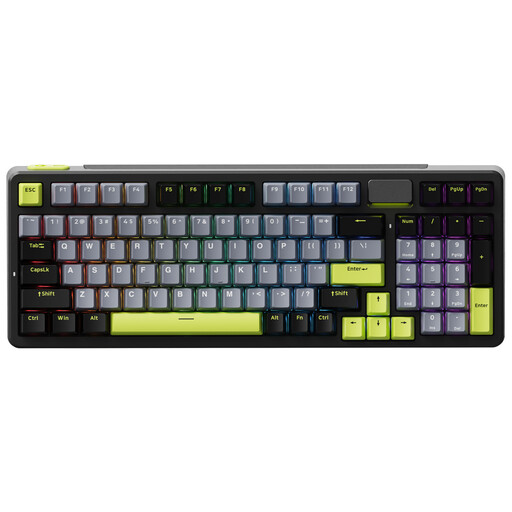 No image available
Examine this layout if you want to balance keyboard footprint with the keys needed for catalogue records.
The title identifies tri-mode connectivity, a gasket mount and US QWERTY layout. Check the exact number-key arrangement and installed switch if figure entry or typing sound will influence your choice.
 No image available
Its 80% format may suit a desk where documents need space beside the keyboard.
The title specifies tri-mode connectivity, a gasket mount and US QWERTY layout. Check number-key access before choosing it for figure-heavy records, and assess the switch sound for your home workspace.
Not necessarily, but a UK-ISO layout reduces the adjustment if you normally use UK key positions. Check the listing’s layout designation and photographs, especially when symbols and file names feature heavily in your work.
Choose the switch feel and sound you can work with for sustained typing, rather than assuming one type suits everyone. Clicky options add a pronounced sound; if you share a room, compare quieter tactile or linear variants in the exact layout you need.
A wired model may be sufficient if the keyboard stays at one computer. Wireless becomes more useful when you want fewer cables or regularly switch devices, provided its connection modes and pairing arrangements suit your setup.
No; the keyboard is only one part of the workstation. The Health and Safety Executive’s home-working guidance also addresses the screen, work surface, chair and environment, so review the full setup and use your employer’s assessment process where applicable.