
24/7 Customer Support

Free returns

Same-day & Next-day Delivery

Quality Guaranteed

Unlock Your Welcome Offers: FREE Delivery | Up to 80% OFF | Free 30-day JoyPlus trial
Download the APP
Navigating the world of mechanical keyboards can feel overwhelming. With endless marketing jargon and features that sound impressive but offer little practical value, it's easy to make a purchase you later regret. As the Joybuy Product Recommendation Officer, my role is to help you sidestep the common traps and focus on what truly matters for a superior typing and gaming experience.
Many buyers fall for the same few issues: keyboards that look great but feel cheap, wireless models that lag at critical moments or "customisable" boards that are anything but. Let's cut through the clutter and identify the key features that deliver genuine value.
Before you add anything to your basket, be aware of these costly pitfalls that often catch out UK shoppers.
To ensure you get a keyboard that lasts and feels great to use, focus on these three non-negotiable specifications.
The way the internal components are mounted inside the case dramatically affects the typing experience. Many standard keyboards use a "tray mount," where the circuit board is screwed directly to the bottom case. This can create a stiff, unforgiving feel and an inconsistent, hollow sound.
A superior alternative is the gasket mount keyboard. This design uses flexible gaskets (often silicone or Poron) to suspend the plate and PCB assembly between the top and bottom case halves. This isolation provides a cushioned, softer typing feel that reduces finger fatigue and produces a deeper, more satisfying sound profile without the harshness.
Your fingers touch the keycaps with every keystroke, yet their material is often overlooked.
This is perhaps the single most important feature for anyone interested in the hobbyist side of mechanical keyboards. A hot-swappable keyboard has special sockets on the circuit board that allow you to pull out and replace the mechanical switches with a simple tool—no soldering required.
This gives you the freedom to experiment with different switch types (e.g., smooth linears for gaming, bumpy tactiles for typing) to find your perfect feel. It also makes repairs incredibly easy; if a switch fails, you can simply swap in a new one in seconds, dramatically extending the keyboard's lifespan. Look for boards that support both 3-pin and 5-pin switches for maximum compatibility.
Based on these core principles, here are a few recommendations tailored to different user needs.
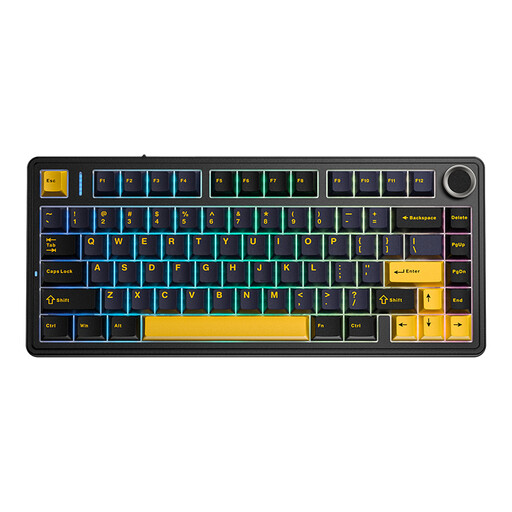
Why This Fits Their Persona: This user needs a single, high-performance keyboard for their home office that also excels at gaming after hours. The 75% keyboard layout saves desk space while keeping essential arrow and function keys and its clean aesthetic fits a professional environment. It's also a great keyboard for Mac and Windows users.
It offers versatile tri-mode keyboard connectivity (2.4Ghz, Bluetooth and USB-C), avoiding the wireless lag trap. The gasket mount keyboard structure and five-layer foam padding deliver a premium feel that sidesteps the cheap "gaming" build quality pitfall.
Full-key hot-swap support for future customisation and durable double-shot PBT keycaps ensure longevity. The integrated multimedia knob adds convenient media control without disrupting workflow.
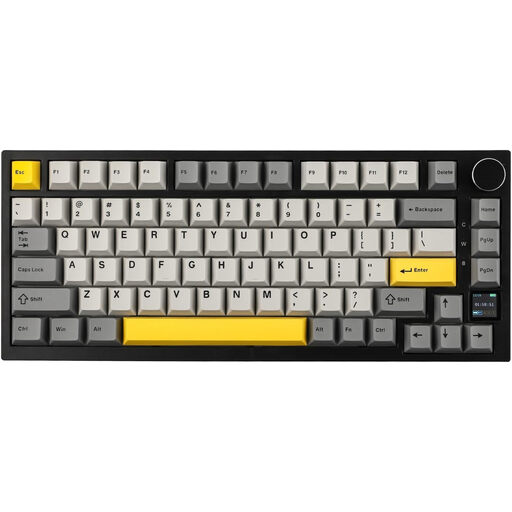
Why This Fits Their Persona: This user wants the latest technology and a high degree of control. The interactive TFT colour screen for status monitoring and custom GIFs is a standout feature that appeals directly to tech enthusiasts who love to personalise their setup.
It completely avoids the customisation dead-end with a true gasket-mounted structure, flex-cut PCB and hot-swappable sockets. This provides the authentic custom mechanical keyboard experience straight out of the box, without the risk of buying a soldered board.
The customisable TFT screen provides at-a-glance info on battery, connection mode and time, a genuinely useful innovation. Its south-facing RGB LEDs also provide brilliant illumination without glare, which is ideal for users who may install custom keycaps.
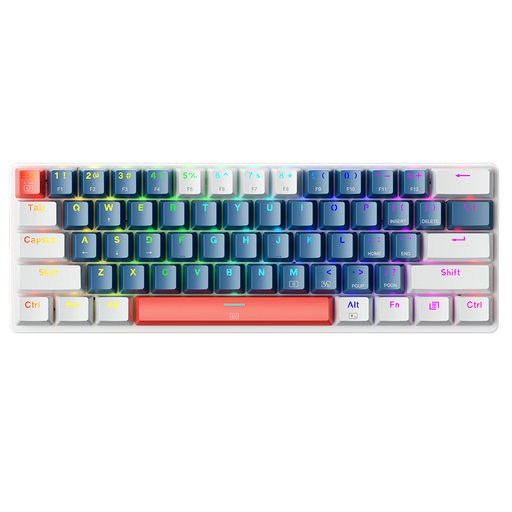
Why This Fits Their Persona: Ideal for someone new to the hobby or who needs a keyboard with a small footprint. The 60% compact keyboard layout provides all the essential keys for typing and gaming while maximising room for mouse movement. It's a straightforward, no-fuss entry into the world of mechanical keyboards.
By focusing on core functionality, it avoids the "gaming tax" of paying for features you don't need. Crucially, it is a hot-swappable keyboard, meaning it sidesteps the customisation dead-end and allows the user to grow with the keyboard as their preferences change.
Its main advantage is providing access to a genuine mechanical and hot-swappable experience at an accessible price point. The detachable USB-C cable and full RGB backlighting are excellent features for an entry-level board.
We have compiled a complete, real-time list of products that fully satisfy these strict selection criteria and UK safety regulations.
A well-built mechanical keyboard can last for many years, far longer than a standard membrane keyboard. The individual mechanical switches are typically rated for 50 million or more keystrokes. The key advantage of a hot-swappable keyboard is that if a single switch fails, you can replace it in seconds, potentially giving the keyboard an indefinite lifespan. Using durable PBT keycaps also prevents the keys from wearing out or looking old.
For many users, yes. The "bouncy" or cushioned feel of a gasket mount keyboard can make long typing sessions more comfortable by reducing the harsh impact of bottoming out the keys. It also helps to create a more uniform sound across the entire board, eliminating the metallic pings or rattles sometimes found in tray-mounted designs. While the feel is subjective, it is a feature widely sought after by enthusiasts for its refined typing experience.
Both are compact layouts designed to save desk space. A Tenkeyless (TKL, or 87%) keyboard is a full-size board with the number pad removed. It retains the traditional navigation cluster (arrow keys, Page Up/Down, etc.). A 75% keyboard is even more compact. It pushes the arrow keys and a column of navigation keys (like Del, PgUp, PgDn) right up against the main block of keys, creating a single, unified rectangle with no wasted space. It's a popular choice for those who want maximum desk space without sacrificing the function row or arrow keys.