
24/7 全天候客户支持

免费退货

当日/次日达

品质保障

开启新人专享福利: 全场免邮 | 低至 2 折 | 免费试用 30 天 JoyPlus 会员
下载 Joybuy
From cluttered kitchen cupboards and chaotic craft boxes to inefficient home office filing, a little organisation can go a long way. A quality label printer is a simple tool that brings order to your space, whether you're a parent preparing for the back-to-school rush, a small business owner streamlining your shipping process or simply someone who appreciates a tidy home.
But with so many options available, choosing the right one can feel overwhelming. Do you need a portable, battery-powered device or a high-speed desktop model? What's the difference between thermal printing technologies? This guide is designed to cut through the clutter, helping you understand the key features to look for and find a label printer that fits your specific needs.
Before diving into our recommendations, consider these key points. Understanding them will help you identify which type of label printer is the right match for your tasks.
The biggest difference between label printers lies in how they create an image on the label.
Your intended use will determine whether a portable or stationary model is more suitable.
Here are our recommendations, selected to meet a range of common labelling needs across the UK.
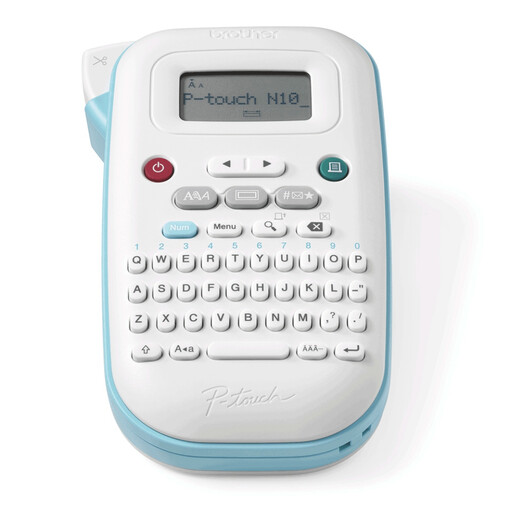
Why It Stands Out: The Brother PT-N10 is the definition of straightforward, effective labelling. It’s a completely standalone device—no apps, no software, no computer needed. Its simplicity and the durability of its labels make it a firm favourite for busy households.
Using thermal transfer technology with Brother’s renowned TZe laminated tapes, the labels it produces are incredibly resilient. They can withstand water, scratches and sunlight, ensuring a name tag on a school jumper or a label on a spice jar stays put and remains legible for years.
Pros:
Who is it for? This is an excellent choice for parents labelling school supplies, home organisers tackling pantries and storage boxes and teachers managing classroom materials. If you need a reliable, portable label maker for everyday tasks without any technical fuss, this is it.

Why It Stands Out: The Brother QL-600B is a workhorse designed for efficiency. As a direct thermal label printer, it requires no ink or toner, which significantly lowers running costs. Its impressive print speed of up to 44 standard address labels per minute makes short work of large mailing lists or shipping batches.
The integrated automatic cutter provides a clean, professional finish to every label, and its high resolution (300 x 600 DPI) ensures text is crisp and barcodes are perfectly scannable. It connects via USB to your PC or Mac and works seamlessly with Brother’s free P-touch Editor software.
Pros:
Who is it for? This is the go-to shipping label printer for e-commerce sellers, small business owners and busy home offices. Anyone who regularly sends post, manages filing systems or needs to create professional-looking badges and barcodes will find it an invaluable tool.
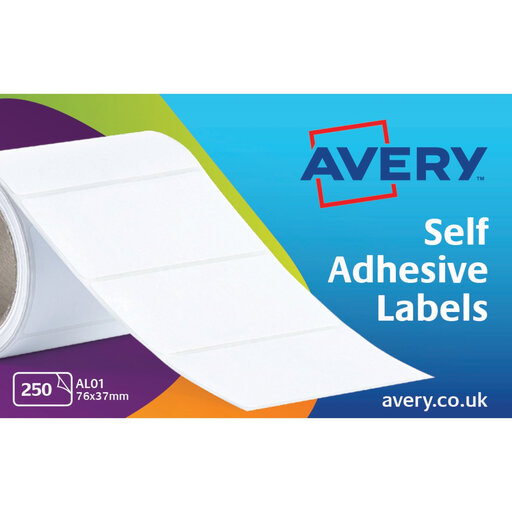
Why It Stands Out: Sometimes the simplest solution is the most practical. The Avery Address Label Roll is a self-contained dispenser with 250 self-adhesive labels, requiring no power, no printer and no setup.
Originally designed for typewriters, these labels are just as useful for handwriting addresses or notes on the fly. The compact and robust dispenser makes it easy to throw in a bag for use at markets, events or any situation where you need to create a quick label without a computer or power source.
Pros:
Who is it for? This is for market stall holders, event organisers or anyone who needs to label items away from a desk. It's also a great, low-tech option for the home or office for those one-off labelling tasks where firing up a printer feels like too much effort.
While these recommendations cover the most common needs, the world of labelling is vast. If you're looking for different label sizes, colours or specialised printers for specific industries, there are many other solutions available.
Explore our full range of office labels to find the perfect match for your project.
1. Do thermal label printers run out of ink? No, a direct thermal label printer (like the Brother QL-600B) does not use any ink, toner or ribbons. It uses heat to activate special thermal paper. A thermal transfer printer (like the Brother PT-N10) uses a ribbon cartridge, which does need to be replaced, but these typically last for many metres of printing.
2. What is the difference between a label maker and a label printer? The terms are often used interchangeably. However, "label maker" usually refers to a portable, handheld device with a built-in keyboard (like a handheld label maker). "Label printer" often refers to a desktop model that connects to a computer to print labels in higher volumes, such as an address label printer.
3. Can I use a label printer for shipping labels? Yes, absolutely. A desktop thermal label printer like the Brother QL-600B is an excellent choice for a shipping label printer. It can print standard-sized shipping labels quickly and clearly, ensuring barcodes are scannable by couriers. Always check the label size requirements for your chosen postal service or courier.