
24/7 全天候客户支持

免费退货

当日/次日达

品质保障

开启新人专享福利: 全场免邮 | 低至 2 折 | 免费试用 30 天 JoyPlus 会员
下载 Joybuy
If you spend hours at your desk, you know the struggle: tired eyes, distracting screen glare and a traditional desk lamp taking up valuable space. A monitor light bar, also known as a screen bar light, seems like the perfect solution. It mounts directly onto your monitor, illuminating your workspace without causing reflections or clutter.
However, the market is filled with options that look similar but perform very differently. Many fall short, leaving you with the same problems you were trying to solve. As the Joybuy Product Recommendation Officer, my role is to help you see past the marketing and focus on what truly matters. Before you buy, be aware of these common pitfalls that can turn a promising purchase into a disappointment.
To ensure your new light enhances your workspace instead of hindering it, focus on these three non-negotiable technical specifications.
This is the single most important feature of an effective eye-care desk light. Unlike a standard lamp, a monitor light bar with an asymmetric light source uses a precisely angled reflector to direct light forwards and downwards across your desk, while preventing any light from spilling backwards onto your screen.
The Colour Rendering Index (CRI) measures how accurately a light source reveals the true colours of objects, on a scale of 0 to 100. Natural daylight has a CRI of 100. For any task that involves looking at a screen for extended periods, a high CRI is crucial for comfort and accuracy.
Your lighting needs change throughout the day. A quality dimmable LED lamp should offer control over both brightness and colour temperature.
Based on these practical criteria, here are a few options from our catalogue, matched to different user needs.
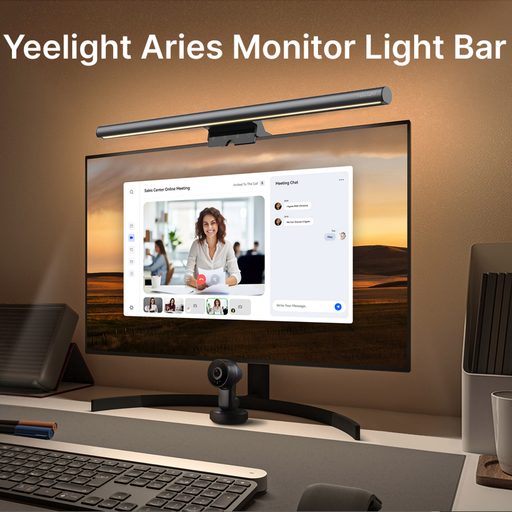
Why This Fits Their Persona: For those working long hours, this model prioritises eye comfort and colour accuracy. Its universal clip is designed to fit a wide range of monitors, including a curved monitor light bar setup, making it a reliable choice for a professional desk.
It features an anti-glare design and a high CRI of Ra95, directly addressing the pitfalls of screen reflections and poor colour reproduction. The tool-free clip is built for stability on various screen types.
Full-metal construction for durability and heat dissipation. Wide adjustable colour temperature range (2700K–6500K) to suit any task or time of day.
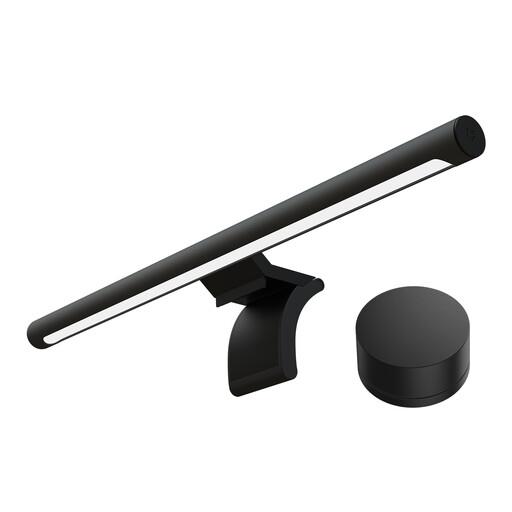
Why This Fits Their Persona: A perfect addition to a gaming desk setup. The included wireless remote control allows for quick brightness and temperature adjustments without interrupting gameplay. Its sleek, black metal finish complements the typical gamer aesthetic.
This model uses an asymmetric optical design to prevent screen glare during intense gaming sessions. The magnetic rotation mount provides a secure fit and easy angle adjustment, avoiding the wobbly clip issue.
The wireless remote is a major convenience for on-the-fly changes. It also features a high Ra95 CRI, ensuring game graphics are displayed with accurate colours.
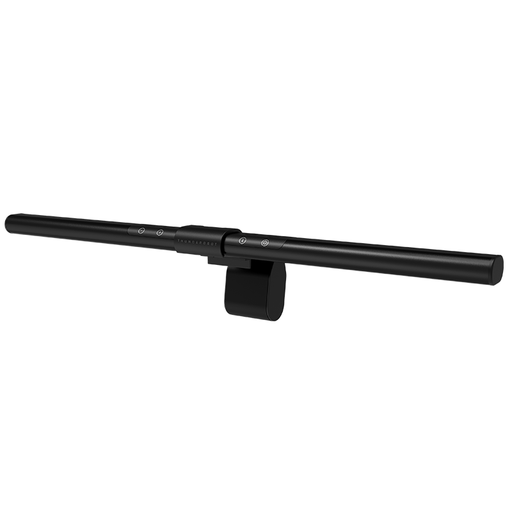
Why This Fits Their Persona: An excellent choice for students or anyone setting up their first home office. It delivers on the essential, high-end features—asymmetric light and high CRI—without the price tag of more premium models.
This light bar focuses on the fundamentals. It has a dedicated asymmetric light source to prevent glare and an impressive Ra95 CRI, ensuring it doesn't compromise on the two most critical aspects of light quality.
Provides ten levels of brightness adjustment (dimming) for precise control. It is also specified as having no video flicker, which is important for reducing eye fatigue over long study sessions.
We have compiled a complete, real-time list of products that fully satisfy these strict selection criteria and UK safety regulations.
A well-designed monitor light bar should not damage your screen. Quality models use a gravity-based clip with a counterweight that simply rests on top of the monitor frame. The contact points are typically lined with soft silicone or rubber to prevent scratches. Always check the manufacturer's specifications for the supported monitor thickness (e.g., 1-3 cm) to ensure a proper and safe fit.
Monitor light bars are highly energy-efficient. Most are powered via a standard 5V USB port and consume very little power, typically between 5W and 10W at maximum brightness. This makes them an inexpensive and eco-friendly addition to your home office lighting.
It depends on the model. Standard light bars are designed for flat screens and may not sit securely on a curved one. However, many newer models are specifically designed with an adjustable or curved-compatible mounting clip. If you have a curved display, it is essential to look for a curved monitor light bar or check the product description to confirm compatibility.