
24/7 Customer Support

Free returns

Same-day & Next-day Delivery

Quality Guaranteed

Unlock Your Welcome Offers: FREE Delivery | Up to 80% OFF | Free 30-day JoyPlus trial
Download the APP
Upgrading an older car's infotainment system can feel like a daunting task. You want the convenience of modern navigation, music streaming and hands-free calls, but a permanent head unit replacement is often costly and complex. This has led many UK drivers to consider a portable CarPlay screen. However, the market is filled with devices that over-promise and under-deliver.
Before you invest, it is crucial to understand the common pitfalls that lead to buyer's remorse. Many drivers find themselves stuck with a unit that seemed perfect online but fails in daily use.
To avoid these issues, focus on a few key technical specifications. These are the non-negotiable features that separate a reliable in-car companion from a dashboard paperweight.
The stability of your wireless android auto screen or CarPlay connection is paramount. Look for devices that specify dual-band Wi-Fi (2.4GHz & 5G). A 5GHz connection offers faster data transfer and is less prone to interference, resulting in a smoother experience for maps and media.
Equally important is a dual Bluetooth configuration. This allows the unit to maintain one stable connection to your smartphone for CarPlay/Android Auto, while simultaneously using a second, separate connection to transmit audio to your car's stereo system. This architecture prevents audio conflicts and dropouts, a common complaint with lesser models.
This is the single most important factor if you want a car screen with youtube or Netflix.
A larger screen is not always better if the quality is poor. For a modern feel, look for an 11.4 inch carplay screen or similar, but check the resolution. A minimum of 1600x600 pixels is needed for sharp map details and text.
If you need a portable car display with backup camera, verify the camera's specifications. Insist on a 1080P AHD (Analogue High Definition) camera for a clear, crisp image. Furthermore, an IP67 waterproof rating is essential for any externally mounted camera to withstand the British weather.
We have filtered the options based on these critical criteria to match different driver needs and priorities.
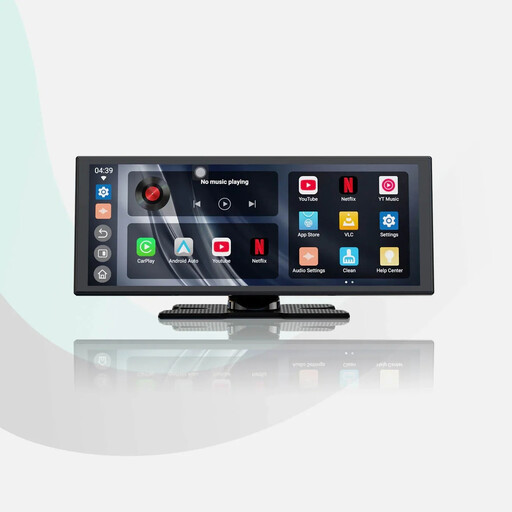
Why This Fits Their Persona: For the driver who wants a true in-car cinema and navigation hub. This user prioritises a seamless, high-quality streaming experience for passengers on long journeys or during breaks, without fumbling with screen mirroring. An ottocast screenflow review often highlights its integrated nature.
It completely bypasses the "entertainment illusion" by running Android 13 with native Netflix and YouTube apps. Its dual Wi-Fi and dual-Bluetooth design directly addresses the unstable connection trap.
Native Android 13 OS: Provides a smooth, reliable streaming experience. Large 11.4" HD Display: The 1920x720 resolution screen is excellent for both navigation and video playback.
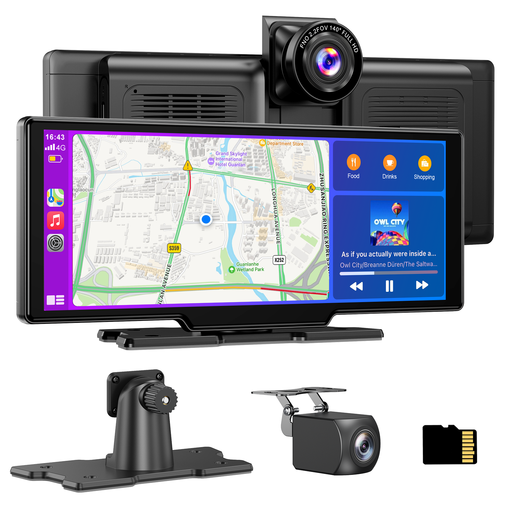
Why This Fits Their Persona: This driver wants a comprehensive safety and connectivity upgrade without the premium price of native apps. They need reliable navigation, a dash cam for peace of mind on UK roads and a clear backup camera, with occasional video playback via screen mirroring being a bonus.
It avoids the "hidden costs" trap by including a 64GB TF card and a quality 1080P rear camera in the box. Its dual-band Wi-Fi also ensures a more stable connection than basic models.
Integrated 4K Dash Cam: Offers high-resolution front and rear recording straight out of the box. Complete Package: Includes a 64GB card and 1080P rear camera, providing excellent value.

Why This Fits Their Persona: This user already has a car with factory-wired CarPlay or Android Auto but is tired of plugging their phone in for every trip. Their goal is simple: make the existing system wireless, reliable and automatic. They don't need a new screen or extra features.
It avoids the feature-bloat of all-in-one screens by focusing on one task: providing a stable wireless connection. It uses 5.8GHz Wi-Fi for a fast, reliable link, solving the core "unstable connection" problem.
Plug-and-Play Simplicity: Converts a wired system to wireless in seconds. High Stability: Utilises 5.8GHz Wi-Fi and a stable Linux-based firmware for automatic and reliable connections.
We have compiled a complete, real-time list of products that fully satisfy these strict selection criteria and UK safety regulations.
Yes, the vast majority of these devices are designed for universal compatibility. They typically plug into your car's 12V or 24V cigarette lighter socket for power and attach to the dashboard or windscreen with a suction mount. This non-permanent, plug-and-play setup makes them suitable for almost any vehicle, regardless of age or model.
No. These units are powered via the cigarette lighter socket, which in most vehicles is only active when the ignition is on or in accessory mode. When you turn your car off, the power supply to the device is cut, so it cannot drain the battery. Some advanced models feature a small internal battery for an "instant boot" function, but this is recharged by the car only when it is running.
No, it is illegal and extremely dangerous for the driver to watch any form of video content while the vehicle is in motion. UK law is very clear on this. The entertainment features on these devices, such as Netflix and YouTube, are intended for use by passengers or for the driver to use only when the vehicle is safely and legally parked. Always prioritise road safety and adhere to all driving regulations.