
24/7 Customer Support

Free returns

Same-day & Next-day Delivery

Quality Guaranteed

Unlock Your Welcome Offers: FREE Delivery | Up to 80% OFF | Free 30-day JoyPlus trial
Download the APP
Running out of space on your laptop is a common frustration. Whether you're a student archiving coursework, a photographer managing large photo libraries or simply someone wanting to create a secure backup of precious family memories, a portable external hard drive is an essential piece of kit. But with so many options available, choosing the right one can feel overwhelming.
This guide is designed to cut through the clutter. As the Joybuy Product Recommendation Officer, my role is to provide clear, practical advice to help you find a reliable storage solution that fits your needs and budget. We will look at key features like capacity, compatibility and security to help you make an informed decision.
Before diving into our recommendations, let's cover a few key considerations. Focusing on these points will help you narrow down your options significantly.
The first question to ask is what you plan to store. A drive for simple document backups will have very different capacity needs from one used for 4K video editing.
Portable hard drives are typically pre-formatted for either Windows (using the NTFS file system) or macOS (using HFS+ or APFS).
While a drive can be reformatted for a different operating system, this process erases all existing data. If you need to work across both platforms, you can format the drive to the exFAT file system, which is readable and writeable on both Windows and macOS.
The connection type affects transfer speed, while encryption protects your data.
Here are a few standout options that cater to different needs, from sheer capacity to premium security features.
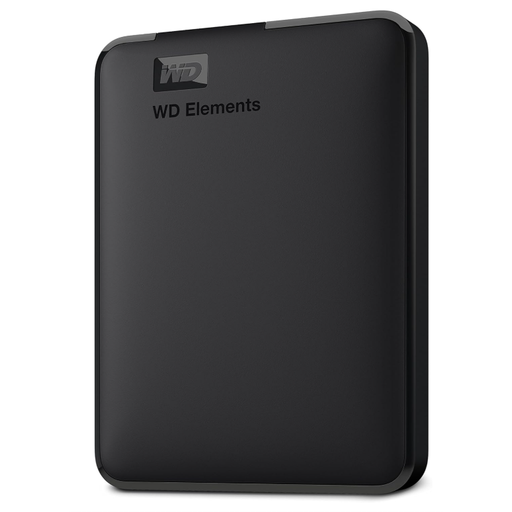
Why It Stands Out: The WD Elements Portable is all about providing maximum storage in a simple, no-fuss package. With a massive 6TB of space, it offers exceptional value for anyone needing to archive large volumes of data without paying for extra features like hardware encryption. Its plug-and-play functionality with Windows makes it incredibly easy to use straight out of the box.
Pros:
Who is it for? This drive is perfect for value-conscious users, students and digital collectors who prioritise storage capacity above all else for their Windows PC.
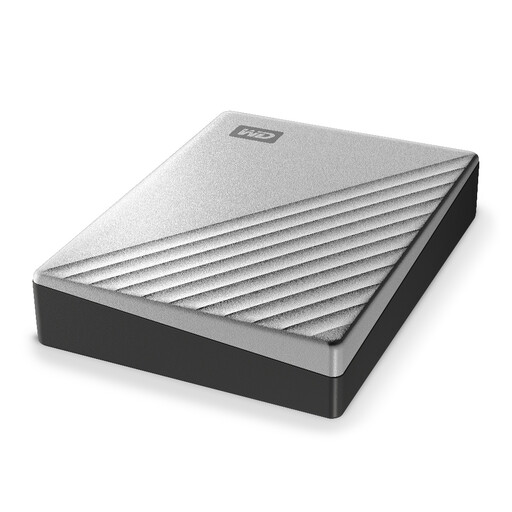
Why It Stands Out: This My Passport Ultra is tailored specifically for the Apple ecosystem. It combines a sleek, anodised aluminium design with powerful security features. Ready for macOS straight out of the box, it works seamlessly with Time Machine for automated backups. The inclusion of 256-bit AES hardware encryption provides peace of mind for creative professionals and anyone handling sensitive information.
Pros:
Who is it for? Mac users, especially designers, photographers and mobile professionals, who need a secure, stylish and high-performance drive that integrates perfectly with their workflow.

Why It Stands Out: The My Passport Ultra for Windows combines the high capacity of a 5TB external hard drive with the premium features of the Ultra line. It features a modern USB-C connection, robust hardware encryption and a stylish metal-textured finish. It’s an excellent all-rounder for Windows users who want a balance of high capacity, strong security and modern design.
Pros:
Who is it for? Windows users who need a high-capacity, secure and future-proof portable drive for professional work, creative projects or simply safeguarding important personal data.
If these recommendations don't quite fit what you're looking for, whether you need a different capacity, colour or feature set, there are many other choices available.
Explore our full range of external memory storage solutions to find the perfect match for your digital life.
What is the difference between a portable HDD and an SSD? A portable HDD (Hard Disk Drive), like the ones featured here, uses spinning magnetic platters to store data. This technology allows for very high storage capacities at a lower cost per gigabyte. A portable SSD (Solid-State Drive) uses flash memory, which is much faster, more durable and more compact, but it is also more expensive for the same amount of storage. HDDs are great for mass storage and backups, while SSDs excel at running applications or transferring files at maximum speed.
How do I use a portable hard drive for backups? Both Windows and macOS have built-in software to make backups simple. On a Mac, you can use Time Machine. Simply connect the drive and your Mac will ask if you want to use it as a backup disk. On Windows, you can use the 'File History' feature in Settings. Once configured, it will automatically back up your files to the external hard drive on a schedule you set.
Can I use a 'for Mac' drive on Windows, or vice versa? Yes, but it requires reformatting the drive. Reformatting erases all data, so it must be done with an empty drive. You can use the Disk Management tool in Windows or the Disk Utility app on a Mac to change the file system. For cross-platform use, formatting the drive to exFAT is often a good solution, as it can be read and written to by both operating systems.