
24/7 Customer Support

Free returns

Same-day & Next-day Delivery

Quality Guaranteed

Unlock Your Welcome Offers: FREE Delivery | Up to 80% OFF | Free 30-day JoyPlus trial
Download the APP
Driving an older car you love shouldn't mean missing out on modern conveniences like seamless navigation and hands-free calls. A portable wireless CarPlay screen seems like the perfect solution to modernise your dashboard without a costly, permanent installation. However, the market is flooded with options and it's easy to make a purchase you'll regret.
As a Joybuy Product Recommendation Officer, my role is to help you see past the marketing jargon. Before you spend your money, let's look at the common pitfalls that many UK drivers fall into and how you can choose a device that genuinely enhances your driving experience.
Many aftermarket infotainment screens promise a simple upgrade, but often hide flaws that only become apparent after a few weeks of use. Here are the top issues to watch out for:
To ensure you get a reliable and useful device, focus on these key technical specifications. They are the true indicators of quality and performance.
The display is your main point of interaction, so its quality is paramount. Look for a screen with a resolution of at least 1024x600 for clear visuals. For larger screens (over 9 inches), a higher resolution like 1600x600 will provide a sharper image. Also, check for features like manual or automatic brightness adjustment to handle changing light conditions.
For power, ensure the device is a plug and play car display that supports a wide voltage input, such as 12V-24V. This makes it suitable for not just standard cars but also for lorries and motorhomes. A long power cable (3 metres or more) provides the flexibility to route the wire neatly, keeping your dashboard tidy.
A dependable wireless connection is the heart of the experience. Prioritise units that feature dual-band Wi-Fi (2.4G/5G). The 5GHz band offers a faster, more stable connection, which is crucial for a smooth wireless Android Auto screen or CarPlay experience, reducing lag and interference.
Getting audio from the screen to your car's speakers is another critical point. You have four main options:
To maximise value and reduce dashboard clutter, consider a CarPlay dash cam combo. These integrated units not only provide infotainment but also record your journeys. Look for a model with a 4K front camera for clear, high-resolution footage and the option to add a 1080P rear camera. Features like loop recording (which automatically overwrites old footage) and a G-sensor (which locks footage in case of an impact) are essential for a reliable dash cam system. This is an excellent way to add CarPlay to an older car while simultaneously boosting your safety and security.
Instead of a one-size-fits-all approach, we've matched a few standout products to specific driver needs.
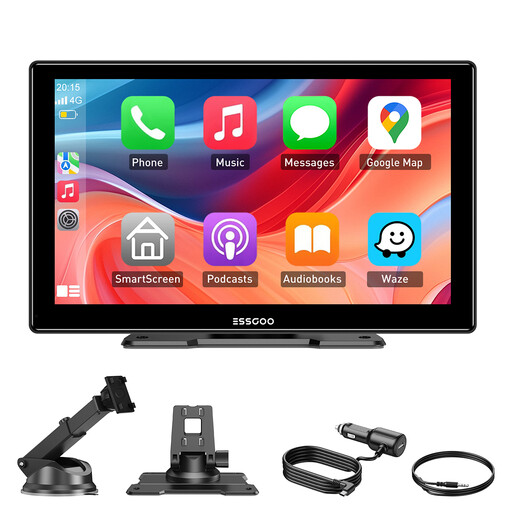
Why This Fits Their Persona: This is for the driver who wants a straightforward, no-fuss upgrade. It's ideal for older hatchbacks or company vans, providing essential navigation and media functions without an overwhelming feature set or high price tag.
It uses dual-band Wi-Fi for a stable connection, avoiding the lag trap. The 9-inch HD screen includes manual brightness adjustment and a day/night mode, tackling the screen glare issue directly.
True plug-and-play installation in minutes. Its 12-24V compatibility and long 3.5m power cable make it versatile for cars, lorries and motorhomes.
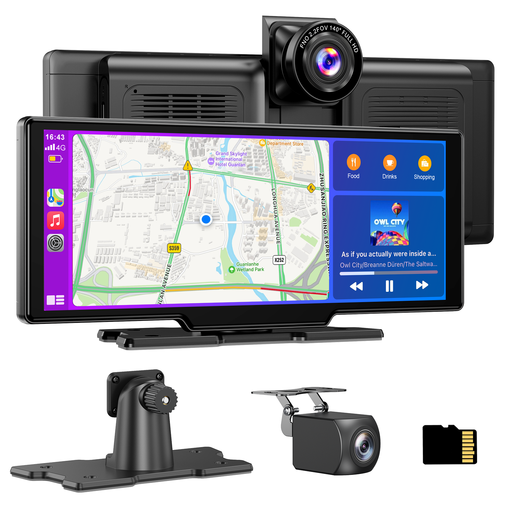
Why This Fits Their Persona: For the family car or daily commuter who values safety as much as convenience. This user wants a single device to handle navigation, media and front/rear journey recording, keeping the dashboard clean and functional.
This is a true 2-in-1 device, not a screen with a tacked-on camera. The large 10.26-inch HD screen is sharp and it includes a 64GB TF card, so you don't have to make a separate purchase to start recording.
The integrated 4K front dash cam and included 1080P rear camera provide comprehensive coverage. Split-screen functionality allows you to view navigation and camera feeds simultaneously.

Why This Fits Their Persona: This is for drivers whose cars (typically 2017-2023 models) already have a factory-fitted screen with wired CarPlay/Android Auto. They love the system but are tired of plugging their phone in for every short trip.
It solves the "wireless" misconception by being a dedicated adapter. It doesn't add a screen; it simply converts your existing wired system to wireless, eliminating cable clutter and connection hassles.
It retains all original car controls (steering wheel buttons, knobs and touchscreen). The 5.8GHz Wi-Fi ensures a fast, stable connection that automatically pairs when you start the car.
We have compiled a complete, real-time list of products that fully satisfy these strict selection criteria and UK safety regulations.
You have a few options. The most reliable is using the included AUX cable for a direct wired connection to your car's stereo. Alternatively, you can use the FM transmitter to broadcast the audio to an unused radio station. Some newer models also support connecting to your car's factory Bluetooth system for a fully wireless audio experience.
No, these devices are designed to power on and off with your vehicle. They plug into the cigarette lighter socket, which is typically only powered when the ignition is on. Therefore, it will not drain your battery when the car is parked and turned off.
Yes, it is legal to use a dash-mounted screen, but it must be positioned so that it does not obstruct the driver's view of the road in any way. According to the Highway Code, windscreens and windows must be kept clean and free from obstructions. Always mount the device in a safe location, such as the lower corner of the windscreen or on the dashboard, ensuring it doesn't block your line of sight.