What matters when choosing?
Decide who will handle the tablet in the vehicle before choosing connectivity and a screen for passenger or parked use.
| Concern |
What to check |
Who this matters to |
| Safe in-vehicle use |
Choose a position that keeps the driver's view clear, and arrange route changes before departure or at a safe stop. GOV.UK states that drivers must not hold and use a tablet while driving. |
If I am driving, I need the itinerary ready before moving rather than a screen that invites detailed changes on the road. Around 31% of consumers put safe use first. |
| Connectivity away from Wi-Fi |
Check the exact cellular or Wi-Fi variant, compatibility with your intended data arrangement and whether your map material can be downloaded. |
When plans change away from Wi-Fi, I need a way to retrieve updates rather than assuming the tablet can connect on its own. Around 25% of consumers prioritise connectivity. |
| Readable planning screen |
Compare display size, stated brightness and glare-reducing treatment; assess the intended viewing position when parked or as a passenger. |
As a passenger comparing bookings with a map, I want enough room to read both without constant zooming. Readability comes first for around 25% of consumers. |
| Vehicle-ready essentials |
Compare the exact storage and connectivity configuration, then check box contents and the charging, mounting or pen equipment you would need. |
If my itinerary is prepared in advance, I would rather keep the setup straightforward than choose extras I will not use. Around 19% of consumers make those essentials their primary concern. |
Joybuy tablets for itinerary review
These tablets offer options for a passenger reviewing plans during a journey or for use when safely parked. Check the exact connectivity variant, charging arrangement and intended viewing position before choosing.
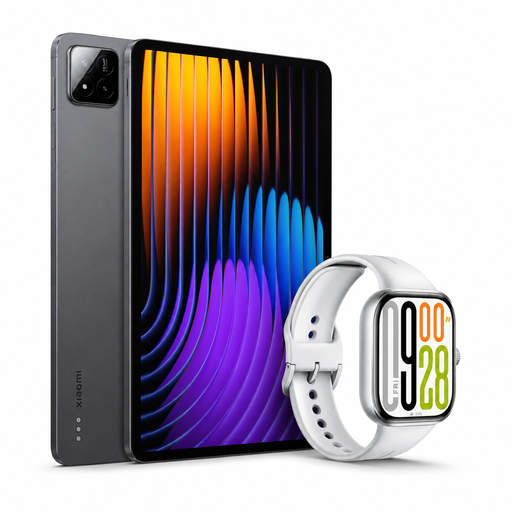 Image unavailable
Xiaomi Pad 7 8GB + 128GB Gray with Redmi Watch 5 Black
Consider this bundle if a passenger or parked user needs room to review maps and plans. Xiaomi specifies an 11.2-inch, 3200 × 2136 display with 800-nit peak brightness for the Pad 7; that figure does not guarantee readability in every vehicle. Arrange tethering or downloaded material away from Wi-Fi, and check the charging equipment needed for the trip.
Joybuy
 Image unavailable
TABWEE W90 11-inch Android 16 tablet, 256GB, 4G LTE
This is an option to examine if a passenger or parked user wants mobile-data capability for itinerary updates. Its title lists an 11-inch screen, dual 4G SIM support and 5G Wi-Fi; 5G Wi-Fi is not a claim of 5G mobile connectivity. Confirm compatibility with your intended UK network and SIM arrangement, and check the exact battery specification and charging equipment before purchase.
Joybuy
 Image unavailable
DOOGEE U11 PRO 11-inch Black tablet, 256GB
Consider this tablet for passenger or parked itinerary review if its display suits the pages you use. Its title lists an 11-inch, 90Hz IPS screen and an 8580mAh battery; check screen readability in your intended position rather than relying on those figures alone. Plan for tethering or downloaded material when travelling away from Wi-Fi, and check mounting and charging equipment.
Joybuy
 Image unavailable
Samsung Galaxy Tab A11+ 8GB 256GB WiFi Gray
This Wi-Fi configuration is worth considering for passenger or parked review when you can tether to a phone or prepare material offline. Check the screen in your intended viewing position and confirm the charging equipment and mount you will use.
Joybuy
 Image unavailable
Apple iPad Air 11-inch (M3) 256GB Blue
This 11-inch iPad Air may suit a passenger or parked user who already works with Apple services. Check how this particular tablet will access itinerary updates away from Wi-Fi, along with the accessories, charging equipment and viewing position you need; specifications for other iPad Air generations should not be assumed to apply to this M3 model.
Joybuy
Frequently asked questions
Can I hold a tablet to check my itinerary while driving in the UK?
No. GOV.UK states that it is illegal to hold and use a tablet while driving, including when stopped in traffic. Prepare the route before moving, ask a passenger to make changes or stop somewhere safe before handling the device.
Does mounting a tablet make it suitable for changing plans while driving?
No. GOV.UK says a hands-free device must not block the view of the road and traffic ahead, and the driver must remain in full control of the vehicle. Leave detailed itinerary changes to a passenger or a safe parking stop.
Is a Wi-Fi-only tablet enough for a road-trip itinerary?
It can be if you download the material you need or plan to tether to a phone. For independent mobile data, check the exact cellular model and compatible data arrangement: Apple lists separate iPad Air Wi-Fi + Cellular options, Samsung lists a Galaxy Tab S10 FE 5G, and the cited Xiaomi Pad 7 and Lenovo Tab M11 UK specifications list Wi-Fi connectivity.
What equipment should I check alongside the tablet?
Check your intended mount, compatible vehicle charging equipment, cable and any case or stylus you need against the exact model and its box contents. Xiaomi states that the Pad 7 has no power adaptor in the box, and Samsung says a travel adaptor is not included with the Tab S10 FE.


