What matters when choosing?
Decide where you will need to use trip information without a connection, then consider whether the tablet will mostly stay in the cottage or come outside with you.
| Concern |
What to check |
Who this matters to |
| Offline maps and connectivity |
Check the mapping app and download the whole relevant area and essential documents while connected. Google Maps Help says an offline route must stay within the downloaded area; offline walking, cycling and public-transport directions are unavailable. |
If I cannot count on a signal near the reserve, I need my map and booking details ready before I leave. Around 40% of consumers would put that offline access first. |
| Outdoor viewing and protection |
Check the exact model's display claims and water- and dust-resistance rating rather than assuming either applies across a brand's tablets. |
When I take a tablet outside to check an itinerary, I need to be able to read it and understand its stated protection limits. For around 30% of consumers, outdoor use would be the primary concern. |
| Cottage planning and notes |
Consider screen size, storage for downloaded material and whether a pen is included or optional; a larger screen also takes more space to carry. |
For shared planning at the cottage, I want room to read routes and organise notes without choosing a device solely for outdoor use. Around 30% of consumers would prioritise that indoor planning role. |
Joybuy tablet choices
These tablets offer different ways to view plans at the cottage, prepare material for offline use or consider mobile data while travelling. Check the exact configuration against where you intend to use it.
 No image available
TABWEE W90 11-inch 256GB 4G LTE tablet
Consider this configuration if you want to view plans on an 11-inch screen and may need mobile data away from the cottage. Its name specifies dual-SIM 4G LTE, 5G Wi-Fi and 256GB storage; 5G Wi-Fi is not a claim of 5G mobile connectivity.
Check UK network-band compatibility, your data arrangement and coverage before relying on cellular access. Confirm the battery specification and package contents for the exact listing before ordering.
View on Joybuy
 No image available
Samsung Galaxy Tab A11+ 8GB/256GB Wi-Fi, grey
This Wi-Fi configuration is worth considering for viewing prepared routes and reserve information at the cottage. The product name specifies 8GB memory and 256GB storage.
If you plan to take it outside, confirm any protection rating for this exact model rather than treating a listing claim as proof of weatherproofing. Check whether a compatible charging adapter is included.
View on Joybuy
 No image available
Xiaomi Pad 7 8GB/128GB, grey, with Focus Pen
Consider this listing if you would use a pen to organise itinerary notes alongside cottage-based planning. Its product name specifies 8GB memory, 128GB storage and an included Focus Pen; confirm the contents of the exact bundle.
Before relying on the tablet outdoors, check its model-specific display and protection specifications. Confirm the charger arrangements as well.
View on Joybuy
 No image available
TECLAST ArtPad Pro 2025 Edition, 12.7-inch 256GB 4G LTE
The 12.7-inch display and included stylus may appeal if you expect to review maps and write itinerary notes mainly indoors. The product name also specifies a 2K display, 256GB storage and dual-SIM 4G LTE.
Its screen is larger than the approximately 10–12-inch range considered for easier carrying. Check that the size suits your trip, and confirm UK mobile-network compatibility, coverage and any outdoor-use specifications before depending on them.
View on Joybuy
 No image available
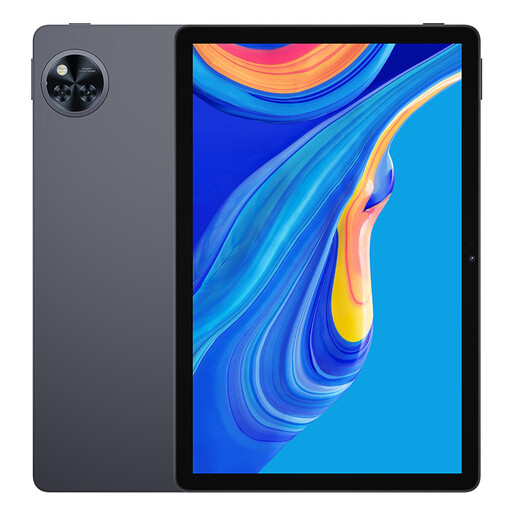
DOOGEE U11 11-inch 16GB/128GB Wi-Fi, grey
This 11-inch Wi-Fi tablet is a choice to examine for cottage-based planning with maps and documents prepared in advance. Its product name specifies 128GB storage and GPS; Wi-Fi connectivity should not be mistaken for mobile-network access.
Check whether its stated 1280 × 800 display resolution suits the maps and documents you intend to read. Confirm any outdoor display or protection requirements against the exact model before taking it into exposed conditions.
View on Joybuy
Frequently asked questions
Can I use a tablet when the cottage or reserve has a weak signal?
Yes, for prepared information, but do not count on full offline navigation. Google Maps Help says a downloaded area can support an offline route when the entire route is inside it; walking, cycling and public-transport directions, live traffic and alternative routes are unavailable offline. Download what you need beforehand and keep a suitable backup for the visit.
Should I choose Wi-Fi-only or a cellular tablet?
Choose Wi-Fi-only if you can prepare maps and documents in advance and will mainly plan at the cottage. Consider cellular capability if internet access away from the cottage is essential: Apple specifies 5G and LTE on Wi-Fi + Cellular versions of the iPad (A16), but mobile use still depends on a suitable data arrangement and coverage.
Do I need a stylus to plan a nature reserve visit?
No; a stylus is useful if you prefer handwritten checklists or itinerary notes. Samsung specifies S Pen features for the Galaxy Tab S10 FE line, while Apple lists Apple Pencil compatibility for the iPad (A16). Check the exact bundle rather than assuming a compatible pen is included.
Can I cancel an online tablet order in the UK?
For eligible UK distance sales, GOV.UK says sellers must tell customers they can cancel up to 14 days after delivery without giving a reason. Check the applicable cancellation terms and exceptions before ordering; a change-of-mind cancellation is distinct from seeking a remedy for faulty or misdescribed goods.
What should I do with an old tablet?
Use an appropriate electrical-recycling or retailer take-back route rather than treating an old tablet as ordinary waste. UK guidance from the Office for Product Safety and Standards and the Department for Environment, Food & Rural Affairs describes rules intended to encourage recovery, reuse and recycling of electrical equipment. Erase personal data before handing the tablet over.


