
24/7 Customer Support

Free returns

Same-day & Next-day Delivery

Quality Guaranteed

Unlock Your Welcome Offers: FREE Delivery | Up to 80% OFF | Free 30-day JoyPlus trial
Download the APP
As a Joybuy Product Recommendation Officer, I see how modern car technology has transformed our daily drives. Factory-fitted systems like Apple CarPlay and Android Auto are brilliant, but the reliance on a physical cable can feel like a step back. The constant plugging and unplugging, the messy wires cluttering your console and the wear on your phone's charging port are common frustrations for UK drivers.
Many turn to a wireless adapter for a 'plug-and-play' solution, only to find themselves disappointed. Before you make a purchase, it's important to understand the common pitfalls that lead to a poor experience and wasted money.
To avoid these issues, focus on the core technical specifications that directly impact performance and longevity. These are the non-negotiable features to check before you buy.
The heart of any wireless CarPlay and Android Auto adapter is its wireless chipset. This determines the speed and stability of your connection.
The software running on the adapter is just as important as the hardware. A good wireless CarPlay dongle needs to be ready for the future.
Never rely on a generic "works with most cars" claim. To convert wired CarPlay to wireless successfully, you must verify compatibility with your specific setup.
We've matched some options to the needs of different UK drivers, focusing on products that address the common pitfalls with solid specifications.

Why This Fits Their Persona: This user already has a great factory-fitted infotainment system and simply wants to eliminate the cable. They value a compact, reliable and truly 'plug and play Android Auto' or CarPlay experience that integrates perfectly with their existing steering wheel and touchscreen controls.
It directly counters the lag and instability trap by using modern 5.8GHz Wi-Fi and Bluetooth 5.2. It also addresses compatibility fears with FOTA updates and a clear vehicle support list.
Its 2-in-1 functionality supports both Apple CarPlay and Android Auto, making it ideal for households with different phones. The compact design and included USB-A/USB-C adapters ensure a tidy fit in virtually any car.
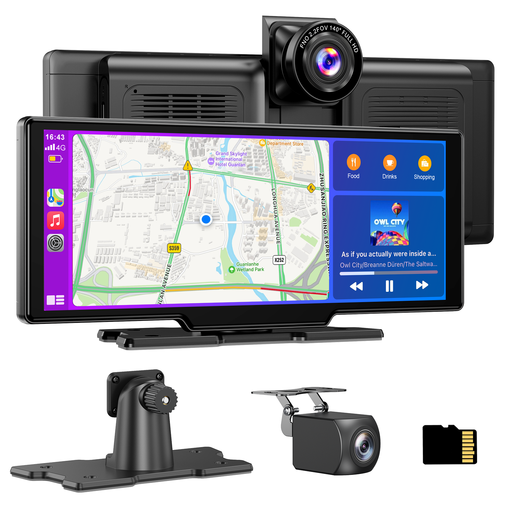
Why This Fits Their Persona: This driver wants more than just wireless connectivity. They are looking for a complete cockpit upgrade, including a larger, clearer screen for navigation and the added security of an integrated dash camera. This is also a great solution for cars without a built-in screen.
This unit sidesteps the limitations of a small dongle by offering a feature-rich, all-in-one system. It provides a stable wireless connection while adding significant value with its 4K front dash cam, 1080p rear camera and large HD display.
It's a comprehensive upgrade. You get wireless CarPlay/Android Auto, a high-resolution dash cam system (front and rear) and a large 10.26-inch touchscreen in one easy-to-install package that plugs into the cigarette lighter.
We have compiled a complete, real-time list of products that fully satisfy these strict selection criteria and UK safety regulations.
Any wireless system will have a minuscule amount of latency, but with a quality adapter using 5GHz Wi-Fi, this delay is typically unnoticeable for core functions like navigation and music streaming. You might observe a fraction-of-a-second delay when skipping audio tracks, but it does not impact the overall usability or driving experience.
No, this is a common misconception. These adapters are powered by your car's USB port, which is generally only active when the ignition is on or in accessory mode. When you turn off your car, the adapter powers down and draws no significant current, similar to leaving a phone charging cable plugged in.
The lifespan of an adapter depends on its build quality, heat management and firmware support. A well-constructed device with good ventilation and consistent FOTA updates can be expected to last for several years, often outliving your current smartphone. Overheating is the primary cause of premature failure, so choosing a device known for stable thermal performance is key.