
24/7 Customer Support

Free returns

Same-day & Next-day Delivery

Quality Guaranteed

Unlock Your Welcome Offers: FREE Delivery | Up to 80% OFF | Free 30-day JoyPlus trial
Download the APP
The shift towards flexible and home-based working has made a reliable home office printer an essential piece of equipment. Yet, choosing the right one can feel overwhelming. You need a device that can handle everything from printing contracts and scanning invoices to printing your child's homework, all without taking up too much space or costing a fortune in ink.
This guide is designed to help you navigate the options. We will break down the key features to look for in a modern printer and highlight a few models that offer a great balance of performance, cost and functionality for UK homes and small businesses.
Before diving into specific models, let's clarify a few features that can make a significant difference to your daily productivity and long-term running costs.
The initial price of a printer is only part of the story; the cost of ink is a crucial long-term factor.
A modern all-in-one printer for home use should be a multitasking hub. Look for a wireless printer scanner copier to cover all your document needs. Two features, in particular, can be transformative for productivity:
In a modern home office, you need to print from more than just a single desktop computer. Ensure the printer you choose offers robust wireless connectivity. Key features include standard Wi-Fi for connecting to your home network, Wi-Fi Direct for allowing guests to print without needing your network password and dedicated mobile apps for easy printing and scanning directly from your smartphone or tablet.
Here are our recommendations for versatile printers that cater to different needs and budgets, from occasional family use to demanding home office tasks.
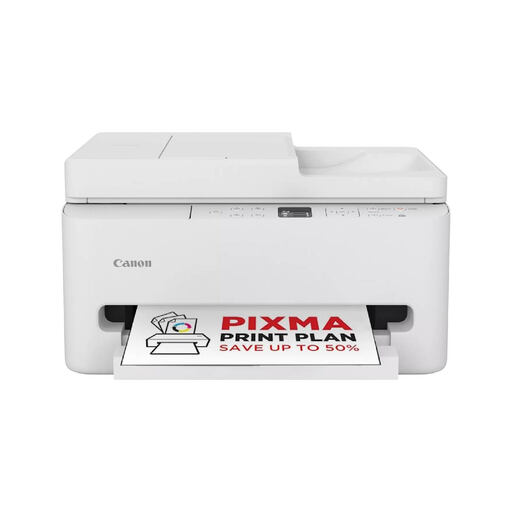
Why It Stands Out The Canon PIXMA TS7550i packs features often found in larger office machines into a compact and stylish body. It is a strong all-rounder that balances productivity with high-quality output, making it a great fit for a dynamic home environment where needs can vary from printing sharp text documents to vibrant photos.
The inclusion of a 35-sheet Automatic Document Feeder (ADF) is a significant advantage at this price point, streamlining the process of scanning or copying multi-page documents. Combined with automatic duplex printing and versatile connectivity options including Wi-Fi and Ethernet, it offers a level of efficiency that elevates it above basic home printers.
Pros:
Who is it for? This printer is ideal for busy households, students and home office professionals who need a versatile A4 colour printer that can handle a mix of tasks efficiently. If you frequently scan contracts, coursework or receipts, the ADF will be a welcome feature.
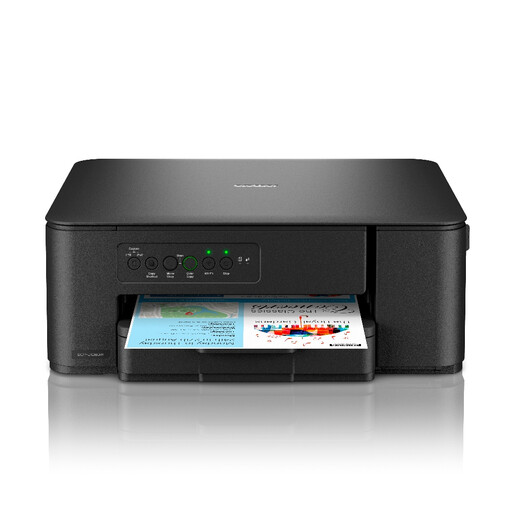
Why It Stands Out The Brother DCP-J1260DW is designed for simplicity and convenience. Its compact, minimalist design allows it to fit neatly into smaller spaces, while its straightforward functionality focuses on delivering the essentials—reliable printing, copying and scanning—without unnecessary complexity.
Control is managed entirely through the Brother Mobile Connect app, which allows anyone in the household to print from their device with ease. It offers excellent print quality for its class, with a maximum resolution of 1200 x 6000 DPI, and supports borderless photo printing. The option to use the EcoPro printer with ink subscription service adds a layer of convenience and cost management.
Pros:
Who is it for? This is a great choice for families, students or individuals who need a straightforward and affordable all-in-one printer for home use. If your printing needs are moderate and you value a compact footprint and easy mobile printing, this model delivers reliable performance.

Why It Stands Out The Brother DCP-T780DW is built for high-volume printing with exceptionally low running costs. As an ink tank printer, its main advantage is the sheer amount of ink included in the box—enough to print up to 15,000 black pages and 5,000 colour pages. This could last for years of typical home use.
Beyond the cost savings, it includes professional features like a 20-sheet ADF and automatic duplex printing. Brother's innovative refill system is mess-free; you simply place the bottle onto the tank and it fills automatically. This model successfully combines the low running costs of an ink tank system with the productivity features required by a demanding home office or small business.
Pros:
Who is it for? This printer is the clear choice for anyone who prints frequently, whether for a small business, a busy family with multiple students or a community group. If your primary concern is minimising the long-term cost of ink while still having access to productivity features, this model offers outstanding value.
If these recommendations don't quite match what you're looking for, or if you'd like to compare a wider variety of models, we have a broader selection available.
Explore our full range of all-in-one printers
1. Is an ink tank or cartridge printer better for home use? This depends on your printing volume. If you print only a few pages a month, a traditional cartridge printer can be more affordable upfront. However, if you print regularly (e.g., for work, school or hobbies), an ink tank printer will almost always offer a much lower cost-per-page and save you significant money over the life of the printer.
2. What is an automatic document feeder (ADF) and do I need one? An ADF is a tray that automatically feeds multiple pages into the scanner or copier. If you ever need to scan or copy documents longer than a single page—like contracts, reports or multi-page assignments—an ADF is an invaluable time-saver. For users who only scan single photos or pages, a standard flatbed scanner is sufficient.
3. Can I print from my phone with these printers? Yes, all the printers recommended here are wireless printer scanner copier models that support mobile printing. They connect to your Wi-Fi network and work with dedicated apps (like the Canon PRINT app or Brother Mobile Connect) as well as native services like Apple AirPrint, allowing you to print and scan directly from your smartphone or tablet with ease.