
24/7 Customer Support

Free returns

Same-day & Next-day Delivery

Quality Guaranteed

Unlock Your Welcome Offers: FREE Delivery | Up to 80% OFF | Free 30-day JoyPlus trial
Download the APP
We’ve all been there: you capture what feels like a perfect moment on your smartphone, only to play it back and find a shaky, jarring video. In an age where smooth, high-quality content is key for everything from family holiday videos to professional vlogging, wobbly footage simply doesn’t cut it. A phone gimbal is the tool designed to solve this exact problem, transforming your smartphone into a powerful filmmaking device.
But with so many options on the market, choosing the right one can feel overwhelming. This guide is here to help. We'll walk you through the essential features to consider and present a few of our top recommendations to help you find a device that delivers steady, professional-looking results without the marketing hype.
Before diving into specific models, it’s useful to understand what sets different gimbals apart. Focusing on these key areas will help you match a device to your specific needs.
The core function of a gimbal is to counteract unwanted movement. You will often see gimbals described by the number of axes they stabilise:
Your gimbal should be a tool that you actually want to carry with you. Consider its weight and whether it has a foldable design for easy packing. Many modern gimbals now come with integrated features that were once separate accessories. A built-in extension rod and a selfie stick tripod base are incredibly useful, allowing you to capture wide group shots, achieve different angles or set up for a static shot without carrying extra gear. This can be a complete vlogging kit for phone in one compact package.
A gimbal's hardware is only half the story; the companion software is just as important. Brands like DJI have dedicated apps (e.g., DJI Mimo) that unlock intelligent features like subject tracking, gesture controls and one-tap editing templates. Before purchasing, ensure the gimbal and its app are compatible with your smartphone model, whether it's the latest iPhone or an Android device. A good iPhone video stabiliser should offer seamless integration for a quick and frustration-free setup.
Here are a few options that cater to different needs, from casual shooting to more demanding content creation.
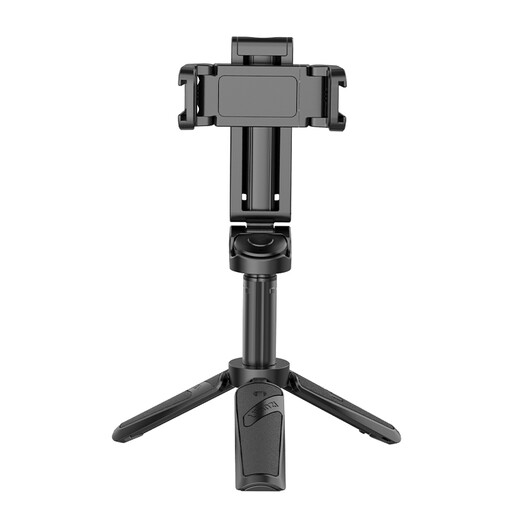
Why It Stands Out: This device is a versatile hybrid, combining a phone grip, selfie stick and tripod into one compact unit. While not a motorised gimbal, its ergonomic grip and stable base provide a significant improvement over handheld shooting for static shots and simple vlogging.
Pros:
Who is it for?: Beginners, casual vloggers and social media users who need a simple, multi-functional tool for improving their static shots and selfies without the complexity of a motorised gimbal.
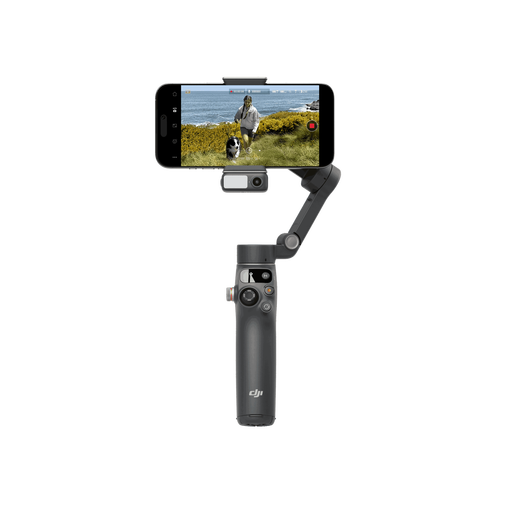
Why It Stands Out: The DJI Osmo Mobile 7P is a powerful and reliable gimbal stabiliser for phone that delivers on its core promise: exceptionally smooth video. Its robust motors, intelligent tracking and user-friendly design make it a go-to choice for serious creators.
Pros:
Who is it for?: Travel vloggers, content creators and anyone who wants to produce professional-grade, stable video with their smartphone. It's an excellent all-rounder that balances performance with portability.
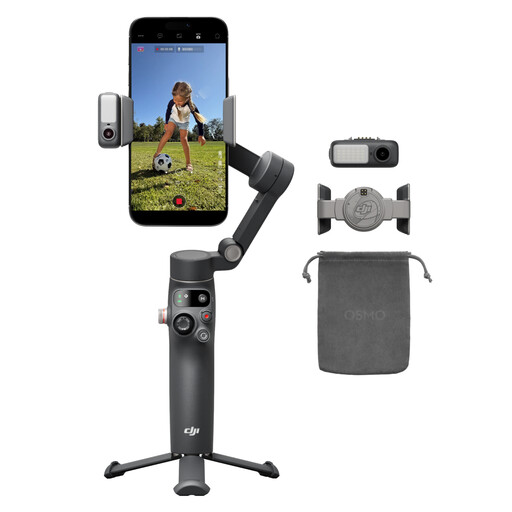
Why It Stands Out: The Osmo Mobile 8 elevates the phone gimbal concept by integrating key vlogging components directly into the device. With native tracking that works alongside built-in audio reception and lighting capabilities, it’s a complete content creation powerhouse.
Pros:
Who is it for?: Serious content creators, live streamers and professional vloggers who want to streamline their setup and minimise gear. This device acts as a comprehensive vlogging kit for phone, all in one hand.
These recommendations cover a range of uses, but every creator's needs are unique. If you're looking for different features, a specific price point or simply want to see what else is available, you can browse our wider selection.
? Explore our full collection of phone video stands and stabilisers
1. Do I really need a 3-axis gimbal? For capturing smooth video while walking, running or moving, a 3-axis gimbal is essential. It counteracts shake in all directions, resulting in a professional, floating-camera effect. For static tripod shots or simple pans, a stabilised grip or a 2-axis gimbal may be sufficient.
2. Are phone gimbals difficult to set up? Not anymore. Modern gimbals, particularly models like the DJI Osmo Mobile series, are designed for ease of use. Features like magnetic phone clamps, automatic app launching and foldable designs mean you can go from packed away to shooting in under a minute.
3. Can a phone gimbal also work as a selfie stick? Yes, many current models do. Gimbals with a built-in extension rod combine the functionality of a selfie stick tripod with motorised stabilisation. This allows you to capture wide-angle selfies, group shots or high-angle perspectives without needing to carry a separate pole.