
24/7 Customer Support

Free returns

Same-day & Next-day Delivery

Quality Guaranteed

Unlock Your Welcome Offers: FREE Delivery | Up to 80% OFF | Free 30-day JoyPlus trial
Download the APP
Whether you're a filmmaker editing 4K footage on location, a professional managing large project files between home and the office, or simply someone who needs to back up a growing digital library, the search for the right portable storage can be a challenge. With terms like transfer speeds, capacity and connectivity to consider, it's easy to feel overwhelmed.
This guide is designed to cut through the clutter. As the Joybuy Product Recommendation Officer, my role is to provide clear, practical advice to help you choose a portable storage drive that genuinely fits your needs and budget. We will explore the key factors to consider and highlight a few standout options for different users.
Before diving into specific products, let's cover a few essential points to help you make an informed decision.
The most significant choice you'll make is between a Solid State Drive (SSD) and a Hard Disk Drive (HDD).
The connection type determines how fast your drive can communicate with your computer. A USB C external drive is now the standard for modern devices, offering a versatile and high-speed interface. Look for specifications like USB 3.2 Gen 2 or Gen 2x2, which indicate the potential transfer speed. For example, a drive with speeds of 2000MB/s can transfer a 20GB file in around 10 seconds, whereas a standard HDD might take several minutes. This makes a fast portable SSD essential for time-sensitive workflows.
Capacity is measured in gigabytes (GB) and terabytes (TB). A 1TB portable SSD is a popular starting point for many professionals, offering ample space for active projects, a photo library and important documents. If you work with high-resolution video or need to back up entire systems, you might consider capacities of 2TB, 4TB, or even larger desktop archiving solutions.
Based on a review of current market options, here are our recommendations to suit various needs, from ultra-fast creative work to high-capacity archiving.
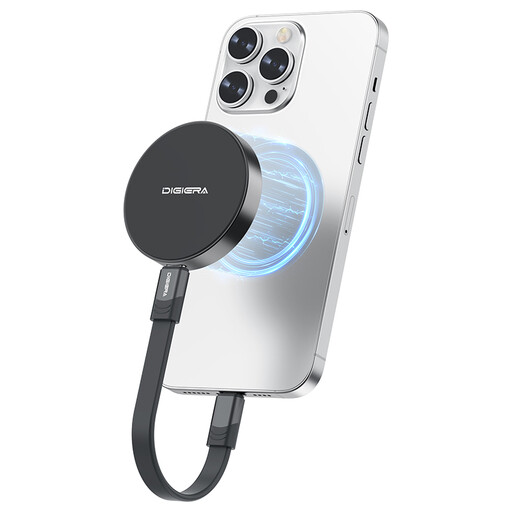
DigiEra 1TB Magnetic Portable SSD – USB 3.2 Gen 2×2
Why It Stands Out: This drive is built for pure performance. With read speeds of up to 2000MB/s via its USB 3.2 Gen 2x2 interface, it handles massive files with ease. Its standout feature is the magnetic design, allowing it to attach directly to an iPhone 15/16 Pro, making it a game-changer for mobile videographers who want to shoot 4K ProRes video directly to an external drive.
Pros:
Who is it for? Content creators, mobile filmmakers and professionals who require the fastest possible transfer speeds in a highly portable form factor. It's an excellent external SSD for Mac and Windows laptops, as well as the latest USB-C devices.

Western Digital My Passport Ultra Portable External Hard Drive – 5TB
Why It Stands Out: The My Passport Ultra strikes a balance between massive capacity and portability. While it's an HDD and therefore not as fast as an SSD, it offers a vast 5TB of storage in a device that fits easily in a bag. It features a modern USB-C port and includes an adapter for older USB-A ports, ensuring wide compatibility. The built-in 256-bit AES hardware encryption also provides a strong layer of security for your data.
Pros:
Who is it for? Users who need to back up or transport large volumes of data, such as photo collections, music libraries or document archives and prioritise capacity and value over raw speed.
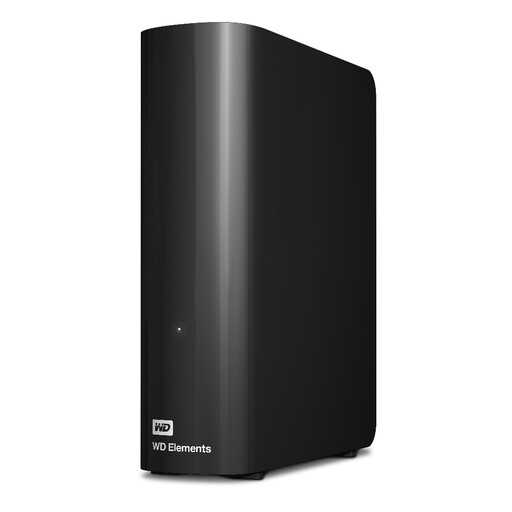
Western Digital Elements Desktop External Hard Drive – 22TB
Why It Stands Out: When your storage needs are measured in the tens of terabytes, a desktop drive like the WD Elements is the solution. Offering a colossal 22TB of space, this HDD is designed to be a central hub for all your data. It's a plug-and-play device for Windows that requires an AC power adapter, making it a stationary solution for your desk. It provides a simple and reliable way to offload files from your main computer and keep extensive archives safe.
Pros:
Who is it for? Home or office users, video editors with vast project archives and anyone needing a central, high-capacity repository for backups. This is not a portable drive for on-the-go use but an archival powerhouse.
These recommendations cover some of the most common use cases, but the world of storage is vast. If you're looking for different capacities, form factors or specific features not mentioned here, there are many other choices available.
Explore our full range of external hard drive storage solutions to find the perfect match for your needs.
1. What is the main difference between a portable SSD and a portable HDD? The key difference is the technology inside. A portable external SSD uses flash memory, has no moving parts, and is significantly faster, more durable and more compact. A portable HDD uses spinning disks, which makes it more fragile and slower but offers much more storage capacity for a lower price.
2. Can I use an external SSD for video editing? Yes, absolutely. A fast portable SSD is highly recommended for video editing. Its high read and write speeds allow you to edit footage directly from the drive without experiencing lag or stuttering, which is a common issue when using slower HDDs. It dramatically speeds up the workflow, especially with 4K or other high-resolution files.
3. Do I need to format an external SSD for a Mac? Often, yes. Many external drives come pre-formatted for Windows (usually with the NTFS file system). While a Mac can read files from an NTFS drive, it cannot write to it without third-party software. For full read/write compatibility, you will need to reformat the external SSD for Mac using the Disk Utility application. The most common formats for cross-platform use are exFAT or APFS for modern macOS systems.