
24/7 Customer Support

Free returns

Same-day & Next-day Delivery

Quality Guaranteed

Unlock Your Welcome Offers: FREE Delivery | Up to 80% OFF | Free 30-day JoyPlus trial
Download the APP
Modern laptops from brands like Apple and Dell are sleeker and more powerful than ever. However, this streamlined design often comes at a cost: a lack of ports. If you've ever found yourself unable to connect to a projector, plug in a USB mouse or use a wired internet connection, you understand the frustration. A single, well-chosen USB-C multiport adapter can solve these problems, transforming one port into a versatile hub for all your peripherals.
This guide is designed to help you navigate the options and find a device that fits your specific needs, whether you're a remote worker setting up a home office, a professional on the move or a tech enthusiast looking to expand your setup. We'll cover the key features to look for and present some of our top recommendations for 2026.
Before you buy, it's important to consider what you'll be connecting. Analysing your daily workflow will help you select an adapter with the right combination of ports and features, ensuring you don't pay for what you don't need.
The primary function of a USB-C hub is to give you back the ports your laptop is missing. Consider these common connections:
One of the most critical features is USB C hub with power delivery. This allows you to charge your laptop through the adapter itself, so you don't have to sacrifice your only USB-C port. Pay close attention to the wattage. While 60W might be enough for smaller ultrabooks, a powerful laptop like a MacBook Pro requires an adapter that supports 85W to 100W pass-through charging to maintain battery levels under heavy load.
If you travel frequently, a compact and lightweight travel dongle is a priority. Look for models with durable materials like aluminium, which helps with heat dissipation and features like built-in cable management. For a more permanent desk setup, a larger USB C docking station might offer more ports and a more robust build.
Here are a few standout USB-C multiport adapters that cater to different user needs, from the frequent traveller to the power user.
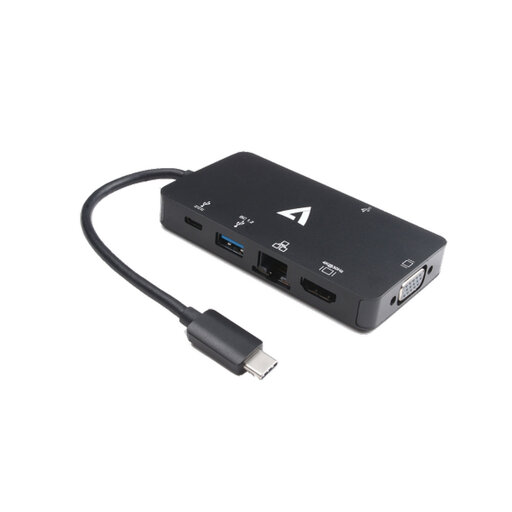
Why It Stands Out: This V7 adapter is a workhorse for professionals who need to be ready for any presentation scenario. Its inclusion of both HDMI and VGA outputs ensures you can connect to nearly any display, new or old. The high-grade EMI/RF shielding is a notable feature, designed to prevent interference with your Wi-Fi and Bluetooth signals.
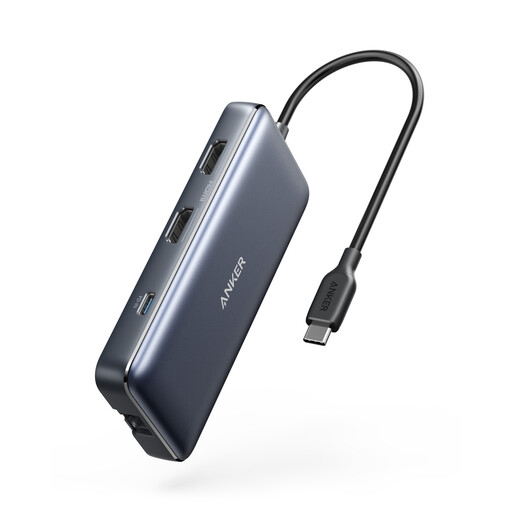
Why It Stands Out: The Anker PowerExpand 8-in-1 is built for multitasking. Its main draw is the ability to drive two external displays via its dual HDMI ports. This makes it a strong candidate for users looking to create an expanded desktop workspace. The inclusion of both SD and microSD card readers adds another layer of convenience for creatives.

Why It Stands Out: For those who demand high performance, the Baseus 10-in-1 hub delivers. It stands apart with its advanced video capabilities, supporting one HDMI display at a smooth 4K@120Hz and a second at 4K@60Hz. Furthermore, it features high-speed 10Gbps USB-A and USB-C data ports, making large file transfers significantly faster.
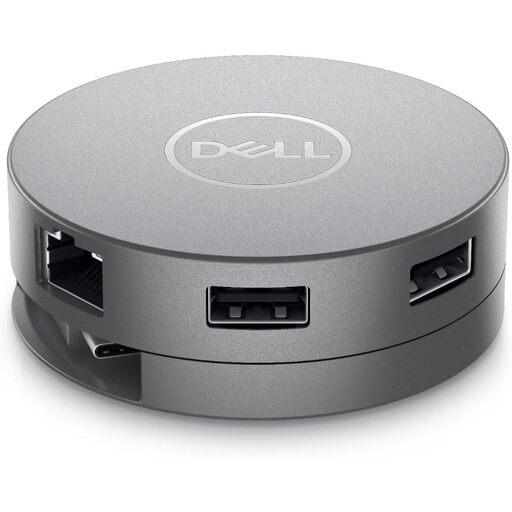
Why It Stands Out: The Dell DA310 is engineered for maximum portability without sacrificing connectivity. Its unique, compact puck shape features a patented design with a wraparound cable, making it an excellent travel dongle. It is one of the few adapters to offer HDMI, DisplayPort and VGA in one small package, providing unmatched video connection flexibility.
If the recommendations above don't quite match what you're looking for, or if you need a different combination of ports, there are many other configurations available. Explore our full collection to find the perfect fit for your setup.
? Browse our complete range of Type-C converters
No, they do not. For a USB-C port to output video, it must support DisplayPort Alternate Mode (DP Alt Mode). Most high-end laptops like the MacBook Pro, Dell XPS and Microsoft Surface have this feature, but it's less common on affordable models. Always check your laptop's specifications to confirm it supports video output over USB-C before purchasing an adapter for that purpose.
The terms are often used interchangeably, but there can be a difference. A USB-C hub is typically smaller, more portable and connects via an attached cable. A USB C docking station is usually a larger, stationary unit that sits on your desk. Docking stations often have more ports, their own power supply and may offer higher performance, such as driving more monitors at higher resolutions. For most mobile and home office users, a multiport hub offers the right balance of function and portability.
A well-made hub from a reputable brand is designed to operate safely with your devices. However, it's important to use a power adapter that matches the requirements of both your laptop and the hub. Using a low-quality, uncertified hub or an incorrect power source could potentially lead to issues. Always choose products that are compliant with UKCA and other safety standards and follow the manufacturer's guidelines for power delivery.