
24/7 Customer Support

Free returns

Same-day & Next-day Delivery

Quality Guaranteed

Unlock Your Welcome Offers: FREE Delivery | Up to 80% OFF | Free 30-day JoyPlus trial
Download the APP
A cluttered desk with tangled cables can be a source of daily frustration, while a lagging or uncomfortable mouse can hinder both productivity and gaming performance. Choosing the right wireless mouse means cutting the cord without sacrificing precision or comfort. But with so many options available, how do you find the one that truly fits your needs?
This guide is designed to help you navigate the key features of a modern wireless mouse. Whether you're a competitive gamer seeking a performance edge, an office professional prioritising all-day comfort or simply looking for a reliable mouse for home use, we'll break down what matters most to help you make an informed choice.
Before diving into specific models, it's helpful to understand the features that will have the biggest impact on your daily use.
The performance of a mouse is defined by more than just its wireless connection. Key specifications to consider include:
wireless gaming mouse often features much higher, adjustable DPI settings (up to 30,000 or more) for rapid, precise aiming.programmable mouse allows you to assign custom commands or macros to its buttons. For gamers, this means executing complex actions with a single click. For office work, it can mean streamlining repetitive tasks like copy-pasting or opening specific applications.Since a mouse is a tool you'll hold for hours, its physical design is crucial.
ergonomic office mouse is shaped to fit the natural contour of your hand, reducing strain on your wrist and fingers during long work sessions.lightweight gaming mouse (often under 60g) is favoured by competitive players for fast, sweeping movements with minimal fatigue. For general use, weight is more a matter of personal preference.silent mouse with optical or dampened switches can be a considerate choice, significantly reducing clicking noise.The main appeal of a wireless mouse is freedom, which depends on a reliable battery and broad compatibility.
long battery life mouse to avoid frequent charging interruptions. Many modern mice offer hundreds of hours of use on a single charge, with some lasting for months or even years, especially non-gaming models.PC mouse for Mac and Windows if you switch between different operating systems.Based on these key considerations, we've selected a few standout models that cater to different users and priorities.

Why It Stands Out
The RAPOO VT2 MAX is engineered for competitive gaming, combining a remarkably low weight with exceptional battery performance. Its standout feature is the True 8K Wireless Polling Rate, which delivers incredibly smooth and responsive tracking without needing extra software or dongles, making it a formidable tool in fast-paced games.
Pros
Who is it for? This is an ideal choice for serious PC gamers and esports enthusiasts who demand peak performance, a lightweight build and the freedom of a long-lasting wireless connection.
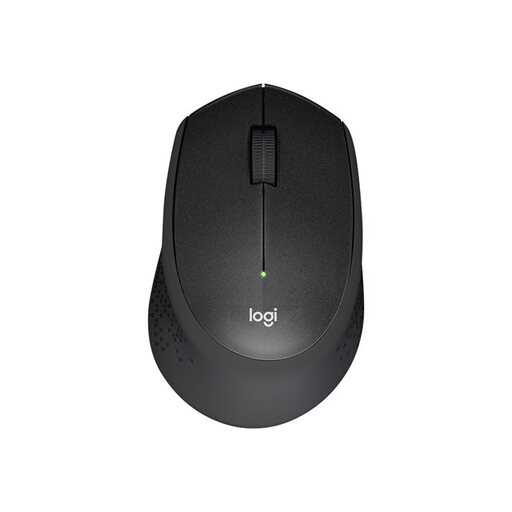
Why It Stands Out
The Logitech M330 Silent Plus focuses on one thing and does it exceptionally well: quiet operation. According to Logitech, its SilentTouch technology reduces click noise by over 90% compared to a standard mouse. This, combined with its comfortable shape and long battery life, makes it a perfect companion for quiet environments.
Pros
Who is it for? This silent mouse is highly recommended for office professionals, students and anyone who works in a shared environment and wants to minimise distractions for themselves and others.
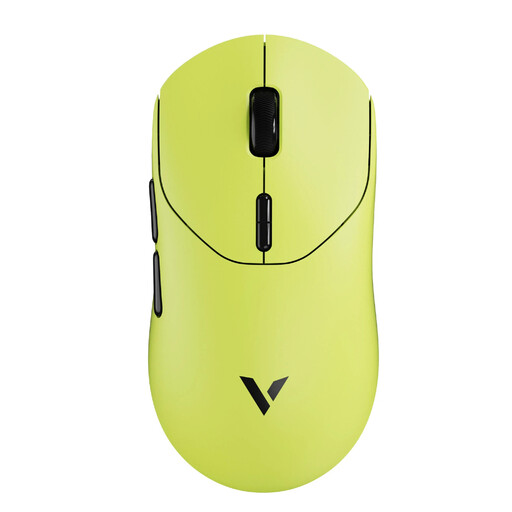
Why It Stands Out
The RAPOO VT2 offers much of the same top-tier performance as its "MAX" sibling, including the 53g lightweight frame and 750-hour battery life. The key difference lies in its switches. It uses 100-million lifespan mechanical switches, which provide the classic tactile feedback and audible click that many gamers prefer, making it a great high-performance alternative.
Pros
Who is it for? This mouse is for gamers who want the lightweight design and high-end performance of the VT2 series but prefer the traditional feel and sound of a mechanical switch.
A great mouse is just one part of a clean, efficient desk setup. If you're looking to complete your wireless workspace or gaming station, a responsive keyboard is the next logical step.
Explore our curated selection of Ultra-device Wireless Keyboards to find the perfect partner for your new mouse.
1. What is a good DPI for a wireless mouse? For general office tasks and web browsing, a DPI setting between 800 and 1600 is typically sufficient for smooth cursor control on most monitors. For gaming, especially in fast-paced shooters, players often use settings between 1600 and 3200 DPI, though many modern gaming mice offer much higher ranges for fine-tuning sensitivity to personal preference and screen resolution.
2. Can I use a wireless gaming mouse for office work? Absolutely. Many users find that the superior precision, ergonomic shapes and customisable buttons of a wireless gaming mouse also make them excellent for productivity. You can use the programmable mouse software to assign shortcuts for work applications, making your workflow more efficient.
3. How can I improve the battery life of my wireless mouse? To maximise the time between charges, you can lower the polling rate (e.g., from 1000Hz to 500Hz), as a higher rate consumes more power. If your mouse has RGB lighting, turning it off will also significantly extend battery life. Most importantly, choosing a model designed as a long battery life mouse from the start is the most effective approach.