Players sharing a desk
You need to remove the wheel after playing rather than leave a cockpit in place. Plan where the pedals will go during a session and where both parts will be stored afterwards.


A wheel that clamps to a desk is a practical alternative to a permanent cockpit when floor space is limited, but its pedals still need a stable position while you drive. Match the wheel to your platform and game before choosing between a conventional wheel position and additional hardware for a flatter, heavy-vehicle-style position.
You need to remove the wheel after playing rather than leave a cockpit in place. Plan where the pedals will go during a session and where both parts will be stored afterwards.
You would prefer a flatter, adjustable steering position to a conventional racing-wheel angle, provided the extra mounting hardware fits your desk.
Your PC or console and the exact bus game determine which wheel version to consider. Bus Simulator 21 publishes different supported-wheel lists for PC, PS4 and Xbox One.
Check your game and platform, then measure the desk and the temporary pedal space; consider a bus-style mount or a different feedback system only after those essentials work for your setup.
| Concern | What to check | Who this matters to |
|---|---|---|
| Temporary footprint | Measure the usable desk edge and clearance beneath it. Leave a stable, unobstructed position for the pedals. | If I have to clear the room after playing, I need a wheel I can remove and pedals I can put away. Around 33% of consumers put the temporary footprint first. |
| Game and platform | Check the exact wheel version against your game’s platform-specific support information; a Windows-compatible wheel may need manual control binding. | I do not want to discover that a suitable-looking wheel is the wrong console version or needs more setup than I can manage. For around 33% of consumers, compatibility is the primary concern. |
| Bus-style controls | Check mount compatibility and steering position. Thrustmaster specifies a 15 mm to 50 mm desk edge for its SimTask Steering Kit. | If I mainly drive simulated buses, I may value a flatter, adjustable wheel position more than the smallest desk attachment. That layout comes first for around 20% of consumers. |
| Steering feedback | Compare the stated drive systems only after checking game recognition, desk mounting and pedal placement. | I want to choose the steering hardware carefully, but it still has to work with my game and fit my desk. Around 14% of consumers make feedback their first priority. |
A desk clamp avoids leaving a wheel stand or cockpit on the floor, but the pedal set still needs a secure position in front of your chair.
Plan the desk edge, chair and pedals together. Keep walkways clear and make sure a wheeled chair cannot roll backwards when you brake.
Logitech G specifies G29 for PlayStation and PC and G920 for Xbox and PC. Bus Simulator 21 also lists supported wheels separately by platform.
Write down your exact console or PC and game before comparing product titles and compatibility information.
Bus Simulator 21 says many other Windows-compatible wheels may work, but players may need to configure them manually.
If straightforward setup matters, start with the game’s published wheel list. Otherwise, check recognition of the exact model and allow time to assign its controls.
Thrustmaster specifies a 15 mm to 50 mm desk-thickness range for the SimTask Steering Kit. A lip or fitting below the edge can also obstruct the clamp.
Measure the actual clamping edge and inspect the clearance underneath before choosing the mount.
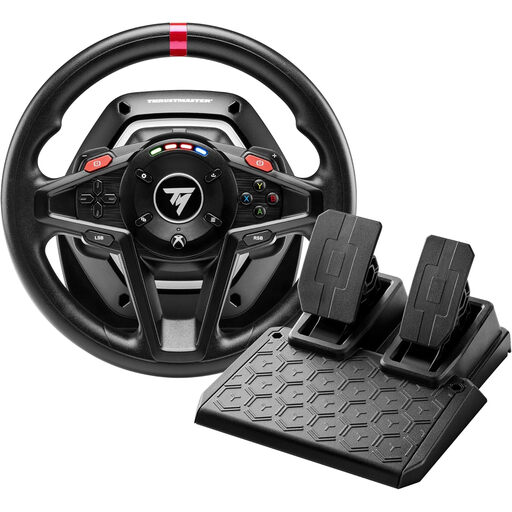
The T128 and compatible SimTask Steering Kit offer a removable desk-wheel route with an optional flatter wheel position.
The G29 and G920 are conventional wheel-and-floor-pedal options distinguished by their console compatibility.
The R3 PC bundle is a desktop direct-drive route with a table clamp and pedals; MOZA also identifies a separate Xbox variant.
These wheel-and-pedal options relate to desk-based bus-simulation setups. Compare their mounting arrangements with your desk, and check support for your exact game and platform.
 No image available
Consider this pack if an adjustable, flatter wheel position matters more to you than keeping desk hardware to a minimum.
Thrustmaster specifies a 15 mm to 50 mm desk edge for the SimTask mount. The pedals still need floor space, and you should check T128 recognition in your exact bus game before buying.
 No image available
For an Xbox or Windows desk setup, make sure the mounting arrangement fits your desk and that the pedals have a stable place during play.
Check recognition and control binding for your exact bus game rather than assuming platform compatibility guarantees automatic setup.
 No image available
This wheel-and-pedal option is worth considering if you prefer a conventional steering position for an Xbox or PC desk setup.
Check the desk-edge fit and pedal position, then confirm how the exact wheel works with your bus game, including whether PC controls need manual binding.
No. It can avoid a permanent wheel stand or cockpit, but the pedals still need a stable position in front of your chair while you play. Measure and plan for the wheel and pedals separately.
Choose by platform: the game’s published list names G29 for PS4 and G920 for Xbox One, and lists both as preconfigured on PC. Logitech G specifies G29 for PlayStation and PC and G920 for Xbox and PC; check your exact console and game version before ordering.
T128 is not named on the game’s published preconfigured-wheel list, which includes TMX, T150, T300 and TX. The developer says many other Windows-compatible wheels may work with manual configuration, so check recognition of the exact T128 version and be prepared to bind controls on PC.
Measure the actual clamping edge: Thrustmaster specifies a 15 mm to 50 mm desk-thickness range for the SimTask Steering Kit. Check beneath the edge for a lip, cable tray or other obstruction before choosing the mount.