
24/7 全天候客户支持

免费退货

当日/次日达

品质保障

开启新人专享福利: 全场免邮 | 低至 2 折 | 免费试用 30 天 JoyPlus 会员
下载 Joybuy
Trying to move a file from your new USB-C laptop to a friend's older computer with only USB-A ports can be a frustrating experience. Juggling multiple memory sticks or fumbling with adapters is an unnecessary complication in a world that should be getting simpler. This is where the dual USB flash drive comes in—a single, elegant solution for a common tech headache.
A dual drive, also known as a 2 in 1 USB stick, features both a modern USB-C and a traditional USB-A connector. This allows you to seamlessly transfer photos, documents and videos between your phone, tablet, laptop and desktop computer, regardless of their port type. As your Joybuy Product Recommendation Officer, my goal is to help you cut through the technical jargon and find a reliable device that genuinely simplifies your digital life. This guide will walk you through what to look for and highlight a few standout options for 2026.
Navigating the market for storage can be tricky. Here are three key factors to consider to ensure you select a drive that meets your needs for speed, durability and capacity.
Not all flash drives are created equal when it comes to speed. The transfer rate, measured in megabytes per second (MB/s), determines how quickly you can read (open) or write (save) files. For a high speed memory stick, look for the USB 3.2 standard.
A flash drive is a portable device, so it needs to withstand the rigours of daily use. The material and design play a significant role in its longevity. A metal USB drive, typically made from aluminium or zinc alloy, offers superior durability and better heat dissipation compared to plastic models, which is important for maintaining performance during intensive transfers.
Also, consider the mechanism that protects the connectors. Swivel caps and sliding designs are popular as they prevent dust and damage without the risk of losing a separate cap.
Choosing the right storage capacity depends entirely on your use case. A 64GB or 128GB drive is often sufficient for documents and photos, while content creators or those backing up their entire system may need 256GB, 512GB or more.
Finally, ensure the drive is compatible with your devices. Most modern dual drives are plug-and-play with Windows, macOS and Linux. For use with a smartphone or tablet, look for OTG flash drive (On-The-Go) support, which allows your mobile device to read the drive directly.
Based on features, build quality and user-centric design, here are our recommendations for versatile and reliable dual USB drives.

Why It Stands Out: The DigiEra LUS320 strikes an excellent balance between speed, durability and practical design. With impressive USB 3.2 Gen 1 performance, it delivers read speeds of up to 500MB/s, making file transfers quick and efficient. The 360° rotating metal casing feels solid and effectively protects both connectors without a cap to lose.
Pros:
Who is it for?: Students and professionals who need a dependable and speedy drive for everyday tasks, such as transferring work presentations, project files and media between various devices.
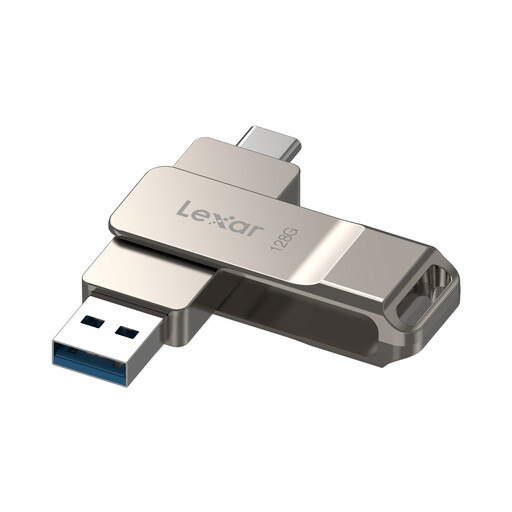
Why It Stands Out: For those who handle sensitive information, the Lexar D40E offers an important layer of security. It comes with software that enables 256-bit AES encryption, allowing you to password-protect your files. While its read speed of up to 100MB/s is more standard, its focus on data protection makes it a trustworthy choice.
Pros:
Type C thumb drive across Windows, macOS and Android systems.Who is it for?: Anyone who prioritises security. It’s a great option for business users, legal professionals or individuals carrying personal financial or identity documents.
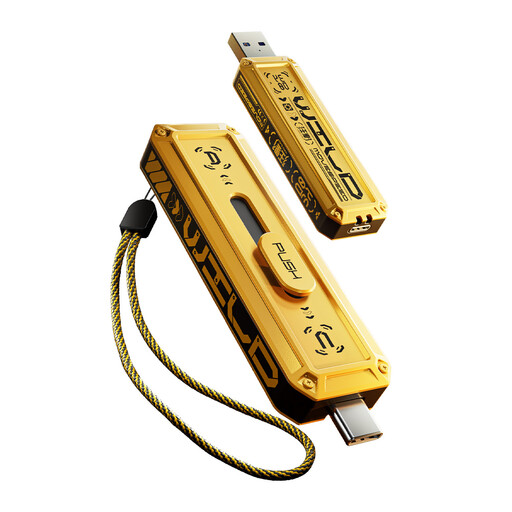
Why It Stands Out: This drive is all about raw performance. Leveraging USB 3.2 Gen 2×1 technology and 3D NAND flash, the MOVESPEED drive achieves staggering speeds of up to 1090MB/s read and 1030MB/s write. This is performance that rivals some external SSDs, all in a compact flash drive form factor. Its bold, mecha-inspired design and robust zinc alloy body add to its premium feel.
Pros:
Who is it for?: Power users, content creators and gamers who cannot afford to wait. If your workflow involves regularly moving huge files, the speed of this USB C flash drive will be a game-changer.
These three recommendations cover a range of needs, from everyday reliability to high-end performance. However, the right choice is always a personal one. If you're looking for different capacities, alternative designs or other specific features, you can explore our full range of storage solutions.
Browse our complete collection of flash accessories to find the perfect fit for your needs.
An OTG (On-The-Go) flash drive can connect directly to a compatible smartphone or tablet, usually via its USB-C port. This allows you to access and transfer files without needing a computer as an intermediary. Most modern dual interface drives, including the ones recommended above, function as OTG drives with supported Android devices.
Yes, that is their primary advantage. The USB-C connector is designed for modern devices like new laptops, MacBooks, tablets and Android phones. The USB-A connector provides backward compatibility with older computers, desktops, TVs and car audio systems. This dual functionality makes it a truly universal storage tool.
A metal USB drive generally offers better durability against drops and impacts. The metal casing also acts as a heat sink, dissipating warmth more effectively during sustained high-speed transfers, which can help maintain performance. Plastic drives are often lighter and less expensive. The choice comes down to whether you prioritise ruggedness and thermal performance or a lighter weight and lower cost.