
24/7 全天候客户支持

免费退货

当日/次日达

品质保障

开启新人专享福利: 全场免邮 | 低至 2 折 | 免费试用 30 天 JoyPlus 会员
下载 Joybuy
Moving files between your new USB-C laptop, your office desktop and your smartphone can feel like a digital juggling act. You might find yourself emailing files to yourself or relying on slow cloud uploads just to get a presentation from one machine to another. A dual USB flash drive is a simple, elegant solution to this modern problem, offering both the traditional USB-A and the newer USB-C connectors in a single, portable device.
This guide is designed to help you understand the key features to look for in 2026. We will explore what makes a great drive for your needs, from transfer speeds to security and offer some practical recommendations to make your decision easier.
Before diving into specific products, let's cover a few essential features that will help you narrow down your options.
The primary benefit of a dual drive is its versatility. Most models feature:
This combination allows you to create a seamless bridge between your devices. Many drives with a USB-C port also support OTG (On-The-Go) functionality. This means you can plug the OTG flash drive directly into your compatible phone or tablet to offload photos, videos and documents, freeing up precious internal storage without needing a computer.
Not all flash drives are created equal when it comes to speed. Look for a fast USB 3.2 drive for the best performance. The USB 3.2 Gen 1 standard offers theoretical speeds of up to 5Gbps, which translates to significantly faster file transfers compared to the older USB 2.0 standard. For example, transferring a 4GB film could take minutes on a USB 2.0 drive but only seconds on a high-speed USB 3.2 drive. Pay attention to the listed read and write speeds (measured in MB/s), as these give a practical indication of performance.
Capacity needs are personal, but a 128GB USB stick offers a good balance for most users, holding thousands of photos and numerous large files. For those working with high-resolution video or extensive project archives, a 256GB flash drive or larger may be more suitable.
For sensitive information, consider an encrypted USB drive. Security can come in two forms:
Here are a few standout options that cater to different needs, from everyday reliability to high-level security.
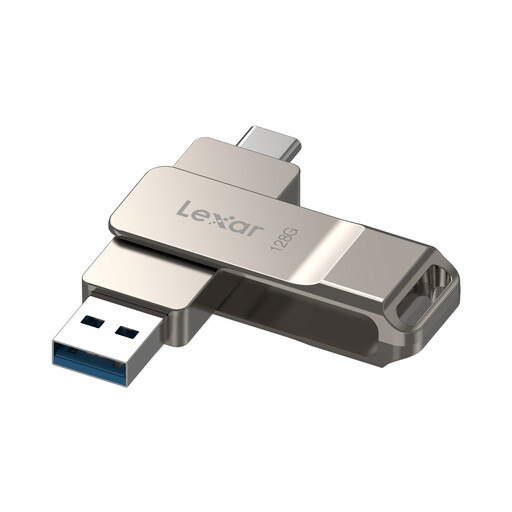
Why It Stands Out The Lexar D40E is a practical and reliable choice for daily use. Its clever 360° swivel design protects the connectors without a separate cap to lose and the durable metal memory stick housing feels solid and helps dissipate heat. It provides a great balance of features, including both USB-A and USB C thumb drive connectors and software-based security.
Pros:
Who is it for?
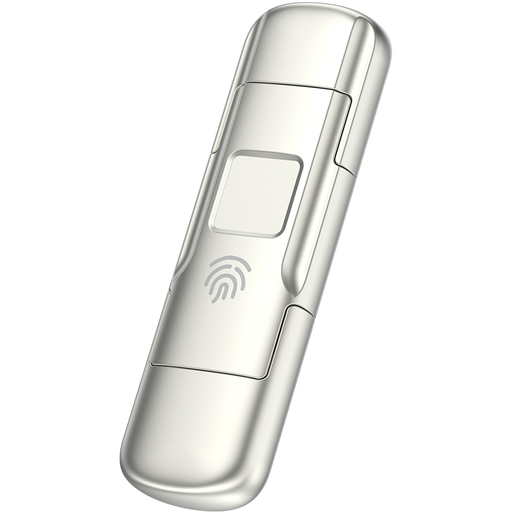
Why It Stands Out For those prioritising security and speed, the MOVESPEED drive is in a class of its own. It combines hardware-based fingerprint authentication with AES-256 encryption, making it an exceptionally secure flash drive. Its performance is equally impressive, with SSD-level read speeds of up to 550MB/s. The 256GB flash drive capacity provides ample space for large, sensitive projects.
Pros:
Who is it for?
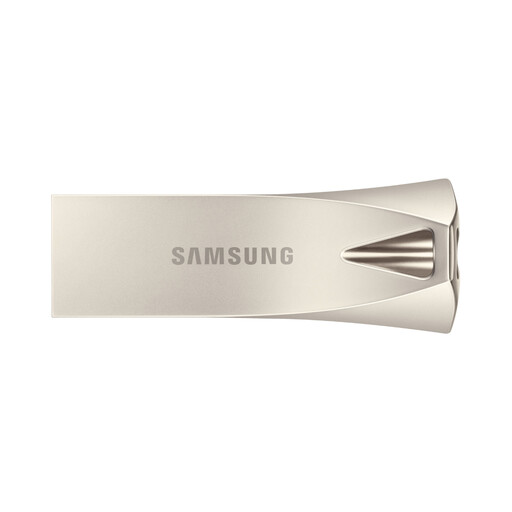
Why It Stands Out While not a dual-connector drive, the Samsung BAR Plus earns its place as a top recommendation for users who primarily need a high-speed, ultra-durable USB-A drive. Its standout feature is its ruggedness; it's engineered to be water, shock, magnet, temperature and X-ray proof. Combined with a fast read speed of up to 400MB/s and a sleek metal design, it's built to perform and last.
Pros:
Who is it for?
If our recommendations don't quite fit your specific requirements, or if you're interested in different capacities, form factors or brands, there are many other excellent choices available.
Explore our complete collection to find the perfect device for your data storage needs.
Browse our full range of USB thumb drive storage
An OTG flash drive features a connector (usually USB-C or Micro-USB) that allows it to plug directly into a compatible smartphone or tablet. This enables you to transfer files to and from your mobile device without needing a computer, making it a convenient way to back up photos or move documents on the go.
Absolutely. A fast USB 3.2 drive offers a dramatic performance improvement over the older USB 2.0 standard. Transferring a large video file or a folder of high-resolution images can be up to 10 times faster. If you frequently move large files, the time saved makes a USB 3.2 drive a worthwhile investment.
It's incredibly straightforward. You use the USB-C connector to plug the drive into your phone (assuming it has a USB-C port and supports OTG). You can then copy files from your phone to the drive. Afterwards, you can rotate or slide the drive to expose the USB-A connector and plug it into your computer to access those same files. It effectively acts as a physical bridge between your devices.